14" Laptop Screen Extender FHD Display Portable Monitor Plug & Play KEFEYA S1
Why Choose KEFEYA S1 14" Portable Monitor for Laptop Screen Extender?
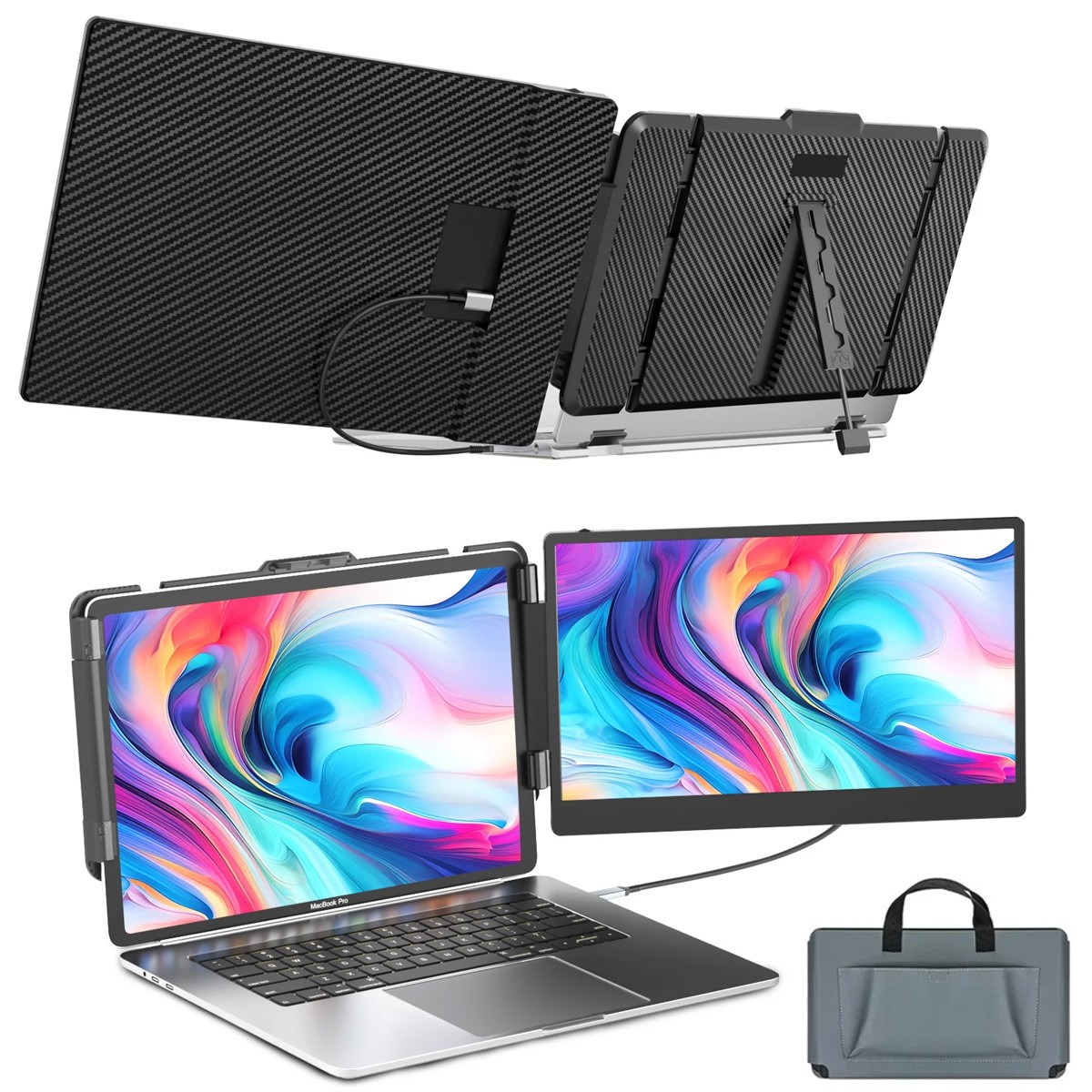
- Increase work efficiency by up to 200% & Save Time:KEFEYA S1 monitor extension for laptop can extend or mirror your laptop's content so you can open multiple tasks at the same time, don't need to continuously switch back and forth your work content on a single laptop screen, save lots time for you.
- One-cable Connection:Only use one Type-C to Type-C cable to achieve high-speed video transmission. Experience the convenience of intuitive installation, saving valuable time without the need to org anize complicated data lines repeatedly.
- Exceptional Display Performance: with a maximum resolution of 1920x1080P, 16:9 aspect ration, 60Hz refresh rate, 300nit brightness, 72% NTSC color gamut, and a wide 178° IPS wide viewing angle, the laptop monitor delivers vibrant colors and a wide field of vision. Adjustable brightness to your prefer ence with its 0-300 level adjustment, immersing yourself in rich visuals.
- Enhanced Compatibility: 14” laptop portable monitor is designed for large-screen laptops. It compatible for and PS4 systems, includingMacBook Air M1, M2 and M3 models, MacBook Pro. Specifically designed to complement 13"-17.3" laptops.
- Portable & Foldable:Easy to fold and carry,not limited by time and space, you can quickly create your own personal laptop workstation anytime, anywhere, a good companion for remote workers traveling.
Travel Monitor for Laptop, A Good Companion for Remote Workers Traveling
180° Rotation & Adjustable Kickstand
180° Rotationallowing you to customize the viewing angle according to your preferences.
Adjustable kickstandwith Anti-slip bottom, can adjust the length and angle, makes your KEFEYA extra screen for laptop portable more stable.
Easy Installation
Align the ports on the side of the dual monitors with the ports on the joystick and gently press down to securely attach the screen. Two installation options are available.
Brightness & Volume Adjust
Brightness:swipe left to quickly enter brightness adjustment, then hold down the button and slide left and right to adjust the brightness.
Volume:swipe right to quickly enter volume adjustment, then hold down the button and slide left and right to adjust the volume.
Connection Methods
USB-C to USB-C one cable connection:
- Make sure the USB-C port on your laptop is full-founctioned (support charge and data transmit), and plug the USB-C cable on the right port (TOP or Middle port withTYPE-C1 & TYPE-C2 marked) of the KEFEYA laptop screen extender.
HDMI to USB-C & USB-A to USB-C 2 cables connection:
- Check the back of the laptop monitor extender,make sure you have connect the HDMI to USB-C cable insert in the BOTTOM port withHDMI markedof the screen extender(There's font identification).
- Use an extraUSB-A to USB-C cableto connect your laptop and the portable monitor(TOP or Middle port withTYPE-C1 & TYPE-C2 marked) to power on the screen extender, then active your laptop after connected.
Common Problem Solutions of this Laptop Screen Extender
Q: Screen Display "No Signal"
- If you use the USB-C to USB-C one cable to connect, please make sure the USB-C port on your laptop is full-founctioned(support charge and data transmit), and plug the USB-C cable on the right port (TYPE-C1 & TYPE-C2 marked) of the KEFEYA laptop screen extender.
- If you use the HDMI to USB-C cable + USB-A to USB-C 2 cables to connect, please check the back of the laptop monitor extender,make sure you have connect the HDMI to USB-C cable insert in the BOTTOM port withHDMI markedof the screen extender(There's font identification).
- And use anotherUSB-A to USB-C cableto connect your laptop and the portable monitor to power on the screen extender, then active your laptop after connected.
Q: Screen Flickers & Black Screen
- It may be that your laptop is low battery or voltage is insufficient, use an extra USB-A to USB-C cable to power your laptop or the monitor extender.
Q: The screen not light up after connecting?
- It may be that your laptop does not have enough power. Please charge the monitor with an extra power supply that provide 5V/2A.
- Please activate your laptop screen, avoid putting your computer to sleep.
PaymentDelivery detailsTerms of salesImportant PointsContact usPayment
1) we accepts all major credit cards via PayPal: MasterCard, Visa, American Express and Discover.
2) We will only ship to the confirmed PayPal shipping address given with the payment. Please make sure your PayPal and address is correct. If not, please correct it before payment. Thank you.
3) If you want to ship to another address, please change your PayPal shipping address before you make payment.
4) To avoid initiating an unpaid item claim, please pay within 7 days.
5) Custom duties, taxes, or charges are not included in the cost you pay to us.
Delivery details
We only ship this item to United States !
1. We ship to your address. Each package will be shipped by UPS or Fedex with tracking number.
2. Ship within 1 business day once payment completed. Orders placed on weekend will be shipped within 3 days.
4. Seriously promise: Refund or resend will be offered if item still not arrive in 7-10 business days. Just send us an email ,we will give you a satisfied solution as soon as possible.
Terms of sales
If you send us an e-mail, it will be answered within 48 hours during our working hours.
Please feel free to contact us if you have any questions:
Dear my friend,we appreciate your support.And our goal is service you well and give you a pleasant shopping time in our store.
✅Dear customer, when you want to return or exchange goods
(Please contact us first, instead of directly initiating a dispute)
1: Contact the seller first
2: Send pictures: outer packaging&scanned labels&item itself&with complete accessories, etc
necessary condition
Rule A: The original packaging of the item is in an unused state.
Rule B: The outer packaging must not have any damage.
3: Obtain return label
4: Delivered Projects - Payment Repayment✅A 15% restocking and shelving fee will be charged for returns or exchanges that are not caused by the seller and are in good condition.
Exchange will not charge restocking fees or shipping fees due to transportation errors✅Priority
In case of the following reasons, the freight will be borne by the buyer
1: Unexpected order
2: Find a better price
3: Change your mind
4: Buy more items/make mistakes/misread model information✅Please note
Missing accessories/quality issues/transportation damage, etc
Please contact us first to obtain a good solution, rather than directly opening a return dispute.
Thank you very much for your understanding. I hope we have a pleasant cooperation!
Important PointsImportant Points
➡️ before Placing an Order, Be Sure to Check the Compatibility and Confirm That This Part Is Suitable for Your Vehicle.
➡️ to Confirm, Please Select a Vehicle from the "My Garage" List or Enter Your Vehicle Details Above to Ensure That Your Model Is Included in the Compatibility Table.
➡️ if You Encounter the Problem That You Can't Confirm Whether the Model Is Suitable, Please Contact Me. I Can Quickly Answer the Adaptability Problem for You. Thank You for Your Cooperation and Support!
✅ Compatible List Can Not Show up All Car Model, and Sometimes It May Have Mistake, and May Not 100% Accurate or out of Date.
✅ Please Check the Manual of Your Vehicle and Choose the Correct Good.
✅ If You Are Not Sure the Which Socket Your Vehicle Need.
✅ Please Send Us Your Car Make, Model, Year and Other Information,We Will Help to Check Which You Need.
✅ If You Have Any Questions, Please Do Contact Us.thank You! Contact us
Contact us if you have any question, Give us a chance to serve you, negative
response could not solve anything, communication Please!
❎(NO) Three stars is LOW star, NO 1,2,3 stars PLEASE!
✅(YES) Please give us Five-star!
Have Question or Problem??
Step 1: Contact seller
Step 2: Select the 1st topic: I have a question about using my item or I want to send the seller a message. NO others please!
Step 3: Describe your question clearly; we will give you the best solution
Please leave five stars positive response positive comment and Five-Stars.
* We maintain a high standard of excellence (5 star rating) and strive for 100% customer satisfaction!
* response is very important to us.
* We would like you to contact us immediately before giving us neutral or negative response so that we can address your concerns to our satisfaction.
* If we don't understand these problems, we won't be able to solve them!
* After understanding the problem, we will be able to give you a satisfactory answer!
It's highly appreciated you leave us positive response and 5 star rating comments if you are satisfied with our service!
Your comment is very important in our business success.
Country of OriginChinaScreen Size14 inRefresh Rate60 HzColorBlackProduct Dimensions13.89 x 8.14 x 0.9 inchesAspect Ratio16:9BrandKefeyaDisplay TypeLCDMaximum Resolution1920 x 1080Contrast Ratio1000:1ModelS1FeaturesDual Monitor, PortableItem Weight2.3 poundsItem Width13 " -17 "Product LineKefeyaResolution1920 x 1080 PixelsEnergy StarAVideo InputsUSB-C, HDMIResponse Time2 msBrightness300 cd/m²MPNDoes not applyEC RangeA - GUnit Quantity1Unit TypeUnitMost Suitable ForCasual Computing, CCTV, Gaming, Graphic Design