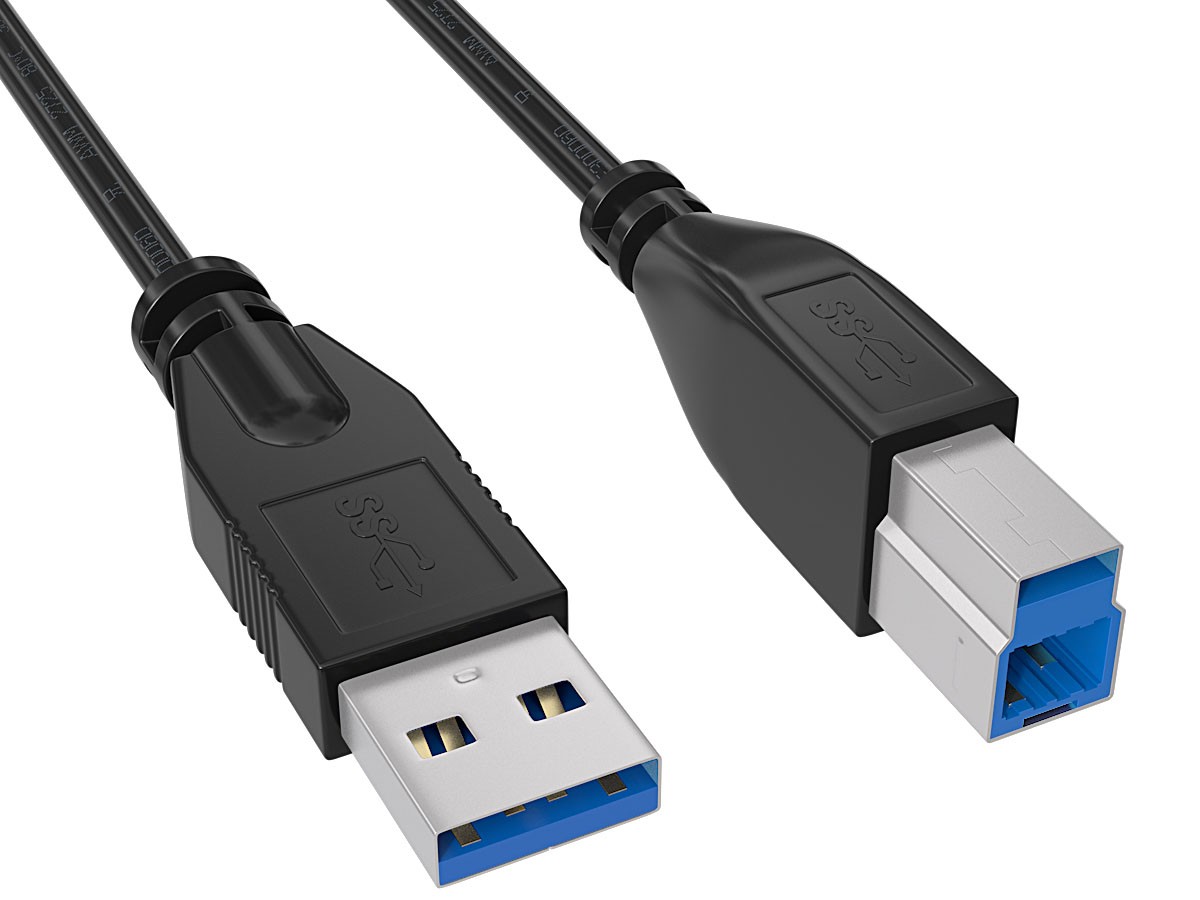
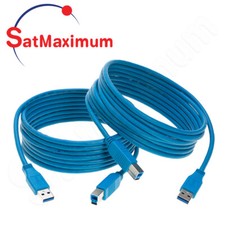
3ft USB 3.0 A Male to B Male Dock Cable, SuperSpeed 5 Gbps, 85% Braid Shielded, Black
The CableLeader U3102-XXXX is a USB 3.0 Type A male to Type B male cable rated at SuperSpeed 5 Gbps, the standard link between a computer's USB-A port and a peripheral fitted with the taller USB 3.0 Type B socket. The family covers 3ft, 6ft, 10ft and 15ft in black. Nine conductors run inside the 5.8 mm jacket, which is what separates a true SuperSpeed cable from a USB 2.0 cable that merely fits the same socket.
The Type A end is the familiar flat rectangular plug, here with gold flash contacts and the blue insulator that identifies USB 3.0. It seats in any USB-A port. Plugged into a USB 2.0 host it still works, simply negotiating down to 480 Mbps, so the cable remains useful across mixed-generation desks rather than failing outright on older machines.
The Type B end is the squared plug with an extra raised section above the classic USB 2.0 profile. That raised section holds the SuperSpeed contacts and creates a one-way fit rule worth knowing before ordering: a USB 3.0 Type B plug does not enter a USB 2.0 Type B socket, while a USB 2.0 Type B plug does fit a USB 3.0 socket and runs at 480 Mbps. Check the device port shape, not the cable.
All materials comply with the RoHS directive. Inside the jacket, each SuperSpeed pair carries an individual foil wrap and the whole bundle sits under an 85% coverage AMA braid, with a 28 AWG twisted pair for USB 2.0 signalling and two 24 AWG conductors for bus power. The molded PVC connectors provide strain relief at the point where repeated plugging usually damages lighter assemblies.
Practical length matters on this interface. The USB 3.0 specification sets no hard maximum, but roughly 3 metres, about 10ft, is the accepted passive limit for sustained 5 Gbps. The 3ft, 6ft and 10ft variants sit inside that window. The 15ft variant is intended for fixed routing where the equipment tolerates a lower negotiated rate; for guaranteed SuperSpeed beyond 10ft, an active repeater cable is the correct product rather than a longer passive run.
The black jacket provides a professional appearance and blends into standard office, rack, and enclosure & Ordering Information — U3102-XXXX works with any device presenting a USB 3.0 Type B socket, including external hard drive docks and enclosures, document and flatbed scanners, USB 3.0 hubs, docking stations and audio interfaces, on Windows, macOS and Linux hosts with a USB-A port. The family ships in 3ft, 6ft, 10ft and 15ft, all black. For a printer or scanner with the standard square USB 2.0 Type B port, the USB 2.0 A to B family is the correct match; for USB-C-only laptops, a USB-C to B cable pairs with the same device end.
Product Comparison: USB 3.0 A to B vs USB 2.0 A to B Cable
Both cables join a USB-A host to a Type B peripheral, but the Type B plugs are different shapes and only fit one way across generations. The table shows which one your device port accepts:
Attribute USB 3.0 A to B (this product) USB 2.0 A to B Data Rate 5 Gbps SuperSpeed 480 Mbps Hi-Speed Type B Plug Shape Taller 9-pin plug with raised contact block Classic square 4-pin plug Conductors 9 wires: 2 SuperSpeed pairs + USB 2.0 pair + 2 power 4 wires: 1 twisted pair + 2 power Cross-Generation Fit Does not fit a USB 2.0 Type B socket Fits both USB 2.0 and USB 3.0 Type B sockets Typical Devices Drive docks and enclosures, flatbed scanners, USB 3.0 hubs, audio interfaces Printers, MFPs, document scanners, audio DACs, MIDI keyboards Practical Passive Length About 3 m (10ft) for sustained 5 Gbps 5 m (16.4ft) per the USB 2.0 specification Choose It When The device socket has the raised USB 3.0 block The device socket is the plain square Type B
Rule of thumb: look at the device socket before ordering. Printers are almost always USB 2.0 Type B and cannot take a USB 3.0 plug at all. Drive docks, scanners and USB 3.0 hubs use the taller socket, where SuperSpeed genuinely changes transfer times.
FAQ
What is the difference between a USB 3.0 A to B cable and a USB 2.0 A to B cable?
The Type B plug shape and the data rate both differ. USB 3.0 runs at 5 Gbps and uses a taller Type B plug with an extra contact block, while USB 2.0 runs at 480 Mbps with the classic square plug. The USB 3.0 plug will not fit a USB 2.0 Type B socket, so the device port decides which cable you need.
Will a USB 3.0 Type B cable fit my printer or scanner?
Only if the device has the taller USB 3.0 Type B socket, which is common on flatbed scanners and drive docks but rare on printers. Most printers use the classic square USB 2.0 Type B port, and a USB 3.0 plug physically cannot enter it. Look at the socket: a raised block above the square profile means USB 3.0.
How fast is USB 3.0 really, and why do some listings say 4.8 Gbps?
USB 3.0 signals at 5 Gbps, and that is the correct figure to quote. The 4.8 Gbps number sometimes seen in older listings reflects payload throughput after 8b/10b line encoding overhead rather than the signalling rate. USB 3.0 is also named USB 3.1 Gen 1 and USB 3.2 Gen 1; all three describe the same 5 Gbps link.
How long can a USB 3.0 cable be before performance drops?
About 3 metres, roughly 10ft, is the accepted practical limit for a passive USB 3.0 cable at full 5 Gbps; the specification itself sets no fixed maximum and relies on signal integrity limits instead. Beyond that, links may negotiate down or drop out. For runs longer than 10ft, use an active repeater cable rather than joining passive cables.
Which USB cable should I buy for an external hard drive dock?
Match the socket on the dock. Most USB 3.0 drive docks use the taller USB 3.0 Type B port, which this cable fits, and SuperSpeed matters here because drive transfers actually saturate the link. Keep the run at 10ft or shorter for sustained throughput, and use a shielded cable — unshielded assemblies are a common cause of dropped transfers on drive docks.