AC1200 WiFi5+4x 7dBi Antennas+up to 64 Devices(NEW)
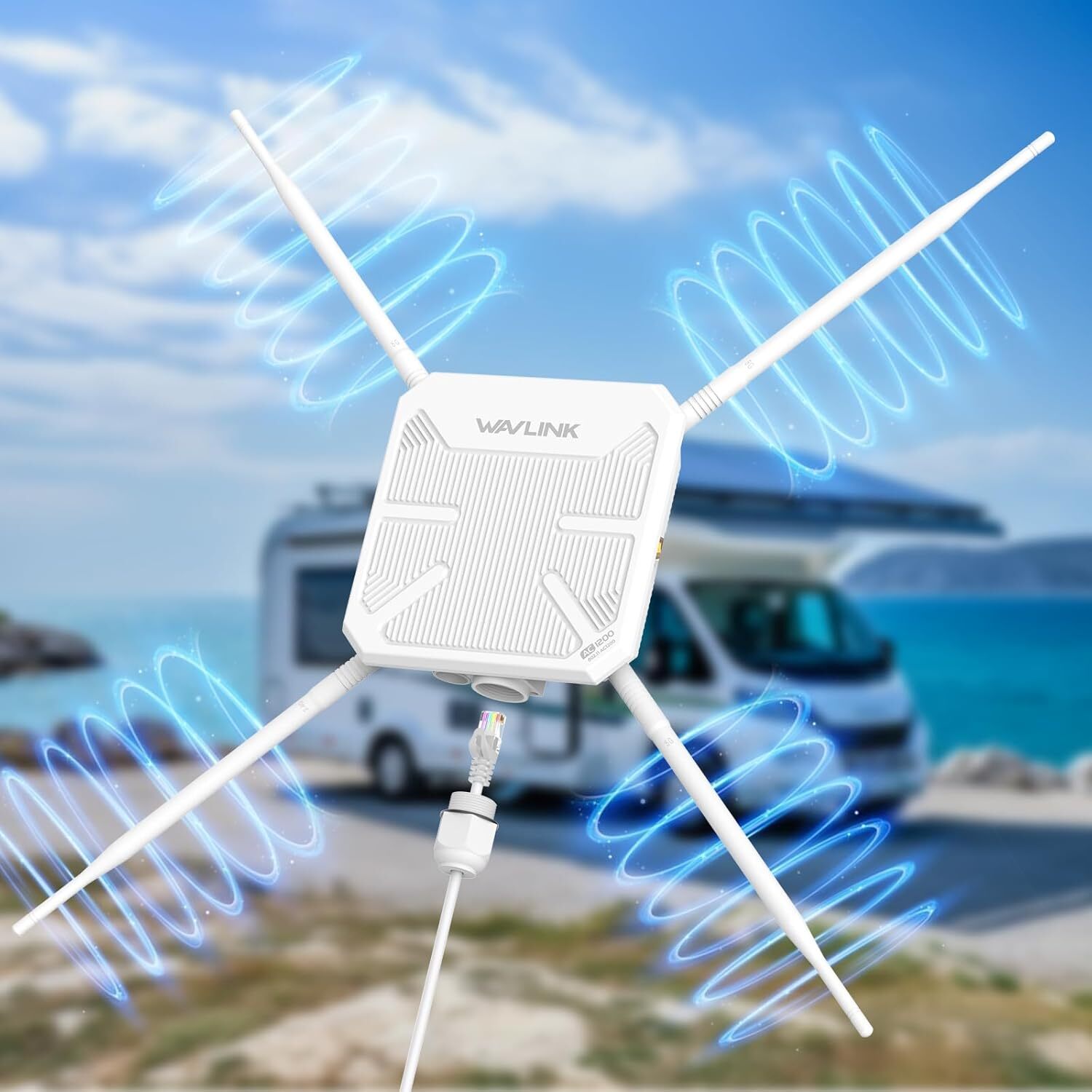
Experience High-Speed Wi-Fi 5 Anywhere with WAVLINK Professional Outdoor Access Point
Experience the power of AC1200 Dual Band outdoor extender - Amplify and extend existing 2.4GHz and
5GHz wireless signals for wider coverage, reaching areas beyond router reach. Simplified by PoE,
this high-power outdoor Wi-Fi solution offers flexible installation anywhere, anytime. Choose from various
operating modes with professional outdoor design to withstand environmental changes, catering to diverse outdoor
connectivity needs. Ideal for resolving warehouse dead spots and ensuring stable network connection for your fishing gear on-the-go.
How to Install the Ethernet Cable?
① Pass the RJ45 cable through the waterproof connector cover.
② Screw the waterproof seal into the waterproof connector bracket.
③ Pass the RJ45 cable through the waterproof connector bracket, and screw the waterproof connector bracket into the cover.
④ Put the waterproof sealing ring on the waterproof connector bracket.
⑤ Connect the RJ45 cable to WAN/LAN port.
⑥ Connect the 2.4G and 5G antennas to the corresponding connectors.
Warm Tips:
1.When setting up a mesh network, please note that the WL-WN588HA2 supports a maximum of 8 devices for networking
(including the main router). It is only compatible with devices from the same brand "Wavlink" that support Everything Mesh;
other devices are not supported.
2.The access point cannot act as a repeater for wireless signals with enforced captive portal.
3.For optimal performance, choose open and unobstructed locations, avoiding obstacles like walls, doors, aquariums, trees,
and other barriers as much as possible.
4.All Wi-Fi extenders are designed to expand or enhance Wi-Fi coverage range, rather than directly increase speed.
5.PoE converter is not waterproof and should be used indoors or in a sheltered WL-WN588HA2 (AERIAL HD8S)
Port: 1 x WAN/LAN Gigabit Port
Button: 1 x Pair/Reset Button
Product Size: 17.0x5.6x17.0cm/6.7x2.2x6.7in
PoE Converter Size: 3.7x2.2x4.3cm/1.5x0.9x1.7in
Ethernet Cable: 100cm/39.4in (CAT 5E)
Power Adapter Cable Length: 125cm/49.2in
Standard: IEEE 802.11ac/a/n/g/b
Frequency Band/Speed: 2.4GHz@300Mbps, 5GHz@867Mbps
Wireless Security: OPEN, WPA2-PSK, WPA/WPA2 MIX, WPA3-SAE/WPA2-PSK, WPA/WPA2-Enterprise
Antennas: 4 x 7dBi Omni Antennas (RP-SMA)
Status LED: Blue
PoE Converter Status LED: Green
PoE Converter Support: DC 54V/0.3A Power over Ethernet (Passive), DC 48V Power over Ethernet (Active)
In the Box:
1 x ACI200 Wi-Fi 5 Outdoor Access Point
4 x Plastic Cable Ties
1 x Main Body Holder
4 x 7dBi Antennas
1 x Wrench
1 x 54V Power Adapter
1 x PoE Converter
1 x Ethernet Cable
1 x PWM M3x5x6MM Screw
6 x KA M3x20x5.2MM Screws
6 x Φ6.5x25MM Screw Plugs
1 x Quick Start Guide
AX1800 WiFi6+4x 8dBi Antennas+up to 128 Devices
Features
- Robust weatherproof case, IP67 waterproof rating and built-in lightning arrester (15kV ESD) withstands harsh outdoor conditions.
- Supports 802.3 AT/AF active PoE and passive PoE to supply power.
- Fiberlass tube antennas for high precision, corrosion resistance, long life, strong wind resistance.
- 4x8dBi detachable omnidirectional external antennas provide excellent wireless performance.
- Supports dual band(2.4G 573Mbps+5G 1201Mbps) with combined speeds of up to 1800Mbps.
- Mesh technology makes you enjoy seamless roaming throughout the house with a single network name and password.
- Complies with IEEE 802.11 ax/ac/a/n/g/b standards.
- Supports Mesh/AP/Router/Repeater/AP+Repeater modes.
- Encryption type:WPA2-PSK, WPA3/WPA2-MIX.
Specification
- Model: WL-WN573HX1
- Product Size(without antennas): 24x24x7cm/9.4x9.4x2.8in
- PoE Converter Size: 4.4x3.7x2.2cm/1.7x1.5x0.9in
- Length: Antennas - 40cm/15.7in; Ethernet Cable - 100cm/39.4in; Power Adapter Cable - 130cm/51.2in
- Product Weight(without antennas): 1109g/39.1oz
- Standard: IEEE 802.11 ax/ac/a/n/g/b
- Frequency Band/Speed: 2.4GHz(574Mbps)+5GHz(1201Mbps)
- Wireless Security: WPA2-PSK, WPA2/WPA3-MIX
- Antennas: 4 x 8dBi Omnidirectional Antennas
- PAIR/RESET LED: Blue
- PoE Converter Status LED: Green
In the Box
1 x Wi-Fi6 Outdoor Mesh Router/AP/Repeater
4 x Omni Antennas
4 x Cable Ties
1 x Ethernet Cable Connectors
1 x Quick Installation
1 x Wrench
2 x Silicone Pads
Several Screws
Passive PoE(Optional):
1 x 54V Power Adapter
1 x PoE Converter
1 x Ethernet Cable
Warm Tips
①The PoE converter is not waterproof, please install it indoors.
②Please make sure your Ethernet cable is CAT5E or above certified and shorter than 100m/328ft.
③Please install the product 2-3 meters above the ground for better performance.
④Under the mesh mode, WN573HX1 ONLY supports interconnection with WN531AX2, WN583AX1 and WN573HX1.
How to install antennas and Ethernet cable?
①Pass the RJ45 cable through the waterproof connector cover.
②Screw the waterproof seal into the waterproof connector bracket.
③Pass the RJ45 cable through the waterproof connector bracket, and screw the waterproof connector bracket into the cover.
④Put the waterproof sealing ring on the waterproof connector bracket.
⑤Connect the RJ45 cable to WAN/LAN port.
⑥Screw the connecting cable into the 2.4G and 5G antenna connector and screw up the connector.
Note: The PoE converter is not waterproof, please install it indoors. Please make sure your Ethernet cable is CAT5E
or above certified and shorter than 100m/328ft.
How to install the product on a column?
①Stick two silicone pads on the bracket and post respectively.
②Thread the cable ties through the fixing point of the bracket.
③Fix the product to the post with cable ties.
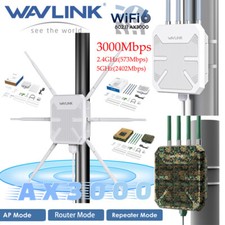
AX3000 WiFi6+4x 8dBi Antennas+up to 256 Devices
Features
- Supports for dual band (2.4G 573Mbps+ 5G 2402Mbps) with the aggregated speeds up to 3000Mbps.
- Supports one WAN/LAN Ethernet Gigabit port.
- Complies with IEEE 802.1 ax/ac/n/g/a/b standards.
- Supports AP/Range Extender/Mesh Router/Mesh Extender mode.
- Encryption type: OPEN,WPA2-PSK,WPA3/WPA2 MIX.
- 2x8dBi 5GHz and 2x8dBi 2.4GHz detachable omni-directional external antennas provide excellent wireless performance.
- Glass tube antenna for high precision, corrosion resistance. long life, strong wind resistance.
- Seamless and stable WiFi Mesh makes you enioy seamless roaming throughout the house with a single network name and password.
- Robust weatherproof case and IP67 waterproof grade withstand harsh outdoor conditions.
- Supports 802.3 AT/AF Active PoE and Passive PoE to supply power.
Specification
- Model: WL-WN573HX3
- Product Size(without antennas): 24x24x7cm/9.4x9.4x2.8in
- PoE Converter Size: 4.4x3.7x2.2cm/1.7x1.5x0.9in
- Length: Antennas - 40cm/15.7in; Ethernet Cable - 100cm/39.4in; Power Adapter Cable - 130cm/51.2in
- Product Weight(without antennas): 1109g/39.1oz
- Standard: IEEE 802.11 ax/ac/a/n/g/b
- Frequency Band/Speed: 2.4GHz(573Mbps)+5GHz(2402Mbps)
- Wireless Security: WPA2-PSK, WPA2/WPA3-MIX
- Antennas: 4 x 8dBi Omnidirectional Antennas
- PAIR/RESET LED: Blue
- PoE Converter Status LED: Green
Warm Tips
①The PoE converter is not waterproof, please install it indoors.
②Please make sure your Ethernet cable is CAT5E or above certified and shorter than 100m/328ft.
③Please install the product 2-3 meters above the ground for better performance.
④Under the mesh mode, WN573HX3 supports interconnection with WN586X3, WN572HP3(*Latest firmware required) and WN573HX3.
How to install antennas and Ethernet cable?
①Pass the RJ45 cable through the waterproof connector cover.
②Screw the waterproof seal into the waterproof connector bracket.
③Pass the RJ45 cable through the waterproof connector bracket, and screw the waterproof connector bracket into the cover.
④Put the waterproof sealing ring on the waterproof connector bracket.
⑤Connect the RJ45 cable to WAN/LAN port.
⑥Screw the connecting cable into the 2.4G and 5G antenna connector and screw up the connector.
Note: The PoE converter is not waterproof, please install it indoors. Please make sure your Ethernet cable is CAT5E or
above certified and shorter than 100m/328ft.
How to install the product on a column?
①Stick two silicone pads on the bracket and post respectively.
②Thread the cable ties through the fixing point of the bracket.
③Fix the product to the post with cable ties.