- Store
- New Arrivals
- Add to Favorite
- View response
- Contact
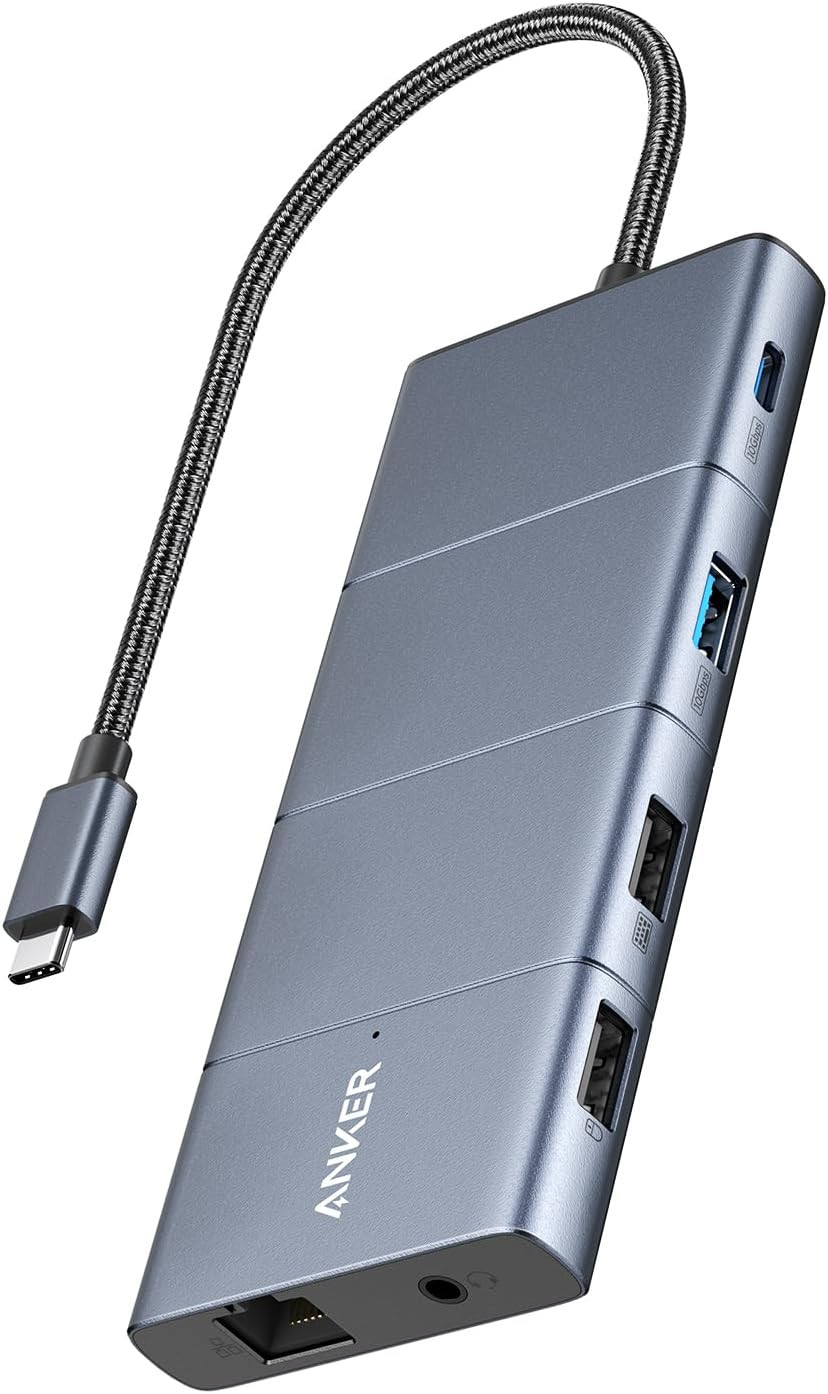
Anker USB-C Hub, 11-In-1 Docking Station Dual Monitor with 4K HDMI and DP | 1 USB-C and 1 USB-A 10Gbps Data Ports, 2 USB 2.0 Data Ports, 4K HDMI and Displayport, 85W Max PD, Ethernet, for XPS and MoreDescription Hardware Interface Ethernet, HDMI, MicroSD, USB 2.0, USB Type C Additional Features Fast data transfer, multi-monitor display, passthrough Compatible Devices Monitors Total Usb Ports 4 Data Transfer Rate 10 gigabits_per_second Number of Ports 11 Minimum Required Operating System Version Mac OS 14 Sonoma Operating System macOS, iPad OS Color Gray Enclosure Material Metal Item Dimensions L x W x H 5.39"L x 2.24"W x 0.55"H Item Weight 4.8 ounces Brand Anker Manufacturer Anker Unit Count 1 Count Model Number A8388 Mfr Part Number A83880A1 Warranty Description 18-month warranty Special Feature Fast data transfer, multi-monitor display, passthrough
Product description 1 Move Files Faster 2 Ultra-Clear Dual Displays 1 Dual Displays 2 Compatibility Model Number: A8388
Anker 565 USB-C Hub (11-in-1) Give Your Laptop an Extra 11 Ports
Expand Your Port Options: A total of 11 ports give you access to high-speed file transfer, powerful pass-through charging, dual-monitor display, USB connectivity, Ethernet, and audio connectivity—all from a single compact hub.
Note: The USB-A and USB-C ports with mouse, keyboard, and 10 Gbps icons are data-transfer ports only and do not support charging or media display.
Supported Display Modes
Only Windows laptops support displaying different content to multiple screens.
For Windows Laptops: 1. The two connected monitors and your laptop's screen all display different content. 2. The two connected monitors show the same content, while your laptop's screen shows something else. 3.The two connected monitors and your laptop's screen all show the same content.
For MacBooks: 1.The two connected monitors show the same content, while your laptop's screen shows something else.2.The two connected monitors and your laptop's screen all display the same content.
Note:
1.Switching between display modes can be done in your laptop's settings.
2. If you cannot detect the dock after updating to macOS Ventura, please follow these steps: Privacy & Security > Allow accessories to connect.
Comparison Add to Cart Add to Cart Add to Cart Add to Cart Customer Reviews 4.3 out of 5 stars 2,613 4.4 out of 5 stars 163 4.4 out of 5 stars 158 4.2 out of 5 stars 725 Price $50.99$50.99 $35.99$35.99 $39.99$39.99 $31.99$31.99 Number of Ports 11 8 8 7 Connection Technology USB 10Gbps USB 10Gbps USB 5 Gbps USB 10Gbps Charging for Laptop 85W Max PD Pass-Through 85W Max PD Pass-Through 85W Max PD Pass-Through 85W Max PD Pass-Through USB-C Port 1 x 10Gbps 1 x 10Gbps 1 x 5Gbps - USB-A Port 1 x 5Gbps, 2 x USB-A 2.0 2 x 10Gbps 3 x 5Gbps 1 x 10Gbps, 3 x USB-A 2.0 HDMI Port 1 x HDMI 2.0, Up to 4K@60Hz 2 x HDMI 2.0, Up to 4K@60 Hz 2 x HDMI 2.0, Up to 4K@60 Hz 2 x HDMI 1.4, Up to 4K@30 Hz DisplayPort 1x Up to 4K@60Hz - - - Ethernet 1 - - - SD Card Slot 1 1 - - Micro SD Card Slot 1 1 - - Audio Port 1 - - - Software - - - -
- Massive Expansion: Turn one of your laptop’s USB-C ports into 11 with a 10 Gbps USB-C data port, a 10 Gbps USB-A data port, a 4K HDMI port, a 4K DisplayPort, a 100W USB-C Power Delivery input port, two 480 Mbps USB-A data ports, an Ethernet port, an AUX port, and microSD / SD card slots.
- Move Files Faster: With a 10 Gbps USB-C port, a 10 Gbps USB-A port, dual 480 Mbps USB-A ports, and 104 MB/s microSD / SD card slots, you have a huge number of ports to transfer files at high speed.
- Multi-Monitor Display: Connect to the DisplayPort and HDMI port to enjoy crystal-clear streaming or mirroring across 2 displays at up to 2K@60Hz with a DP 1.4 laptop or 1080p@60Hz with a DP 1.2 laptop. Note: For macOS, the display on both external monitors will be identical.
- Pass-Through Charging: Supports up to 85W pass-through charging so you can power up your laptop while accessing the hub’s other functions. Note: Pass-through charging requires a charger (not included).
- Note: The hub supports display outputs only through HDMI and DP ports; it does not support display outputs through USB-C ports.
- Compatibility: Supports USB-C, USB4, and Thunderbolt connections. Compatible with MacBook (macOS 12 and newer), Windows 10 and 11, ChromeOS, and laptops equipped with DP Alt Mode and Power Delivery. Note: This device is not compatible with Linux.
- What You Get: Anker 565 USB-C Hub (11-in-1), welcome guide, 18-month warranty, and friendly customer service.
ABOUT US
We offer the best prices around on high quality products. Our E-store includes media such as books, movies, music and games while offering electronics, toys, sporting apparel, clothing, tools, general home, garden items and more.
SHIPPING
We are always working hard to ensure your package arrives as soon as possible. Please understand that some factors like weather, high postal traffic, and the performance of shipping companies are outside of our control.We offer free shipping to the lower 48 states and ship within 2 business days of payment, usually sooner. We do not accept P.O. Boxes. Please provide a physical address.For shipping outside of the continental USA, we only use 's Global Shipping Program.The item is shipped to KY and then sent to the rest of the world. International customers are responsible for all duties and taxes. Continue to check out in order to calculate costs for shipping the item to your country. Messages regarding 's Global Shipping Program MUST be directed at EXCLUSIVELY.
RETURNS
We offer a 30-Day Return Policy on items which you are not completely satisfied with. You have the option for a full-refund or an exchange of the item. No returns are available on items shipped outside of the USA.
PAYMENT
We accept PayPal.
CONTACT US
This page content is yet to come
Please ad us to your favorite seller and visit again later
Thank You
CUSTOMER SATISFACTION
We try our very best to make sure every customer is completely satisfied. If there's a problem, message us! We're happy to help.
WE ACCEPT
Copyright © 2021 AutoDS. | All Rights Reserved