 When you click on links to various merchants on this site and make a purchase, this can result in this site earning a commission. Affiliate programs and affiliations include, but are not limited to, the eBay Partner Network. When you click on links to various merchants on this site and make a purchase, this can result in this site earning a commission. Affiliate programs and affiliations include, but are not limited to, the eBay Partner Network.
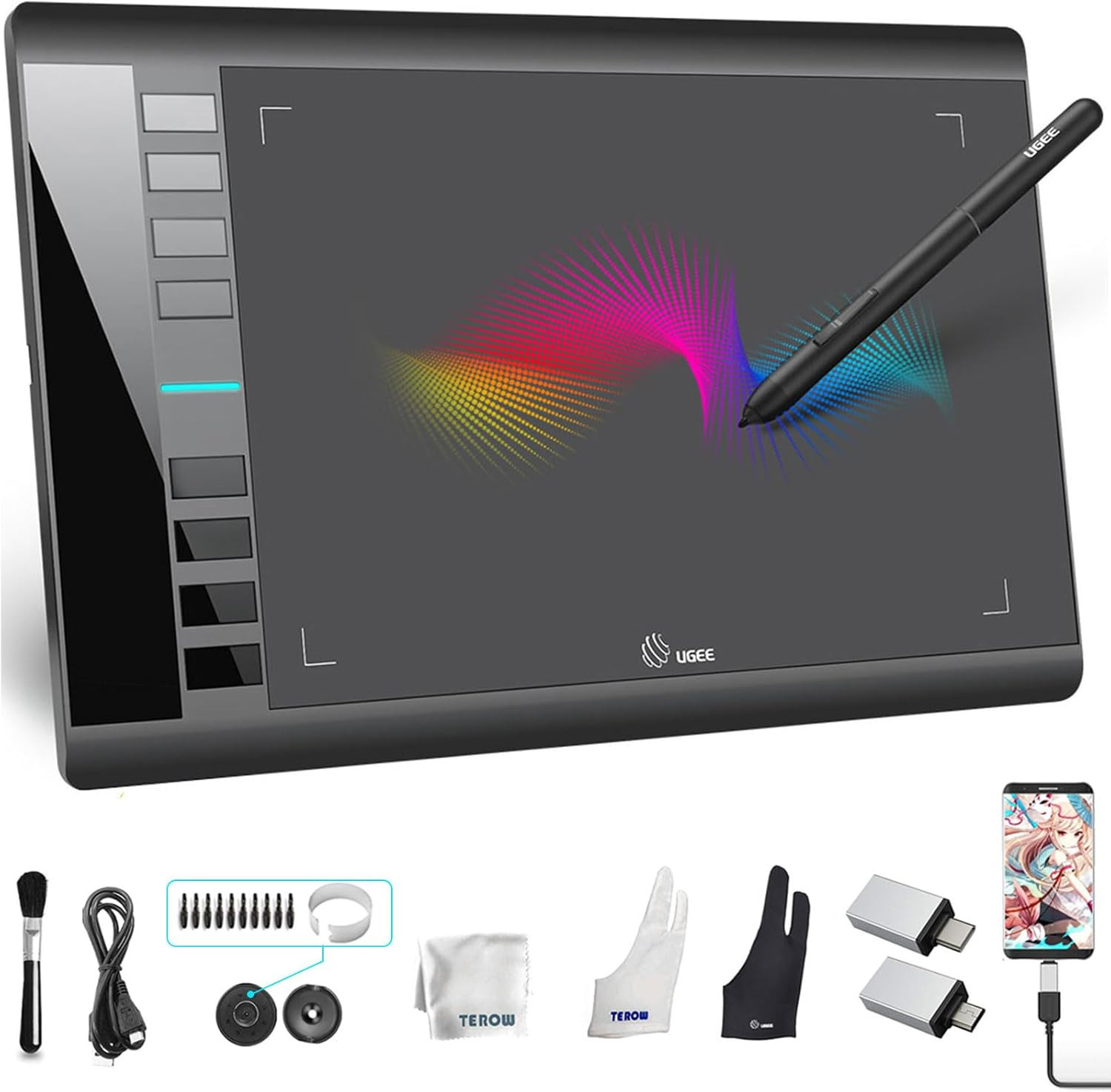
Product description UGEE M708 Graphics Drawing Tablets Feel Every Unique Touch Moment User-friendly for right and left-hand users with the pen holder, ideal for professional artists, newbie designers, and amateur hobbyists in all ages. The function of the 8 short keys included zoom in / out, brush size + / -, undo, hand, brush, and eraser. Ease of operation saving more time. Easily Connect to PC/Android NOT a standalone item. It compatible with Windows 7 (or later), Mac OS X 10.10 (or later), Android 6.0 (or later), Chrome OS 88 (or later) and Linux. Good Hand Wrinting Experience 8192 levels of pressure sensitivity, 290 PPS and 60° tilt battery-free stylus constantly deliver precise and natural lines and strokes. Large Active Area 10 x 6 inch large working area, which provides more space for art creation. Only 8 mm thickness and lightweight, it’s portable to take anywhere. Multi Software Compatibility Compatible with most software,such as Adobe Creative Software, Sai, Corel Painter, MediBang Paint,Clip Studio, Krita, ibisPaint,Zbrush, Zoom and etc. - Draw, Write and Learn with UGEE M708
Supports digital drawing, painting, sketching, E-signatures, E-learning, remote work, photo editing, etc. One pen tablet, can be used for at least 5 different fields. - Learn and Work From Home
Whether your study or job requires a lot of annotations, video conference presentations, UGEE M708 drawing tablet will make it easier to interact with and engage your students, teachers or colleagues. - Show Your Style
It can utilize the tablet’s pressure sensitivity to make tasks such as digital sculpting and texturing easier on Zbrush, Blender, or Maya. - Show Off Your Talents
Easy to set up and easy to use, it helps to show off your talents in desigen and the paper-like surface of the graphic tablet provides users with a more natural and realistic experience. - Online Teaching and Learning
Teachers can create and explain information-rich content visually by writing and annotating directly in files and share their screen in real-time with Google Jamboard's whiteboard. The simple design and stable performance of the ugee M708 makes it the ideal tablet for you to start drawing or learning. This highly favored tablet has been enjoyed and recommended by an overwhelming majority of students and beginner artists. Product Dimension: 14.09 x 8.27 x 0.31 inches Package Dimension: 14.92 x 9.17 x 1.97 inches Working Area: 10 x 6 inches Pressure Sensitivity: 8192Levels Tilt 60° Report Rate 266RPS (max) Reading Resolution 5080LPI Ports Included Micro USB -
Does this tablet need to connect to a computer? Yes, it NOT a standalone pruduct, it needs to be connected to a computer/laptop device. -
How do I know if my phone or tablet is compatible with this drawing tablet? Your phone or tablet must be equipped with Android 6.0 or above and should have OTG function. -
Does the image displayed on the drawing tablet? No. -
If the pen is lost, is it possible to purchase a replacement pen? Yes, you can buy a new pen to replace it. There are replacement pens available for purchase in our shop, please check our shop for details. - [Drawing tablet for PC &Computer support with multiple operating systems: Works with Windows, macOS, Chrome OS, and Android 6.0 or later devices Supports popular creative software: Compatible with ibis Paint X, FlipaClip, MediBang Paint, Autodesk SketchBook, ZenBrush, ArtRage, and other major drawing applications. Note: This is a graphics input device that requires connection to a computer or compatible mobile device to function; it does not operate as a standalone tablet
- 【Drawing Pad for PC and Computer,Compatible with PC Multiple Systems】 This graphics tablet is compatible with Windows 7/8/10/11or later, Chrome OS 88 or later and Linux, Mac OS 10.12 or above after download latest driver from UGEE official website, Creative software and Driver Program works: for example: Adobe Photoshop/Photoshop CC/Illustrator/LightRoom/Corel Painter/Autodesk MAYA/Pixologic ZBrush/ Macromedia Flash/Comic Studio/SAI and etc.drawing software. [Note: NOT SUPPORT iPhone]
- [New Version 16384 level Passive Stylus Technology,Papery Drawing Experience]: The Pen of Ugee drawing tablet M708 with 8192 levels pressure sensitivity, the harder you press, the thicker and darker lines would be,the lines transition from thin to thick will be fluid and precisely under your control.The paper-like surface of the graphic tablet provides users with a more.
- [Large Active Drawing Area]: UGEE M708 Android Version Upgrade,10 x 6.25-inch working area allows to release your inspiration on enough space and slim, sleek, super lightweight panel with compact design and delicate craftsmanship, For your digital artwork Creation, offers a no delay or no chopping excellent drawing experience. Create delightful moments, make joy last
- [Ergonomically Design Shortcults with 8 customizable and Innovative Tilt Control System]: M708 V2 Own 8 customizable express keys on the side for short cuts like eraser, zoom in and out, scrolling and undo, provide more for convenience and helps to improve the productivity and efficiency when creating with the drawing tablet; supports up to 60 degrees of tilt brush effect and delivers smoother and more natural lines and strokes, while also giving you the ability to add shading to your creation.
 |
|