<!-- ====== 产品描述 – Epson EcoTank ET-2400 All-in-One Printer ====== -->
<!-- 适合移动端,6 --><div style="font-family:Arial, Helvetica, sans-serif; font-size:16px; line-height:1.6; color:#222; max-width:700px; margin:0 auto; padding:10px;"> <!-- ===== 模块 1:标题与概述(SEO + 品牌钩子 + 核心卖点) ===== -->
<h2 style="font-size:20px; margin:0 0 8px 0; border-bottom:2px solid #0095D9; padding-bottom:6px; color:#0095D9;">
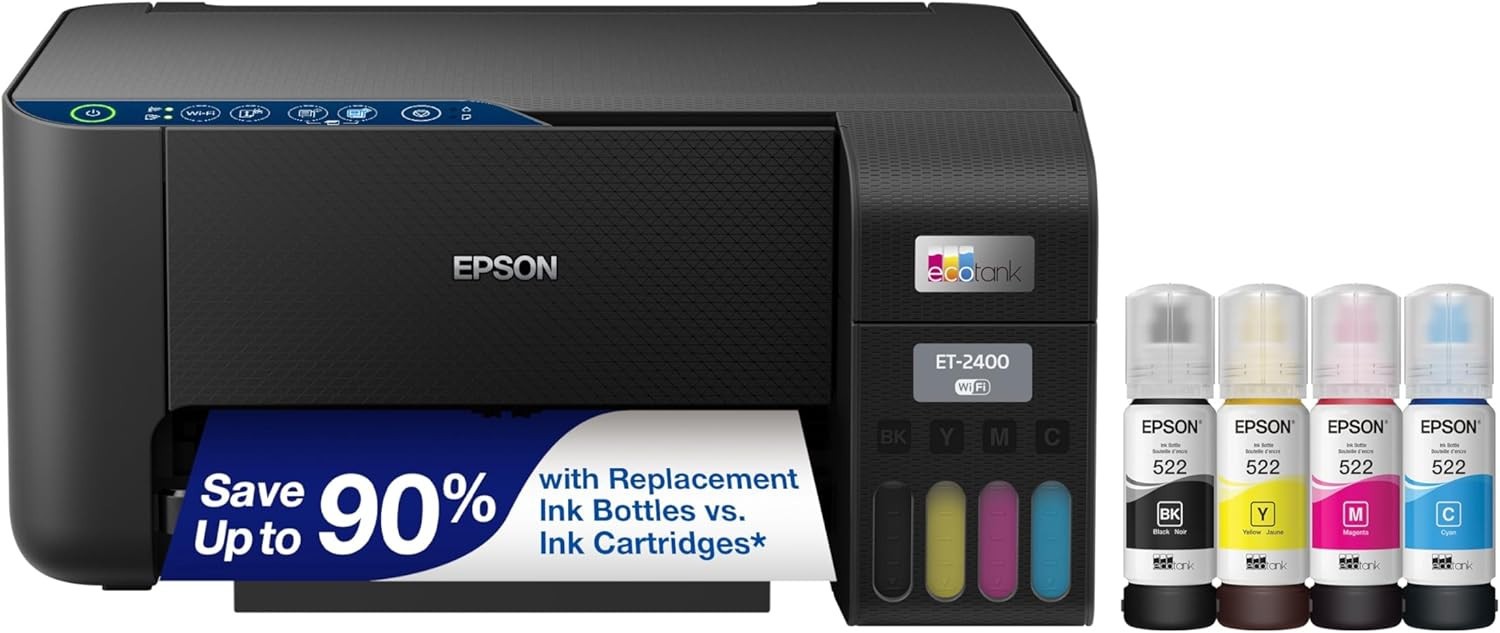
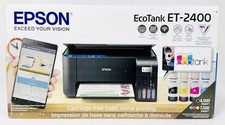
Epson EcoTank ET‑2400 Wireless All‑in‑One Printer – Cartridge‑Free Supertank, Scan & Copy, Includes Full Ink Set
</h2>
<p style="margin-top:6px; font-size:16px;">
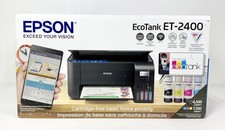
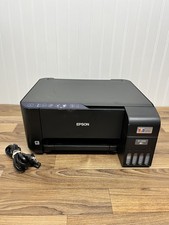
<strong>Model: ET‑2400 (C11CJ67201)</strong> · Black · Inkjet<br>
Say goodbye to expensive ink cartridges – the EcoTank Supertank printer delivers ultra‑low cost printing with up to 2 years of ink in the box.
</p> <!-- ⚠️ 核心卖点强调(Eric M. 战略诊断 + Alex 信任背书) -->
<div style="background:#E3F2FD; border-left:4px solid #0095D9; padding:10px 14px; margin:10px 0 6px 0; font-size:15px;">
<strong style="color:#0095D9;">✅ Why EcoTank – The Cost‑Saving Advantage:</strong><br>
• <strong>Cartridge‑Free Printing:</strong> No more tiny, expensive cartridges. Each ink bottle set is equivalent to about <strong>80 individual ink • <strong>Up to 2 Years of Ink IN THE BOX:</strong> Includes full ink set (1 black + 3 color bottles) – print up to <strong>4,500 black</strong> and <strong>7,200 color</strong> pages right out of the box.<br>
• <strong>Ultra‑Low Cost Per Page:</strong> Save up to 80% on printing costs compared to traditional cartridge printers – ideal for home, school, and small office use.<br>
• <strong>Zero Cartridge Waste:</strong> Refillable ink tanks help reduce landfill waste – better for the environment.
</div> <div style="background:#FFF3E0; border-left:4px solid #E87A20; padding:10px 14px; margin:6px 0 6px 0; font-size:15px;">
<strong style="color:#E87A20;">⚠ Important – Please Read Before Purchase:</strong><br>
• <strong>Wireless Printing:</strong> Connects via Wi‑Fi – print from laptops, smartphones, and tablets (compatible with Android and iOS).<br>
• <strong>Manual Duplex:</strong> Supports manual double‑sided printing – you'll need to flip the paper manually.<br>
• <strong>Included in Box:</strong> Printer, full ink set (1×T522 Black 65mL, 1×each Cyan, Magenta, Yellow 65mL), power cord, and quick start guide.<br>
• <strong>Paper Capacity:</strong> 100‑sheet input tray, 30‑sheet output tray – standard for home use.
</div> <!-- ===== 模块 2:核心卖点与利益(Alex Martinez 风格 – 痛点解决) ===== -->
<h3 style="font-size:18px; margin:20px 0 6px 0; color:#0095D9;">Key Features & Benefits</h3>
<ul style="list-style-type:square; padding-left:20px; margin:4px 0 12px 0;">
<li><strong>Revolutionary cartridge‑free Supertank system</strong> – uses high‑capacity refillable ink tanks instead of small, expensive cartridges. One set of ink bottles equals up to <strong>80 traditional cartridges</strong> – save money and reduce waste.</li>
<li><strong>Up to 2 years of ink in the box</strong> – every ET‑2400 comes with a full set of EcoFit ink bottles (1 black + 3 colors). Print <strong>4,500 black pages</strong> and <strong>7,200 color pages</strong> before you need to buy more ink – perfect for students, families, and small businesses.</li>
<li><strong>Incredibly low cost per page</strong> – pay pennies per page, not dollars. EcoTank ink bottles are affordable and last for thousands of pages – reduce your printing budget significantly.</li>
<li><strong>Wireless printing from anywhere</strong> – built‑in Wi‑Fi lets you print from laptops, smartphones, and tablets. Compatible with Android, iOS, Windows, and macOS – no cables required for everyday printing.</li>
<li><strong>All‑in‑one versatility – print, scan, copy</strong> – flatbed scanner with 5760 × 1440 dpi resolution copies and scans documents and photos with impressive quality. One machine, all your home office needs.</li>
<li><strong>High‑quality Micro Piezo Heat‑Free technology</strong> – Epson's exclusive print head technology delivers sharp text, vivid colors, and detailed graphics on virtually any paper type – from plain paper to photo paper.</li>
<li><strong>Easy, worry‑free refilling</strong> – Epson's exclusive EcoFit ink bottles feature a unique keyed design that fits only the correct color tank – no spills, no mess, no mistakes.</li>
<li><strong>Energy Star certified – ultra‑efficient</strong> – consumes only <strong>12 watts</strong> during operation – save energy and reduce your electricity bills.</li>
<li><strong>Impressive speed and resolution</strong> – print up to 10 pages per minute (black) and 5 ppm (color), with print resolution up to 5760 × 1440 dpi – crisp, professional‑quality output.</li>
<li><strong>Environmentally responsible</strong> – by using refillable ink tanks instead of cartridges, you eliminate the waste of hundreds of disposable cartridges over the life of the printer.</li>
</ul> <!-- ===== 模块 3:完整技术规格表(Ameer Hamza SEO 表格) ===== -->
<h3 style="font-size:18px; margin:20px 0 6px 0; color:#0095D9;">Technical Specifications</h3>
<table style="width:100%; border-collapse:collapse; font-size:15px; background:#f9f9f9; border:1px solid #ddd;">
<tr style="background:#0095D9; color:#fff; font-weight:bold;">
<td style="padding:8px 10px; border:1px solid #ddd; width:45%;">Feature</td>
<td style="padding:8px 10px; border:1px solid #ddd; </tr>
<tr><td style="padding:8px 10px; border:1px solid #ddd;">Brand</td><td style="padding:8px 10px; border:1px solid <tr><td style="padding:8px 10px; border:1px solid #ddd;">Model Number</td><td style="padding:8px 10px; border:1px solid #ddd;">ET‑2400 (C11CJ67201)</td></tr>
<tr><td style="padding:8px 10px; border:1px solid #ddd;">Product Type</td><td style="padding:8px 10px; border:1px solid #ddd;">All‑in‑One Inkjet Printer (Print, Scan, Copy)</td></tr>
<tr><td style="padding:8px 10px; border:1px solid #ddd;">Printing Technology</td><td style="padding:8px 10px; border:1px solid #ddd;">Micro Piezo Heat‑Free Inkjet</td></tr>
<tr><td style="padding:8px 10px; border:1px solid #ddd;">Ink System</td><td style="padding:8px 10px; border:1px solid #ddd;">EcoTank Refillable Supertank <tr><td style="padding:8px 10px; border:1px solid #ddd;">Ink Included</td><td style="padding:8px 10px; border:1px solid #ddd;">1×T522 Black 65mL + 1×each Cyan, Magenta, Yellow 65mL (full set)</td></tr>
<tr><td style="padding:8px 10px; border:1px solid #ddd;">Page Yield (Black)</td><td style="padding:8px 10px; border:1px solid #ddd;">Up to 4,500 pages (with included ink)</td></tr>
<tr><td style="padding:8px 10px; border:1px solid #ddd;">Page Yield (Color)</td><td style="padding:8px 10px; border:1px solid #ddd;">Up to 7,200 pages (with included ink)</td></tr>
<tr><td style="padding:8px 10px; border:1px solid #ddd;">Print Speed (Black)</td><td style="padding:8px 10px; border:1px solid #ddd;">10 ppm</td></tr>
<tr><td style="padding:8px 10px; border:1px solid #ddd;">Print Speed (Color)</td><td style="padding:8px 10px; border:1px solid #ddd;">5 ppm</td></tr>
<tr><td style="padding:8px 10px; border:1px solid #ddd;">Max Print Resolution</td><td style="padding:8px 10px; border:1px solid #ddd;">5760 × 1440 dpi (Color & B&W)</td></tr>
<tr><td style="padding:8px 10px; border:1px solid #ddd;">Max Copy Resolution</td><td style="padding:8px 10px; border:1px solid #ddd;">5760 × 1440 dpi</td></tr>
<tr><td style="padding:8px 10px; border:1px solid #ddd;">Scanner Type</td><td style="padding:8px 10px; border:1px solid <tr><td style="padding:8px 10px; border:1px solid #ddd;">Duplex Printing</td><td style="padding:8px 10px; border:1px solid #ddd;">Manual Duplex</td></tr>
<tr><td style="padding:8px 10px; border:1px solid #ddd;">Connectivity</td><td style="padding:8px 10px; border:1px solid #ddd;">Wi‑Fi, USB 2.0</td></tr>
<tr><td style="padding:8px 10px; border:1px solid #ddd;">Mobile Printing</td><td style="padding:8px 10px; border:1px solid #ddd;">Android, iOS, Laptops, Tablets</td></tr>
<tr><td style="padding:8px 10px; border:1px solid #ddd;">Paper Sizes Supported</td><td style="padding:8px 10px; border:1px solid #ddd;">A4, A6, Legal, Letter, Executive, Half Letter</td></tr>
<tr><td style="padding:8px 10px; border:1px solid #ddd;">Max Media Size</td><td style="padding:8px 10px; border:1px solid #ddd;">8.5 × 14 inches (Legal)</td></tr>
<tr><td style="padding:8px 10px; border:1px solid #ddd;">Input Tray Capacity</td><td style="padding:8px 10px; border:1px solid #ddd;">100 sheets</td></tr>
<tr><td style="padding:8px 10px; border:1px solid #ddd;">Output Tray Capacity</td><td style="padding:8px 10px; border:1px solid #ddd;">30 sheets</td></tr>
<tr><td style="padding:8px 10px; border:1px solid #ddd;">Power Consumption</td><td style="padding:8px 10px; border:1px solid #ddd;">12 Watts (Energy Star Certified)</td></tr>
<tr><td style="padding:8px 10px; border:1px solid #ddd;">Compatible Ink</td><td style="padding:8px 10px; border:1px solid #ddd;">Epson T522 (Black, Cyan, Magenta, Yellow)</td></tr>
<tr><td style="padding:8px 10px; border:1px solid #ddd;">Dimensions (D×W×H)</td><td style="padding:8px 10px; border:1px solid #ddd;">22.8 × 14.8 × 10 inches</td></tr>
<tr><td style="padding:8px 10px; border:1px solid #ddd;">Weight</td><td style="padding:8px 10px; border:1px solid #ddd;">8.6 lbs</td></tr>
<tr><td style="padding:8px 10px; border:1px solid #ddd;">Color</td><td style="padding:8px 10px; border:1px solid <tr><td style="padding:8px 10px; border:1px solid #ddd;">Warranty</td><td style="padding:8px 10px; border:1px solid #ddd;">1‑Year Limited Warranty</td></tr>
<tr><td style="padding:8px 10px; border:1px solid #ddd;">UPC</td><td style="padding:8px 10px; border:1px solid </table> <!-- ===== 模块 4:兼容性与使用说明(Eric M. 准确信息 + 重要提示) ===== -->
<h3 style="font-size:18px; margin:20px 0 6px 0; color:#0095D9;">Compatibility & How to Use</h3> <p style="margin:4px 0 4px 0;"><strong>✅ Compatible with:</strong></p>
<ul style="list-style-type:circle; padding-left:20px; margin:2px 0 10px 0;">
<li><strong>Operating Systems:</strong> Windows (10/11 and earlier), macOS, Chrome OS</li>
<li><strong>Mobile Devices:</strong> Android smartphones & tablets, iPhones & iPads – via Wi‑Fi</li>
<li><strong>Paper Types:</strong> Plain paper, photo paper, envelopes, legal/letter size, A4</li>
<li><strong>Laptops & PCs:</strong> USB or Wi‑Fi connection</li>
</ul> <!-- ⚠️ 重要使用提示 -->
<div style="background:#FFF3E0; border-left:4px solid #E87A20; padding:10px 14px; margin:6px 0 12px 0; font-size:15px;">
<strong style="color:#E87A20;">🔧 Important Setup & Usage Tips:</strong><br>
• <strong>Ink setup:</strong> The printer comes with full ink bottles. Follow the quick start guide to fill each color tank – it's simple, fast, and mess‑free thanks to the unique keyed bottle design.<br>
• <strong>First‑time charging:</strong> After filling ink, the printer will go through an initial charging cycle (takes about 10 minutes). This is normal – do not power off during this process.<br>
• <strong>Wi‑Fi setup:</strong> Download the Epson Smart Panel app (iOS/Android) for easy wireless setup from your mobile device.<br>
• <strong>Paper loading:</strong> Load up to 100 sheets in the rear tray, with guides adjusted to the paper width.<br>
• <strong>Manual duplex:</strong> To print double‑sided, select "Manual Duplex" in the print driver, follow the on‑screen instructions to flip the paper and re‑insert.
</div> <p style="margin:6px 0 4px 0;"><strong>Quick setup guide:</strong></p>
<ol style="padding-left:20px; margin:2px 0 8px 0;">
– remove the printer and included ink bottles from the box.</li>
<li><strong>Fill ink tanks</strong> – open the ink tank covers and pour each color into the correct tank (match color labels).</li>
<li><strong>Connect power</strong> – plug in the printer and power it on. The printer will begin initial ink charging (approx. 10 minutes).</li>
<li><strong>Load paper</strong> – place paper in the rear tray, up to 100 sheets.</li>
<li><strong>Install software</strong> – download drivers from Epson's website or use the Epson Smart Panel app for wireless setup.</li>
– connect via Wi‑Fi or USB to your computer or mobile device.</li>
<li><strong>Start printing</strong> – enjoy ultra‑low cost printing with thousands of pages of ink already in the tank.</li>
</ol> <div style="background:#E8F5E9; border-left:4px solid #4CAF50; padding:10px 14px; margin:10px 0 6px 0; font-size:15px;">
<strong style="color:#2E7D32;">💡 Pro Tips – Maximize Your EcoTank Printer:</strong><br>
• <strong>Print regularly:</strong> Inkjet printers perform best when used at least once a week – this prevents the print heads from drying or clogging.<br>
• <strong>Use genuine Epson EcoFit ink:</strong> For best quality and reliability, always use Epson T522 ink bottles – third‑party inks can cause clogs and damage.<br>
• <strong>When to replace ink:</strong> The ink tank windows show the ink level – top up when ink falls below the lower line. No more "low ink" surprises.<br>
• <strong>Wireless printing from anywhere:</strong> Connect the printer to your Wi‑Fi network and print from any room – no USB cable needed.<br>
• <strong>Scanning tips:</strong> Use the flatbed scanner for documents and photos – scan resolution up to 5760 × 1440 dpi.
</div> <!-- ===== 模块 5:包装内容与特色技术(Alex Martinez 信任背书) ===== -->
<h3 style="font-size:18px; margin:20px 0 6px 0; color:#0095D9;">What's in the Box & Key Technology</h3> <div style="background:#E3F2FD; border:2px solid #0095D9; padding:12px 16px; border-radius:6px; margin:4px 0 12px 0;">
<p style="margin:4px 0 4px 0; font-size:16px; font-weight:bold; color:#0095D9;">
📦 In the Box – Everything You Need:
</p>
<ul style="list-style-type:disc; padding-left:20px; margin:4px 0 4px 0;">
<li>Epson EcoTank ET‑2400 All‑in‑One Printer × 1</li>
<li>T522 Black Ink Bottle (65 mL) × 1</li>
<li>T522 Cyan Ink Bottle (65 mL) × 1</li>
<li>T522 Magenta Ink Bottle (65 mL) × 1</li>
<li>T522 Yellow Ink Bottle (65 mL) × 1</li>
<li>Power Cord × 1</li>
<li>Quick Start Guide × 1</li>
</ul>
<p style="margin:4px 0 0 0; font-size:15px; font-weight:bold; color:#0095D9;">
💰 <span style="background:#FFEB3B; padding:2px 6px; border-radius:3px;">Ink value ~$40–50</span> – included free with your printer!
</p>
</div> <h3 style="font-size:18px; margin:20px 0 6px 0; color:#0095D9;">Key Technology</h3>
<ul style="list-style-type:disc; padding-left:20px; margin:4px 0 10px 0;">
<li><strong>EcoTank Supertank System</strong> – Epson's revolutionary cartridge‑free printing solution. Refillable ink tanks replace expensive, wasteful cartridges. One ink bottle set equals approximately <strong>80 individual cartridges</strong> – drastically reduce your printing costs.</li>
<li><strong>Micro Piezo Heat‑Free Technology</strong> – Epson's exclusive print head technology uses precision piezoelectric crystals to eject ink. Unlike thermal inkjet, it <strong>never applies heat</strong> to the ink – this means consistent, high‑quality prints, less wear on the print head, and longer print head life.</li>
<li><strong>EcoFit Ink Bottles</strong> – keyed to fit only the correct color tank – no spills, no mistakes. The bottles are easy to pour with no squeezing – simply tilt and the ink flows into the tank.</li>
<li><strong>Wireless Printing</strong> – built‑in Wi‑Fi allows you to print from laptops, desktops, tablets, and smartphones. No network? Print directly via USB.</li>
<li><strong>5760 × 1440 dpi Print Resolution</strong> – industry‑leading resolution for inkjet printers. Produces sharp text, vivid colors, and stunning photo prints on a wide range of media.</li>
<li><strong>Energy Star Certified</strong> – at only 12 watts of power consumption, this printer is among the most energy‑efficient in its class. Save money on electricity while helping the environment.</li>
<li><strong>100‑Sheet Paper Capacity</strong> – standard capacity for home and small office – load and forget, print multiple documents without constant reloading.</li>
</ul> <!-- ===== 模块 6:保修与买家保障(Eric M. + Alex 综合策略) ===== -->
<h3 style="font-size:18px; margin:20px 0 6px 0; color:#0095D9;">Warranty & Buyer Assurance – Epson Quality</h3> <div style="background:#E3F2FD; border:2px solid #0095D9; padding:12px 16px; border-radius:6px; margin:4px 0 12px 0;">
<p style="margin:4px 0 4px 0; font-size:16px; font-weight:bold; color:#0095D9;">
✅ The EcoTank Advantage – Lowest Total Cost of Ownership
</p>
<ul style="list-style-type:check; padding-left:20px; margin:4px 0 4px 0;">
<li><strong>Up to 80× more pages per ink set</strong> vs traditional cartridges</li>
<li><strong>Up to 2 years of ink included</strong> – print thousands of pages right out of the box</li>
<li><strong>Zero cartridge waste</strong> – better for the planet</li>
<li><strong>Energy Star certified</strong> – only 12 watts</li>
</ul>
</div> <ul style="list-style-type:disc; padding-left:20px; margin:4px 0 0 0;">
<li><strong>1‑Year Limited Warranty</strong> – backed by Epson, a global leader in printing technology with a reputation for quality and reliability.</li>
<li><strong>Genuine Epson product</strong> – authentic Epson EcoTank printer with full manufacturer support.</li>
<li><strong>Complete solution</strong> – includes full ink set worth approximately <strong>$40–50</strong> – no hidden costs, no need to buy ink immediately.</li>
<li><strong>Trusted by millions</strong> – Epson EcoTank printers have helped millions of customers save money and reduce waste with cartridge‑free printing.</li>
<li><strong>Cost savings calculator</strong> – compared to traditional ink cartridge printers, you can save hundreds of dollars per year on ink costs alone.</li>
Please allow the printer to complete its initial ink charging cycle (approx. 10 minutes) before first use. Do not turn off during this process.</li>
<li>Questions? Contact us – we're here to help.</li>
</ul> <!-- ===== 底部信息 ===== -->
<p style="font-size:14px; color:#777; border-top:1px solid #ddd; margin-top:20px; padding-top:10px; text-align:center;">
© Epson · EcoTank ET‑2400 · Model C11CJ67201 · UPC 010343971042 · Includes Full Ink Set · 1‑Year Warranty
</p></div>