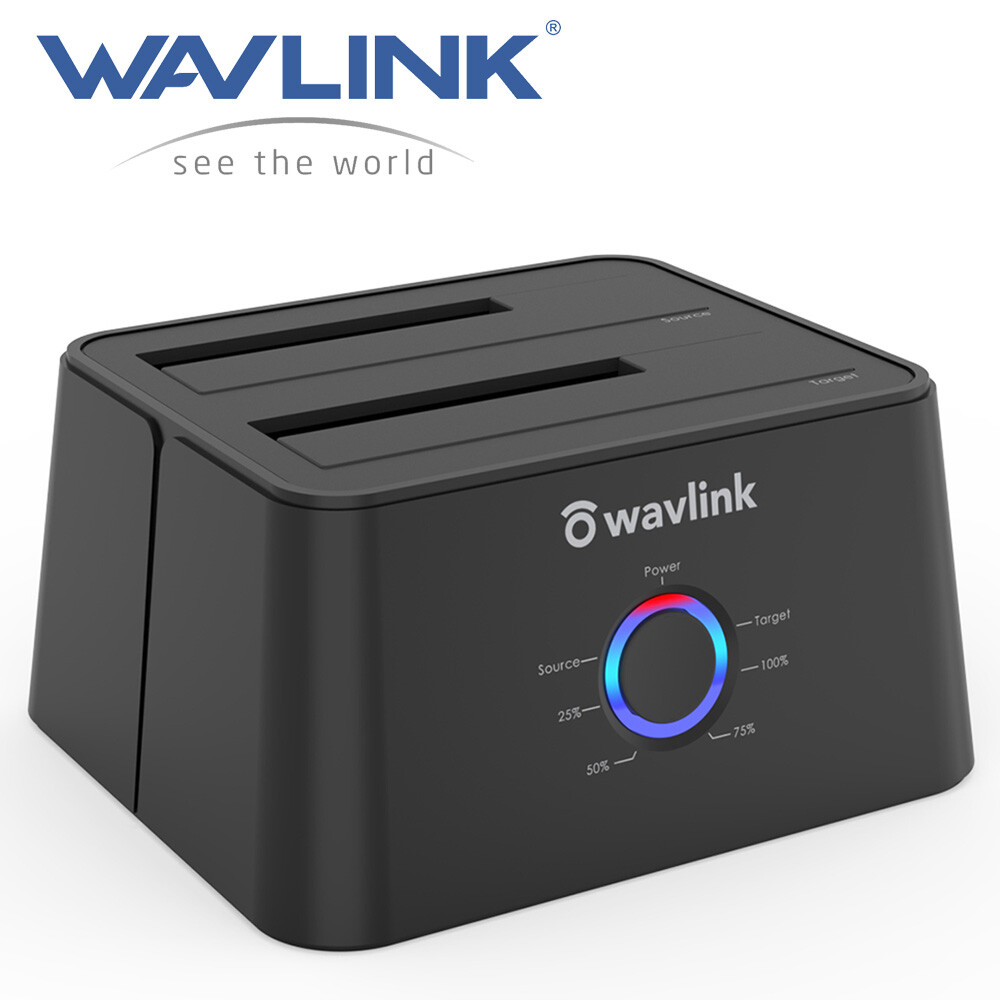
Wavlink Dual Bay Hard Drive Docking Station, USB 3.0 to SATA I/II/III Tool-Free External Hard Drive Lay-Flat Dock for 2.5/3.5inch HDD/SSD with Hard Drive Duplicator/Offline Clone Function/1 USB A to USB C Converter, Support UASP and 2x16TB with 12V/3A Power Clone Function】 - Wavlink hard drive docking station supports offline clone function, it can be used to clone an existing hard drive without connecting to a computer, easy to duplicate data from one to another hard drive by pressing the CLONE button for about 3 seconds. Please note the target disk must be larger than the source disk.
●【Dual Bay Connections 】 - This dock offers an easy access with two 2.5/3.5 inches HDD SSD SATA I/II/III drives, which is a perfect solution for backup & processing IT data, batch processing data, data recovery, formatting and file transferring. The dust-proof design of the cover gives you a unique experience.
●【Extensive Capacity】-This dock enables access to 2 drives simultaneously(Up to 2×16TB). LED indicator light shows power and activity status. Support plug and play & hot swap. On/Off power switch for hard drives protection. Compatible with Windows, Mac OS, Linux and Android. {Note: Your phone should support OTG function then you can easily read the hard disk data.}
●【UASP Accelerated】-Super speed USB 3.0 data file transfers (up to 5 Gbps/420MB/s) from your computer to back-up files and centralize storage for convenient access. Up to 70% faster at read speed and 40% faster at write speed over traditional USB 3.0, downward compatible with USB 2.0/1.1.
●【We Care For You】- This adapter features a light weight, perfect for the occasion of home office, watching movies, entertainment etc.What you will get: 1 x USB 3.0 Dual Bay Docking Station, 1 x USB-B to USB-A Cable, 1x Power Adapter 12V/3A, 1 x USB-A to USB-C Adapter, 1 x Quick Start Guide. 1-Year worry-free warranty (extra 6 months for registered members) and life-long friendly customer service and technical support.
Wavlink USB to SATA Dual-Bay External Hard Drive Docking Station
SATA Drives Only: This docking station do not compatible with IDE drives. It is compatible with all 2.5 inch and 3.5 inch SATA HDD and SSD.
Equipped Type-C Port: The type-c converter is compatible with your USB C devices, like thunderbolt 3 laptop, computer with USB-C port & USB C Android phone.
Considerate Deisgn: Four anti-skid footpads on the bottom of the product provide maximum protection for your device from sudden sliding off and insure the stability.
Smart Auto-sleep Mode: The auto sleep mode greatly reduces the invalid energy consumption, prolongs the service life of the hard disk and protects the hard drive data for you.
Stable Power Supply: Equipped with 12V/3A power adapter to meet the power consumption requirements of large-capacity hard drives. Please connect the power adapter when using.
Features:
1. Support maximun capacity up to 2x16TB.
2. Support UASP accelerated transfer protocol.
3. Automatic replication of HDD or SSD (clones from Source Disk A to Target Disk B) at a click of the button.
4. Use the dedicated DC power adapter certified by PSE.
5. Plug and play. No software, drivers or complicated installation required.
Instructions on How to Connect the Dock to the Computer:
1). Please unplug the DC power adapter to make sure that the power is off before starting.
2). Insert HDDs/SSDs into the slots vertically and slowly until them stick.(One HDD/SSD is also supported)
3). Connect the power adapter and turn the "ON-OFF" switch on.
4). Connect the USB cable to the computer then you can use it as your computer's external hard drive.
How to Operate Offline Clone Function:
ѧ Please unplug the DC power adapter to make sure that the power is off before starting.
ѧ Insert Source Disk into hard drive bay A, then insert Target Disk into hard drive bay B.
ѧ Make sure the USB cable is disconnected from computer.
ѧ Connect the power adapter and turn the"ON-OFF" switch on.
ѧ Hold the CLONE button for about 3 seconds, when all leds turn on, the clone progress will start.
ѧ Four lights (25%, 50%, 75%, 100% ) will turn solid blue when the cloning process is completed.
ѧ Finally turn the "ON-OFF" switch off, disconnect the power adapter and eject your drives.
Tips for Offline Clone:
- The capacity of target disk must be larger than the source disk.
- Please confirm that your source drive and target drive can both work properly.
- Please connect the 12V power adapter to ensure a stable power supply for transmission.
- To avoid data transfer errors, overheating and damage to the device, please make sure that there are no faulty driver cells.
- To avoid data loss, do not remove or insert drives when one drive is working in the docking station. Please power off the dock before removing.
- Please confirm the target drive have no data. If you have existing data on the target drive, the cloning process will eliminate your target drive's data. Because the target drive will be cloned to be the same as the source drive, partition, format
and data are the same too.
Black-Model 2
Wavlink Dual Bay External Hard Drive Docking Station, USB 3.0 to SATA I/II/III for 2.5 or 3.5in HDD, SSD with Offline Clone Function, supports UASP SATA 5Gbps[ 2x16TB Support]
Dual-bay Docking Station: The Wavlink two-slot hard drive docking station supports all 2.5''/ 3.5'' SATA I/ II/ III HDD SSD (up to 2x 16TB), a perfect solution for data backup and transferring files. The unique bezel design offers stable performance and better protection for your hard drives.
Offline Clone Function: Offline data copy between two hard drives with no computer involved, totally a competent assistant for data backup. Press the OTB button for about 3 seconds and short-click it once again to start the process. Tips: please make sure the capacity of target disk' s is larger/equal than source disk's.
USB 3.0 Superspeed with UASP: With standard USB 3.0 and SATA III connectors' ready, the data transfer rates up to 5 Gbps, 10x faster than USB 2.0. UASP supported allows a 20% faster transfer speed over conventional USB 3.0, transferring 1GB files only takes 3 seconds, backward compatible with USB 2.0/1.1.
Easy to Use: Back-up files and expand storage with convenient access. Tool-free, no driver is needed. Hot-swappable, plug and play! Compatible with Windows 7/8/10/11, Mac 10.2 or latest (Do not support M1-based Mac), Chrome OS, Linux, Android. {Note: Your phone should support the OTG function.}
Package Includes: 1x usb 3.0 dual bay hard drive docking station, 1x usb 3.0 type-b to a cable, 1x usb 3.0 type-a to c adapter, 1x 12v/3a power adapter, 1x user manual, 2x bezels, several screws. 1 Year worry-free warranty( extra 6 months for registered members) and life-long technical support.
WAVLINK USB 3.0 to SATA I/II/III Dual Bay External Hard Drive Docking Station for 2.5 / 3.5in HDD SSD, a Perfect Data Access & Hard Drive Clone Tool
SATA Interface Only: Not compatible with HDD/SSD features IDE interface. Please confirm your hard drive type before purchasing.
For Your Smartphones: Compatible with your USB-C Android phones, data transfer by OTG. (The USB-A to USB-C converter is included)
Auto-Sleep Function: After finishing cloning, product will go to sleep mode if there were no operations in about 12mins and HDDs stop running.
Sufficient Power Supply: A highly efficient 12V/3A power supply provides a stable and reliable energy supply which can easily drive large capacity hard drives.
Before you clone, please noted:
①.The target drive has to be at least equal or larger in capacity than the source drive.
②. Please confirm your source drive and target drive both can work properly, and target drive have no data. If you have existing data on the target drive, the cloning process will eliminate your target drive's data. Because the target drive will be cloned to be the same as the source drive, partition, format and data are the same too.
③.To avoid data loss, do not unplug drives when one drive is working in the docking station. Please power off the dock before removing.
④. Make sure there is no connection to the USB port.
After transferring data on computer, please noted:
1). Before the removal, please stop all data access and transfer to the device.
2). Never remove your hard drive(s) or insert a new one while the hard drive is in use. Otherwise, you may corrupt the data on the hard drive(s) or damage the hard drive(s), docking station, or computer.
Tips:
●Do not support M1 based Mac.
●One-Touch Backup function for Windows PC ONLY.
●One button to offline clone, does not need to connect to the computer.
●Please make sure the actual capacity of the Target disk is higher than Source disk (Target≥Source).
●Making sure your smartphone supports OTG function or data will not be transmitted.
●A brand-new hard drive should be formatted and partitioned in Disk Management/Disk Utility before use.
●To avoid data loss, please do not try to insert or withdraw HDD or SSD when another hard drive running.
●Please backup files in the target hard drive before cloning. Any files in the target hard drive will be overwritten when offline cloning occurs.
●Some disks might need more wattage than normal disk to start up, please connect the 12V power adapter to ensure a stable power supply for transmission.
Specification
Compatible HDD: 2.5/3.5 inch
Max HDD Capacity: 2x16TB
Maximum data transfer rates: 5Gbps
Material: Plastic ABS and PC
Weight (with 2 bezels): 366g/12.9oz/0.8lbs
Item Dimensions: 14.2 x 12 x 4.5cm/ 5.6 x 4.7 x 1.8 in
USB-B to USB-A Cable Length: 2.3ft /27.56inch /70cm
Power Cable: 120cm/47.2in/3.93ft
for 2.5/ 3.5" SATA I/II/III HDD/SSD+SD/TF Reader
USB 3.0 to SATA Dual Bay External Hard Drive Docking Station for 2.5” & 3.5” SATA I/II/III HDD/SSD with Offline Clone and Fast Charging Hub, Card Reader [ Supports UASP & up to 2 x 16TB]Dual Bay Docking Station: Allows an easily insertion into two 2.5” & 3.5” SATA I II III HDD SSD, supports up to 2x 16TB hard drives.
Multi-Function: Offline clone, storage, USB hub, 2-port fast charging.
Faster Transfer: Improved performance with USAP and SATA III(up to 6Gbps), the faster transfers reach up to 70% faster read speeds and 40% faster write speeds.
Convenient operation: LED indicators make HDD Access, Power status, clone process clearly at a glance.
Plug & Play: No reboot and additional driver needed, hot-swapping, easy and quick Tool-Free installation. Supports Microsoft Windows 11/10/8/7/XP/Vista, Mac OS X 10.2 to 13.x and latest.[Note: not compatible with Mac computers with M1 series chipsets including M1, M1 Pro and M1 Max.]
Wavlink - Bringing Technology to Life
The Wavlink Dual Bay Docking Station with Fast Charge Hub and Card Reader provides a perfect solution for backup & processing IT data, batch processing data, formatting, file transfers, data recovery, charging, etc.
2-Port Fast Charging. Each up to 5V/2.4A.
The Dock features a built-in 4-port USB 3.0 Hub that enables you to connect any other USB peripherals to your PC. The 2 fast charging ports charge iPads and other mobile devices as effectively as through a wall plug, each up to 5V/2.4A.
2-Port SuperSpeed USB 3.0 with UASP
With USB3.0 SuperSpeed connectivity, data transfer speed could reach up to 5 Gbps, 20% faster than traditional USB 3.0 with UASP Transfer Protocol, spending less time for syncing mass data.
Clone Function
Just press the OTB button to operate Clone function and copy mass data without PC. The cloning process will clearly show 25%, 50%, 75%, 100% through LED lights. You can rest assure of doing other things.
SD Card Reader
Use the Card Reader to easily access data on your SD, SDXC, or SDHC memory card between your computer and camera, smartphone, music player, tablet, flash drive, and external hard drive.
Specification:
1.Voltage: 100~240V
2.Operating Temperature: 0°C~40°C
3.Storage Temperature: -10~70°C
4.Power Plug: US
5.Power Supply: 12V/3A
What’s in the package?
1 x Dual Bay Docking Station
1 x DC 12V Power Adapter
1 x USB 3.0 A to B Cable
1 x Quick Guide
Note:
-The charging port only for fast charging, without USB function.
-Please backup files in the target hard drive before cloning.
-The target disk must be larger than the source disk.
-To avoid data transfer errors, overheating and damage to the device, please make sure that there are no faulty driver cells.
-To avoid data loss, do not remove or insert drives when one drive is working in the docking station. Please power off the docking station before removing.
-Please read the manual carefully before using the clone function.
-This dock is not compatible with Mac computers with M1 series chipsets including M1, M1 Pro and M1 Max.
for 2.5" SATA SSD or HDD
Wavlink USB 3.0 to SATA 2.5" Tool-free External Hard Drive Enclosure, Optimized for 7mm and 9.5mm 2.5 Inch SATA HDD/SSD, Support Max 4TB with UASP Protocol
{Ultra-fast USB 3.0 & UASP Accelerated}: Transfer 1GB file in 3 seconds. The SATA interface of this enclosure supports UASP accelerated transmission protocol, 70% faster than traditional USB 3.0. The USB 3.0 interface supports up to 5Gbps transfer rate, also backward compatible with USB 2.0 and USB 1.1 ports.
{Various Application }: Easily connects your 2.5 inch SSD & HDD to PC, laptop, PS4, TV, router for data transferring or expanding storage. It protects the hard disk from outside scratches and makes SATA hard drive portable for data store. It is awesome for booting up old hdd/ssd and recovering important files of broken PC.
{Universal Compatibility}: Supports Windows, Mac OS X and above systems. Fit with most 2.5"" SATA III / II / I HDD (Hard Disk Drive) & SSD (Solid State Drive) up to 4TB.
{Easy Installation}: Tool free installation. Plug & Play, no driver needed for this SATA enclosure. Just push out the cover, plug in the drive, close the cover and go. Hot-swap supported. No request for extra power supply.
{Great Portability for Your Hard Drive}: Ideal for harnessing your old 2.5"" HDD and SSD hard drive as an external USB drive, it will provide you greater convenience of use and versatility of digital data storage. An ideal choice for digital lovers, movie lovers and business elites.
{What you get}: Package contents: 1 x USB 3.0 to SATA 2.5"" Hard Drive Enclosure, 1 x USB 3.0 Micro-B to Type A Cable, 1 x Quick Start Guide. We provide 1 year warranty, but if you sign up as one of our members, you will get an additional six months warranty. Please do not hesitate to contact us at anytime if you have any problems, night or day : -)"
Quickly access a SATA SSD or HDD: you can connect to an external drive to add storage, perform backups, create disk images, implement data recoveries, and transfer content to your PC, TV, router or PS4.
High quality materials: this external enclosure is made of high-quality ABS plastic which is resistant to fall and can well protect your hard drive and precious data.
LED indicate: the blue LED indicator let you know the working status easily.
Fingerprint-free design: diamond-patterned surface design prevents fingerprints and is hard-wearing, protecting your hard disks from improper shaking and scratches.
SATA port: HDD/SSD with IDE interface are NOT compatible.
Product size: L4.9*W3.14*H0.5(inch)
USB 3.0 to SATA III supports UASP protocol: super speed USB 3.0 has a maximum data transfer rate of 5Gbps, 10 times faster than USB 2.0; 20% faster than traditional USB 3.0, with UASP transfer protocol, which reduces CPU utilization, data delay and waiting time.
· To reach the UASP speedup function, please confirm whether your computer support the UASP Protocol or not first.
· The systems supported the UASP protocol: WIN8 / WIN10 / MAC OS 8 / 9 and above.
· The USB3.0 transfer rate may differ from different computers, systems and hard drives.
Features:
Transfer rates up to 5 Gbps when connected to a USB 3.0 port.
Transfer rates up to 480 Mbps when connected to a USB 2.0 port.
Hot-swappable, plug and play, no drivers needed.
Backwards compatible with USB 2.0 or 1.1.
Warm Reminder:
1. For UASP, make sure the device, OS and controller have the UASP function enabled.
2. 3.5"" HDD drives are NOT compatible.
3. Data transfer rate is limited by the SATA SSD and USB port rating.
4. Always safely remove your disc before unplugging this product."
USB 3.0 to SATA external hard drive enclosure, 7mm, 9.5mm, 2.5" hdd/ssd, 4TB, UASP, TRIM, 5Gbps, ABS plastic, LED, fingerprint-free, 3.5" hdd/ssd, micro-b, tool-free, plug and play, data transfer, hot-swap, 480Mbps, IDE port, Windows, Mac OS X, portable, slim.
USB 3.0 to Dual Bay SATA Adapter Only
WAVLINK USB 3.0 to Dual Bay SATA Adapter, External 2.5" 3.5'' SATA Hard Drive Connector with 2 USB3.0 Ports and Offline Cloning Function for Files Transfer & Backup (2x18 TB & UASP Supported)
{One-Button Offline Clone}: Simply pressing ""Clone"" button to backup files from one hard drive to another (No need to connect with PC). Tips: 1.Cloning can only be done from A drive to B, please make sure B drive' s capacity is larger/equal than A; 2.12V/3A power supply is needed (power adapter is included).
{Dual 18TB Capacity Access}: Dual SATA connectors enable access to two hard drives simultaneously, supports each capacity up to 18TB, a total incredible 36TB supported. This USB 3.0 to SATA external hard drive adapter helps you easily realize expanding storage space, reading & backuping data, and transferring files.
{Extra 2x USB3.0 Data Transfer}: 2 USB3.0 ports on the side make it easy and quick to connect your keyboard or mouse without any lag, or hard drives for effortless sync and file transfer. It ensures an instant 5Gbps transfer speed and allows you to charge smartphones at up to 7.5W.
{5Gbps Superspeed with UASP}: With standard USB 3.0 and SATA III connectors ready, the transfer rates up to 5 Gbps,10X faster than USB 2.0. With UASP acceleration and TRIM, 70% faster transfer speed at reading and 40% faster at writing you can experience compared with conventional USB 3.0 (The connected computer should also support UASP).
{Easy to Use}: Easily connect with your 2.5 or 3.5 inch SATA HDD/SSD, no extra drivers needed, supports hot-swap, just plug and play. Works with Western Digital, Seagate, Fujitsu, Samsung hard drives and universally compatible with Windows 10/ 8.1/ 8/ 7/ Vista/ XP, Mac OS 11/ 10/ 9, Linux, Chrome OS.
{What You Get}: Attention! Does Not Support IDE Drives! In the Box: 1 x USB 3.0 to Dual-Bay SATA Adapter; 1 x Power Adapter; 1 x Quick Start Guide. 12-month worry free warranty( extra 6 months for registered members) and life-long technical support. If you have any concerns or questions, please feel free to contact us."
Wavlink USB 3.0 to Dual Bay SATA Adapter, Fully ""Expand"" the Joy of Your Life
A universal USB3.0 to dual-bay SATA cable, compatible with most 2.5-inch and 3.5-inch SATA SSDs/HDDs on the market. Connect your desktops, notebooks and other devices through the USB 3.0 port with transmission rate up to 5Gbps. Allows to read 2 hard drives at the same time, each capacity can be up to 18TB. One-button offline cloning can be easily operated to make data backup more convenient. Equipped with two additional USB 3.0 ports that support BC1.2 fast charging and along with 0.5 meters' USB-A cable. Support plug and play, small and portable, it is an essential companion for digital enthusiasts.
Easy Setup for Plug and Play
1. Insert the hard drive into the SATA connector and make sure your HDD/SSD is mounted correctly;
2. Plug the adapter in a power outlet and connect it to the sata adapter. (For 2.5'' hard drives might not be needed);
3. Connect the USB 3.0 cable to your laptop( the LED light on the adapter will blink), then you can start using.
Notes:
The new disk window may pop up or you have to find it in ''This PC'' then start using it.
Please make a partition for the new hard drive disk at the first use.
Please remember to safely remove the USB adapter on your PC/laptop first then remove manually.
One-Button Offline Clone
Simply pressing ""Clone"" button to backup files from one hard drive to another (No need to connect with PC).
How to operate Offline Clone(A to B) ?
1. Insert your SATA HDD/SSD into adapter's A/B ports (Capacity requirement: B≥A) and connect the power supply;
2. Start clone by pressing Clone Button 3 seconds, then releasing and quickly clicking it at a time;
3. Four LED lights indicate the cloning process(25%, 50%, 75%, 100%). Work is done when all indicators light up;
4. Connect the target drive B with your PC and set its status into ""Online"" in Disk Management.
Notes:
Make sure that the USB cable is disconnected from any computer during the cloning.
Please backup files before cloning. Any files in the target hard drive will be overwritten when offline cloning occurs.
Multi-scenes applicable: widely used in home and office with connecting to laptops, routers, smart TVs, PS3/4, Xbox, simply to realize expanding file storage, watching movies and playing games.
Large capacity supported: dual-bay adapter enables you to connect with two of HDDs or SSDs at the same time, supports with expanding a maximum 18TB*2 large capacity.
Additional USB3.0 ports: two built-in USB 3.0 Type A ports support fast charging for your mobile phone or other compatible devices and support other extended functions of USB port.
LED indicators: one red-light power indicator and four blue-light working status indicators, which help you easily obtain the information of the adapter's power status and cloning progress.
Auto-sleep mode: the auto-sleep mode is supported for 15-minute no data transferring of the adapter, which effectively helps to extend the lifespan of your hard drives.
Specification
- The maximum data transfer rate is around 5Gbps.
- Compliant with Universal Serial Bus 3.0 Specification Revision 1.0.
- Compliant with Universal Serial Bus 2.0 Revision.
- Compliant with Serial Bus ATAII Specification 1.0 Version.
- Compatible with 2.5’’, 3.5’’ HDD & 2.5’’ SSD.
- 2 x USB 3.0
- 2 x SATA III
- Offline clone
System requirement
-Microsoft windows 10, 8, 8.1, 7, Vista, XP
-Mac OS 9, 10, 11 or later
-Linux
-Chrome OS
In the box
1 x USB 3.0 to Dual-Bay SATA Adapter;
1 x Power Adapter;
1 x Quick Start Guide.
Warning
- Please do not damage this product on purpose or crush the device with external force.
- Please do not disassemble this product without the help of professionals.
- Please avoid humid environment.
- Remember to safely remove your disk on laptop/PC first.