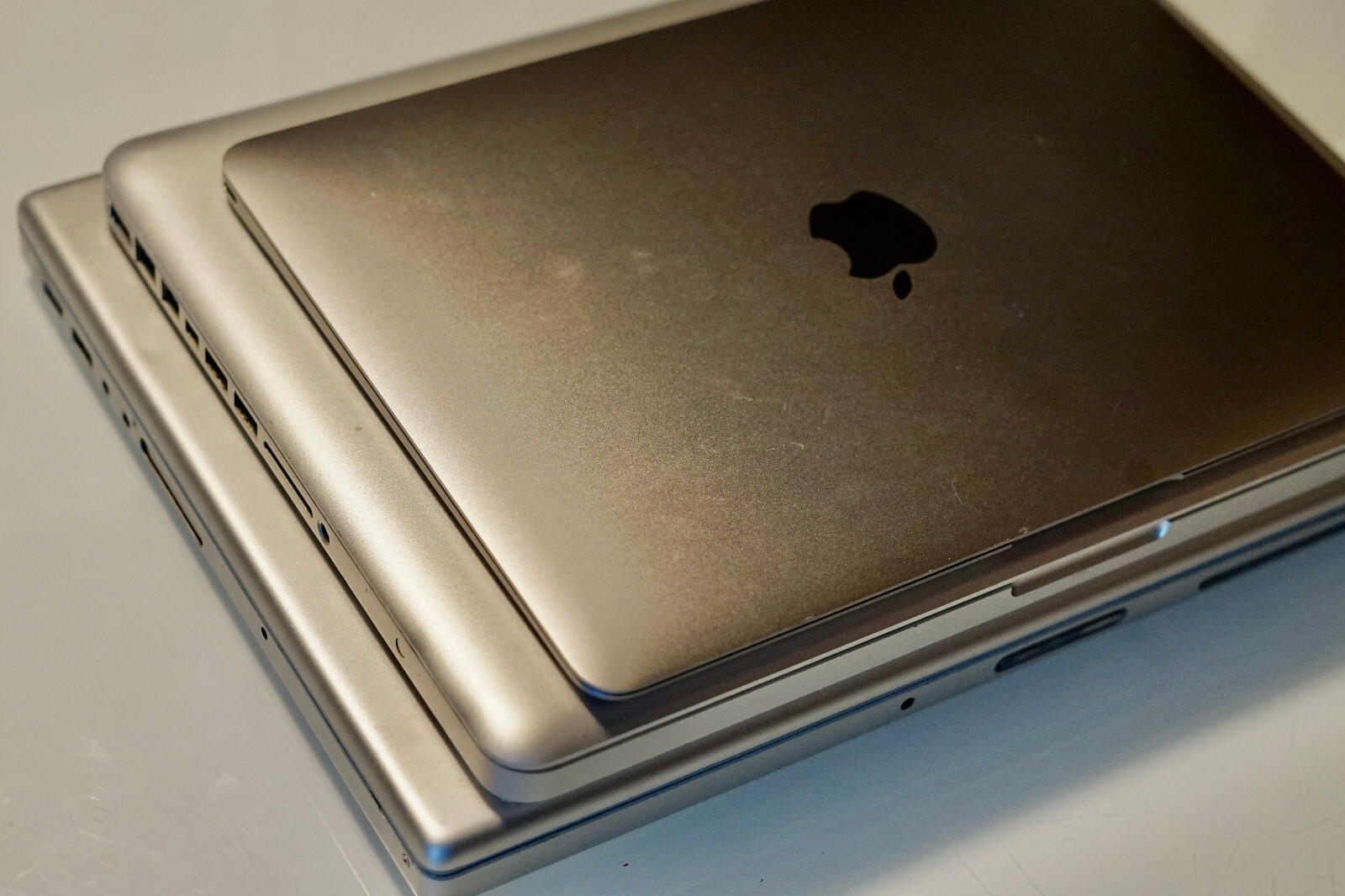
For sale (as a batch) are three MacBooks: One from 2006 (one of the earliest MacBook Pros); One from 2010 (a highly souped up MacBook Pro); and one from 2015 (the ultralight-weight “MacBook”).INCLUDES bootable USB Mac OS install sticks for the versions that go with the computers! Especially for the older models, these are not easy to make and it took me a lot of work (including difficult workarounds for various legacy OS quirks) to get them successfully created. These are worth something just on their own! Four OS install sticks are: OS X 10.7 (“Lion”); OS X 10.12 (“Sierra”); OS X 10.13 (“High Sierra”); and OS 11 (“Big Sur”).All three computers have been wiped with a fresh install, and are ready to set up.
A unique collection here — perfect for a computer expert to mess around with or use as Linux machines, or for someone just looking to pick up three Mac computers on the cheap.For the Mac computer lovers, below is a detailed write-up of each one, along with lots of pictures and screenshots. Enjoy!MacBook Pro 2,2 (A1211) 15”, 2.33 GHz Core 2 Duo, Late 2006This was a great, hard-working computer for me for several years. I used to record a lot of music on it using Logic and a Firewire interface.This is the faster of the two 15” MacBook Pro models from the time (the 2.33 GHz rather than 2.16 GHz).RAM has also been upgraded to 4GB from the standard 2GB. 120GB storage.I put in a brand new after-market battery in January 2024 — works great, and good to go for a long while on that front! After-market power / charging cable.CD / optical drive - I tested this out recently with an Audio CD and it worked and seemed to be functioning perfectly. To be honest I was pretty surprised! It’s possible I might have replaced the drive at some point and just can’t remember (drive information provided in the screen shot). It does seem to have to work hard to eject the CD, and I had to grab the disc when it popped out to avoid the drive automatically sucking it back in.Ports: USB (2.0) x2; Firewire 400; Firewire 800; ethernet; ExpressCard/34; DVI; 3.5mm headphone out (with digital); 3.5mm mic in.Mac OS X “Lion” (10.7) freshly installed. Comes with a bootable install USB for future use. (As far as I know, Lion is as high up as you can go on this computer.)(As you can see in the pic, has an Ohio “I heart voting” sticker from, if I recall correctly, 2010. Can easily be removed of course—might take a bit of goo-gone—but I couldn’t bring my self to peel it off.)Known Issues: 1. Some odd pixel artifacts on the bottom-left and bottom-right of the screen (see pictures) — popped up a long time ago but fortunately never seems to have gotten worse. 2. The “0” [zero] button doesn’t work.MacBook Pro 7,1 (A1278) 13”, 2.66 GHz Core 2 Duo, Mid 2010No doubt this is the best of the lot. I souped up this MacBook Pro a while ago, and it was a beast and a fantastic computer for me over many years.Computer originally had the slower 2.4 GHz processor, but a long time ago some of the ports (which are hard-wired to the logic board) failed, and I replaced the entire logic board with the faster 2.66 GHz board. I did this very carefully using all the correct tools, thermal paste, etc. . . . and it worked like a dream! That was sometime around 2016 and I never had any issues after the swap.RAM also upgraded to 16GB! (This model has easy to swap out RAM cards, and fortunately was one of the very few models from around the time that takes two 8GB cards!)Storage: At the same time I was making the above upgrades, I swapped out the original hard drive with a Crucial 250GB solid state drive (SSD), and I removed the CD / optical drive and put in a second one of the same drive. So you have options on storage: (1) 500GB when configured RAID0 (striped); (2) 250GB when configured RAID1 (mirrored); (3) two totally separate 250GB SSDs. You could do all kinds of different things with setup #3 I’m sure (e.g., different bootable OS’s). If you do the non-RAID #3 option with just MacOS installed, one drive will show up as the internal (boot) drive and one will show up as a separate storage drive. I went with #1 pretty much the whole time I’ve used the computer, and it worked great for me. Will come with option #1 (500GB RAID0) set up.So to recap, upgraded logic board, 16GB RAM (!), and two 250GB RAID-configurable SSDs! For anything outside of video streaming or graphics-heavy work (since you can’t soup up the video card on this), this computer is a total workhorse — more powerful than computers that are many years newer.Operating System: As just mentioned, I always used this computer with the two after-market SSDs in RAID — worked like a dream. At some point, however, Mac came out with “High Sierra” OS, which was when Mac stopped playing nicely with RAID (this relates to High Sierra being the first OS to feature the all-new “Apple File System” (APFS) rather than just the “Mac OS Extended (journaled)” file system. If you Google around, there seems to be folks that think there is some way to use High Sierra and/or APFS in RAID, but I spent a long time going down that rabbit hole and I’m not convinced it’s a wise thing to pursue. Even if it’s possible, I wouldn’t be comfortable putting all of my personal files on a jerry-rigged system that forces APFS and RAID to work together. The previous OS, “Sierra” (which uses the Mac OS Extended file system) continued to work just fine for me, and I decided to just keep enjoying my RAID setup. I have tested installing High Sierra on a non-RAID setup (see option #3 in the previous paragraph) to confirm it works.CD / Optical drive removed. See above.Ports: USB (2.0) x2; Firewire 800; Ethernet; Mini DisplayPort; SD Card; 3.5 mm headphone out + mic in (with digital)After-market battery, but in need of another replacement. Two power / charging cords.Mac OS X “Sierra” (10.12) freshly installed. Comes with two bootable install USBs for future use: one for Sierra (10.12) and one for High Sierra (10.13). See above on operating systems. (As far as I know, High Sierra is as high up as you can go on this computer.)Comes with black case if interested.Known issues: 1. As noted above, it’s time for another install of a fresh after-market battery, which is easy to do (battery should come with the specific small screwdriver you need to remove/install). 2. I’ve sometimes (not always) had issues getting SD cards to show up when I put them in the port.MacBook 8,1 (A1534) 12”, 1.1 GHz Core M, Early 2015Your chance to own one of Apple’s funny ducks, and a super-lightweight Macbook for lighter use or TV streaming (or some strange project).This was the very first of the relaunched and short-lived “Macbook” (not Pro, not Air) line. Unlike the other two above, I have not gone inside this one and done any messing around with upgrades and that wort of thing. Since it’s significantly newer, it has necessarily better graphics components, including a Retina display, and so likely the best of the bunch for everyday streaming-type stuff.8GB RAM; 250GB storage.Ports: USB-C (3.0); 3.5mm headphone out. The USB-C port is also where the power cord plugs in; there is no separate power cord input.Comes with adapter that turns the USB-C input into three separate inputs: (1) a USB-C (where the power cord can go while using the other inputs); (2) a USB-A input; (3) an HDMI output.Comes with power cord (which includes a USB-C to USB-C connector).Mac OS 11 “Big Sur” freshly installed. Comes with bootable install USB for future use. (As far as I know, Big Sur is as high up as you can go on this computer.)Comes with an soft inCase case — fits like a glove; looks and works great.Known issues: 1. I believe the internal battery could stand to be replaced. I’ve never opened this computer and didn’t want to start now, but I’ve read that the battery replacement is fairly straightforward, and after-market batteries for this model are readily available on Amazon with positive reviews.