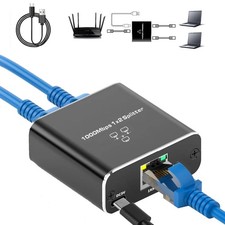
🌐 RJ45 1-to-2 Ethernet Cable Splitter Adapter – 8P8C Network Connector for PC, Internet, IPTV & Broadband 🔌💻📺
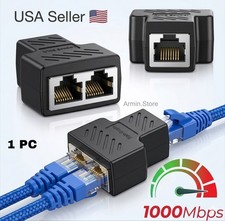
Make your compatible Ethernet connections more convenient with this practical RJ45 1-to-2 Ethernet Cable Splitter Adapter, designed for users who need additional connection flexibility in network, PC, IPTV, broadband, and other compatible Ethernet applications. 🌐🔌✨
This compact network accessory features RJ45 / 8P8C connectors and is designed to help organize and adapt Ethernet connections without requiring a large or complicated piece of networking equipment.
Whether you're setting up a home network 🏠, organizing your office connections 💼, working with compatible IPTV equipment 📺, connecting computers 💻, troubleshooting Ethernet cables 🛠️, or keeping spare networking accessories in your toolbox 🧰, this small adapter can be a useful addition to your collection.
Its compact size makes it easy to carry, store, and use whenever a compatible RJ45 connection arrangement is needed. 🎒🔌
🌐 Practical Ethernet Connection Accessory
Ethernet cables are widely used for computers, routers, switches, broadband equipment, IPTV systems, network devices, and other wired networking applications. 💻📡📺
When you need to work with multiple compatible Ethernet connections, having the right adapter can make your setup more flexible.
This RJ45 splitter-style adapter provides a compact way to work with compatible network cabling and can be useful in various home, office, entertainment, and DIY networking situations.
It is especially useful for people who frequently work with:
💻 Desktop computers
💻 Laptop docking/network setups
🌐 Ethernet networks
📡 Broadband equipment
📺 IPTV systems
🖥️ Network-enabled devices
🔌 RJ45 cables
🛠️ DIY networking projects
🔌 RJ45 8P8C Connection
The adapter uses standard-style RJ45 / 8P8C Ethernet connectors, making it suitable for compatible Ethernet cables and equipment. 🔌🌐
The familiar RJ45 connector design allows compatible network cables to be connected without requiring unusual or specialized connectors.
Connector Type:
🔹 RJ45
🔹 8P8C
🔹 Ethernet-style connection
Always check the connector arrangement and wiring requirements of your equipment before use.
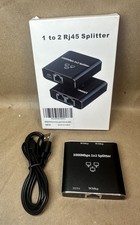
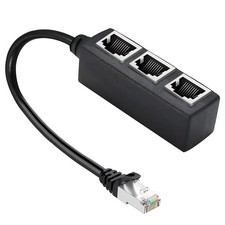
🔄 One-to-Two Connection Design
The main feature of this adapter is its one-to-two connection configuration. 🔌➡️🔌🔌
This design can be useful when working with compatible Ethernet connections where you need to organize or adapt multiple cables.
The compact structure provides a simple physical connection solution without requiring a large networking device.
Basic Concept:
🌐 Main Ethernet Connection
⬇️
🔌 Adapter
↙️ ↘️
💻 Connection 1 📺 Connection 2
The actual network functionality depends on the specific equipment, wiring arrangement, and application.
💻 Useful for PC Networking
This adapter can be useful in compatible computer networking environments. 🖥️🌐
If you're working with desktop PCs, network cables, Ethernet accessories, or wired network equipment, a compact RJ45 adapter can be a useful part of your networking toolkit.
It may be useful for:
💻 Desktop PCs
🖥️ Workstations
🌐 Wired network setups
🛠️ Network testing
🔌 Cable organization
🏢 Office equipment
Before connecting, make sure your network configuration supports the intended arrangement.
📺 IPTV Applications
The adapter can also be useful for compatible IPTV and network-based entertainment setups. 📺🌐
Many modern entertainment systems rely on Ethernet connections for internet-based content and network communication.
For compatible IPTV equipment, this adapter can provide additional flexibility when organizing Ethernet cabling.
Possible compatible equipment may include:
📺 IPTV boxes
📡 Network media devices
🖥️ Smart entertainment equipment
🌐 Network-enabled receivers
🔌 Ethernet-connected streaming equipment
Always check your IPTV system's networking requirements before using a passive splitter-style adapter.
🌐 Broadband Connection Applications
Broadband networking often involves routers, modems, Ethernet cables, computers, IPTV equipment, and other connected devices. 📡💻📺
This compact adapter can be useful as part of a compatible broadband cable setup.
It can help users manage physical Ethernet connections in situations where a suitable splitter arrangement is required.
⚠️ A passive Ethernet splitter is not the same as an Ethernet network switch or router. For independent simultaneous network connections from one Ethernet port, an active network switch is normally required.
🔌 Compact & Space-Saving Design
One of the biggest advantages of this type of adapter is its compact size. 📦✨
It doesn't take up the space of a full-size network switch or bulky networking device.
You can easily keep it in:
🧰 Toolboxes
🎒 Laptop bags
💼 Office drawers
🗄️ Cable organizers
🏠 Home networking cabinets
🚗 Vehicle electronics kits
Its small size makes it convenient to carry as a spare.
🛠️ Useful for DIY Networking Projects
If you enjoy setting up or modifying your own network equipment, this adapter can be a handy accessory. 🔧🌐
DIY networking enthusiasts often keep different RJ45 adapters, Ethernet cables, couplers, connectors, and other networking accessories available for troubleshooting and installation.
This splitter-style adapter can be another useful component in your networking toolkit.
🏠 Home Network Applications
For home users, Ethernet cables may connect a wide variety of devices. 🏠🌐
These can include:
💻 Computers
📺 IPTV boxes
🎮 Gaming consoles
📡 Routers
🖥️ Smart devices
📦 Network storage
📺 Media equipment
The adapter can be useful when working with compatible cabling arrangements around your home.
💼 Office Networking
The compact design also makes it convenient for office environments. 🏢💻🌐
Keep one in your office equipment drawer or IT accessory box for situations where an RJ45 connection needs to be adapted or reorganized.
It can be useful for:
🖥️ Desktop computers
💻 Workstations
🖨️ Network-connected equipment
📡 Broadband equipment
🔌 Ethernet cable setups
🛠️ Troubleshooting kits
🎮 Gaming & Entertainment
Wired Ethernet connections are popular among gamers and entertainment users because they can provide a direct network connection to compatible equipment. 🎮🌐
This adapter can be useful when organizing compatible Ethernet cables around gaming and media equipment.
Possible applications include:
🎮 Gaming consoles
📺 IPTV boxes
🖥️ Gaming PCs
📡 Network media devices
🎬 Streaming equipment
However, network performance depends on the complete network configuration and equipment used.
⚡ Passive Adapter – No Separate Power Required
This type of connector is designed as a passive cable adapter and does not normally require a separate power supply for the adapter itself. 🔌⚡
Simply connect compatible Ethernet cables according to the intended configuration.
This makes it convenient compared with larger powered networking devices.
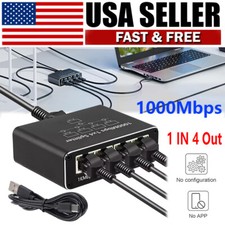
⚠️ Because it is a passive adapter, it does not function like an Ethernet switch, router, repeater, or powered network hub.
🔀 Important: Splitter vs Network Switch
This is an important point for buyers. 👀🌐
A passive RJ45 splitter physically adapts Ethernet wiring; it does not automatically provide two independent network ports from one router port.
If you want two devices to independently access the internet simultaneously from a single Ethernet port, you generally need an active Ethernet switch.
For example:
❌ Passive Splitter Alone
One router port ➡️ passive splitter ➡️ two devices
This does not necessarily provide independent simultaneous network access.
✅ Ethernet Switch
One router port ➡️ powered network switch ➡️ multiple devices
A network switch is designed to manage multiple independent Ethernet connections.
Therefore, please make sure this product matches your intended application before ordering. 👍
📡 Designed for Compatible Wiring Applications
The adapter can be useful for particular Ethernet wiring arrangements where the cable configuration and equipment support its use.
For some specialized setups, two Ethernet connections can share a cable using appropriate wiring at both ends. Such configurations require compatible equipment and correctly arranged adapters.
This product should therefore be viewed as a connection/wiring adapter, not a replacement for an active network switch.
🔧 Easy to Connect
The RJ45 connector design is straightforward. 🔌😊
A typical connection involves:
1️⃣ Identify the correct Ethernet cable.
2️⃣ Check the RJ45 connector orientation.
3️⃣ Insert the connector into the appropriate port.
4️⃣ Connect the second compatible Ethernet cable.
5️⃣ Verify that the equipment recognizes the network connection.
6️⃣ Test your setup.
Do not force connectors. If a plug does not fit correctly, check whether the cable and adapter use the appropriate connector type.
🎒 Great for Technicians
Network technicians and DIY users often carry small accessories for troubleshooting and installation. 🧰👨🔧
This compact adapter can fit easily into an Ethernet installation kit alongside:
🔌 RJ45 connectors
🌐 Ethernet cables
🛠️ Crimping tools
✂️ Cable cutters
🔍 Cable testers
📡 Network accessories
🧰 Repair tools
Its small size makes it easy to keep available without adding much weight or bulk.
🧰 Useful Troubleshooting Accessory
When diagnosing networking problems, having spare adapters can be helpful. 🔧🌐
A compact RJ45 adapter can allow you to test alternative cable arrangements or verify whether a connection issue is related to a particular cable or connector.
It can be particularly useful for people who frequently work with wired networking equipment.
✨ Simple & Practical Design
The adapter focuses on functionality rather than unnecessary complexity. 🔌✨
Its compact construction makes it easy to install, remove, store, and carry.
It can become a useful accessory for anyone who regularly works with Ethernet cables and RJ45 connections.
📏 RJ45 8P8C Compatibility
The product uses the familiar 8P8C Ethernet-style modular connector format. 🌐🔌
This makes it suitable for compatible Ethernet cable applications where the physical connector and wiring arrangement match.
Before ordering, verify your cable category, wiring configuration, and intended application.
🖥️ Suitable for Multiple Environments
This adapter can be used in many different environments when the application is compatible:
🏠 Home
🏢 Office
🏫 School
🛠️ Workshop
🧰 Repair center
🎮 Gaming room
📺 Entertainment setup
📡 Networking cabinet
💻 Computer desk
Its small size makes it easy to move between locations.
🌟 Main Features
🔌 RJ45 8P8C Connector
Designed for compatible Ethernet-style network cables.
🔀 One-to-Two Configuration
Provides a compact one-to-two connection arrangement.
💻 PC Applications
Useful with compatible computer networking setups.
📺 IPTV Applications
Suitable for compatible network-based IPTV cabling arrangements.
🌐 Broadband Applications
Can be used in compatible broadband Ethernet setups.
🧰 DIY Friendly
Useful for network installation, maintenance, and troubleshooting.
🎒 Portable
Small enough to carry in a tool bag or electronics organizer.
⚡ Passive Design
Does not require separate power for the adapter itself.
🔧 Easy Connection
Simple RJ45 plug-and-connect design.
🏠 Home Network Convenience
For home networking enthusiasts, keeping spare Ethernet accessories nearby can make troubleshooting much easier. 🏠🌐
Instead of waiting to purchase a connector when you need one, you can keep this adapter inside your networking drawer.
It can be useful for home projects involving:
📺 IPTV
💻 Computers
🎮 Gaming
📡 Broadband
🖥️ Media systems
🌐 Wired networking
📦 Easy to Store
The adapter is small enough to store alongside your other network accessories. 📦🔌
You can keep it in a small organizer box with:
🔹 Ethernet couplers
🔹 RJ45 plugs
🔹 Ethernet cables
🔹 Network testers
🔹 Cable clips
🔹 Adapters
🔹 Connectors
This makes it easy to find when you need a particular Ethernet connection arrangement.
💡 Practical Accessory for Cable Management
A well-organized network is easier to troubleshoot and maintain. 🧹🌐
Using suitable adapters and properly arranged cables can help keep your setup neat and manageable.
This compact RJ45 accessory can be part of a larger cable-management strategy, especially where space is limited.
🧑💻 Perfect for Computer Enthusiasts
PC builders, network enthusiasts, and home-lab users often experiment with different wired network configurations. 🖥️🔧🌐
Keeping a variety of Ethernet accessories available can make it easier to test, modify, and organize networking equipment.
This adapter can be a useful addition to a home lab or PC accessory collection when used for a compatible wiring application.
🏢 Useful for Small Office Setups
Small offices often use Ethernet for computers, printers, IPTV, routers, and other equipment. 💼🌐
A compact adapter can be useful for cable management, temporary configurations, and troubleshooting.
For permanent installations requiring multiple independent devices, however, an appropriate Ethernet switch is generally the better solution.
📺 Entertainment System Compatibility
Modern entertainment environments can contain several network-enabled devices. 📺🎮🌐
An IPTV box, smart television, gaming console, media player, and computer may all require Ethernet connectivity.
This adapter can be useful for compatible wiring situations, but users should confirm that their intended setup supports passive splitting before installation.
🔍 Check Compatibility Before Purchase
Before purchasing, please confirm:
✅ Your equipment uses RJ45/8P8C connectors.
✅ You need the specific one-to-two configuration.
✅ Your intended application supports a passive Ethernet splitter.
✅ Your cables have compatible wiring.
✅ Your equipment supports the intended network arrangement.
✅ You do not actually need an active Ethernet switch.
This simple check can help prevent compatibility problems.
⚠️ Important Network Information
Ethernet networking is more than simply connecting wires. 🌐🔌
Modern Ethernet equipment depends on proper wiring, negotiation, signal integrity, and network hardware.
A passive splitter cannot replace active networking electronics.
If your goal is to connect two separate devices to the internet simultaneously through one router port, use a suitable powered Ethernet switch.
This adapter is best considered for compatible Ethernet cable splitting/adaptation applications, not as a universal two-device internet-sharing device.
🛡️ Proper Usage
For reliable operation:
🔹 Use compatible Ethernet cables.
🔹 Ensure connectors are fully inserted.
🔹 Avoid excessive cable bending.
🔹 Keep connectors clean and dry.
🔹 Do not force incompatible connectors.
🔹 Verify wiring before connecting network equipment.
🔹 Use an Ethernet switch when independent simultaneous connections are required.
🎁 Great Addition to a Networking Toolkit
For anyone who works with computers, networking, IPTV, or broadband equipment, small adapters can be surprisingly useful. 🎁🌐
This RJ45 splitter-style connector can make a practical addition to a home networking kit, office IT drawer, technician's toolbox, or DIY electronics collection.
⭐ Product Highlights at a Glance
🌐 RJ45 Ethernet splitter-style adapter
🔌 8P8C connector format
🔀 One-to-two connection design
💻 Suitable for compatible PC applications
📺 Suitable for compatible IPTV applications
📡 Useful for compatible broadband setups
🧰 Great for DIY networking projects
🛠️ Useful for troubleshooting
🎒 Compact and portable
⚡ Passive design
🔧 Easy plug-and-connect operation
🏠 Useful for home networks
🏢 Useful for office setups
🎮 Suitable for compatible gaming/entertainment configurations
📦 Easy to store as a spare networking accessory
❤️ Why Keep One Handy?
Networking problems often happen unexpectedly. 😄🌐
A cable may need to be rearranged, an installation may require a different connection configuration, or you may simply need a compact adapter for a particular project.
Keeping an RJ45 adapter in your toolbox means you have another option available when working with compatible Ethernet equipment.
It takes up very little space but can be useful across a variety of networking tasks.
🚀 Ideal for Modern Connectivity Projects
From home broadband to IPTV and computer networking, wired connections remain an important part of many digital setups. 💻📺🌐
This compact adapter is designed to provide additional flexibility when working with compatible Ethernet cabling.
Its straightforward design, small size, and familiar RJ45 connector format make it an easy accessory to add to your network toolkit.
📋 Quick Specification Summary
🔹 Product: RJ45 Ethernet Cable Splitter Adapter
🔹 Connector Type: RJ45 / 8P8C
🔹 Configuration: One-to-Two
🔹 Application: Compatible Ethernet cable setups
🔹 Suitable For: PC, IPTV, broadband, networking, and compatible AV/network applications
🔹 Power: Passive adapter; no separate adapter power required
🔹 Design: Compact and portable
🔹 Use: Cable adaptation, compatible splitting arrangements, DIY, repair, and networking projects
🛒 Final Product Description
The One-to-Two RJ45 Ethernet Cable Splitter Adapter is a compact and practical accessory designed for compatible RJ45 / 8P8C Ethernet cable applications. 🔌🌐
With its one-to-two connection design, it provides a convenient way to adapt certain Ethernet cable configurations for compatible PC, IPTV, broadband, home networking, office, and DIY applications.
Its compact size makes it easy to carry and store, while the familiar RJ45 connector format allows it to integrate easily into compatible Ethernet cable setups.
Whether you're a home network enthusiast 🏠, PC user 💻, IPTV user 📺, technician 🧑🔧, DIY hobbyist 🛠️, or electronics enthusiast 🔧, this small adapter can be a useful addition to your networking accessory collection.
Keep one in your toolbox, office drawer, computer bag, or home network cabinet so you're ready whenever a compatible Ethernet connection project comes up. 🎒🧰🌐
⚠️ Important Reminder
This is a passive Ethernet splitter-style adapter and should not be confused with an active Ethernet switch. If you need two independent devices to access the internet simultaneously from a single router Ethernet port, an appropriate powered network switch is generally required.
Always verify your equipment, cable wiring, connector configuration, and intended application before use. ✅🔌🌐
Compact design. Simple connection. Convenient networking accessory. 🔌💻🌐📺✨