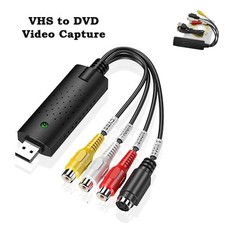
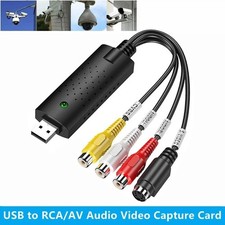
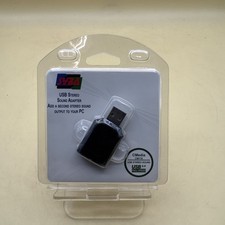
USB 2.0 Audio TV Video VHS to DVD VCR PC DVR HDD Converter Adapter Capture CardFeatures:
💿 1. Converts analog audio‑video from VCR, camcorders and DVD players to digital files for computer saving.
💿 2. Equipped with RCA composite, S‑Video and RCA stereo audio input ports for multiple signal sources.
💿 3. Supports NTSC and PAL formats, max resolution up to 720x480@30fps and 720x576@25fps.
💿 4. USB 2.0 connection, compatible with Windows XP, Win7, Win8, Win10, Win11 for desktops and laptops.
💿 5. Complete kit includes capture device, USB extension cable, driver CD and English user manual.
Specification:
Color: Black
Cable Length: 12cm
Complies with Universal Serial Bus Specification Rev.2.0
Support NTSC,PAL,SECAM,Video format
Video input: One RCA composite,One S-Video
Audio input: Stereo audio (RCA)
Dimension: (L)88mmx(W)28mmX(H)18mm
USB bus power
Support high quality video resolution:
NTSC:720X480 @ 30fps
PAL:720X576 @ 25fps
System Requirements:
USB: Compliant USB2.0 free port
OS: Windows 2000,XP/Vista/10
CPU: PentiumIII 800 above
HD: 600MB of available hard drive space for program installation, 4GB+ hard drive space for video capture and editing
Memory: 256MB of RAM
Display: Windows-compatible display with at least 1024x768
Sound card: compatible Widows-sound card
Suitable for:
USB 2.0: Desktop computers, laptops
RCA female connector: Webcams, set-top boxes, DV camcorders, DVDs
How to use it?
Hardware Installation:
Now you need to plug the USB Video Capture into USB 2.0 port. Click then Device Manager. In the Device Manager click on the "Sound, video and game controllers" correctly you should see the "AV TO USB2.0". This collection adopts the installation method without drive.Drive installation completed.
ShowBiz 3.5 Installation & Guide:
Note: If you have any antivirus software enabled, please disable it during the installation of the software. Before you first connect the USB Video Capture to your computer, please insert the "CD-ROM" into your CD drive. You should also find a picture of software running. Option "Install ShowBiz 3.5" and select your language for the installation. And click "Next" or/and "Install".
You need enter user name and serial number (you can find out the serial number on CD-ROM bag).
System will install the software, and you can choose destination location and folder. Then click "Next" to continue installation.
Click "finish" to complete setup, restart your computer if needed.
Sounds setup:
Click right mouse button on the taskbar, Click "Sounds".
Click "Recording".
Click "2-AV TO USB2.0". Click "Listen"
☑ Listen to this device tick.
Click "Apply", Sound setup complete.
Capture video
Now, you need to set software for capturing and editing video and audio.
Double click "ShowBiz 3.5" icon on your desktop, and click Capture button to enter into the capture panel. On the capture panel, please set "Source" to be " AV TO USB2.0", and you must click "Audio Device" to select "2-AV TO USB2.0" option. Please set "Video input" to be "Composite" or "S-Video" according to the connection of the device.
You can click "device Settings" to adjust the Brightness, Contrast, Hue and saturation of the image. After all that, you can browse the video on the window of the player software.
Record video
On the capture panel, please click "Record" button to record your video. When you want to stop the recording,
please click "Record button again. You can save your video files with MPEG2 format, and you can change the saved folder for your recorded videos
Note:
1. Only compatible with XP, Win7, Win8, Win10, and Win11 systems.
2. S-video interface video input (Note: Cannot be used simultaneously with RCA video input).
3. If you have any antivirus software enabled, please disable it during the installation of the software.
4. You maybe have to buy Video and Audio cable, and S-Video cable to connect the USB Video Capture with your analog video device. You need to buy the Scart Video/Audio adapter if the output of your video source device is Scart type.
5. The following devices can be used as analog video sources: Video recorder, DVD player, Video camera, Set-top box, Game player and any device that provides an analog video signalPackage List:
Video Capture Device *1
USB Extension Cable *1
CD *1
PaymentShipping & HandlingReturns PolicyContact USresponsePayment
- Shipping will be arranged only your payment is cleared.
- We accept payment by PayPal only.
Shipping & Handling
- We ship the same business day if paid by 4pm EST(1pm PDT).
- We don't ship to APO/FPO and Post Office box addresses, Alaska, Hawaii and Puerto Rico.
- No shipping on Weekend or Public Holidays & No responsibility for any customs duty.
Returns Policy
- We offer a 60 day money back guarantee or exchange.
- Buyer pays return shipping and we pay replacement shipping.
- If you want to initiate a return,please contact us to get a returning address before sending the item back.
Contact US
- We hope that every transaction can have a happy ending. And if you have any more problems, please feel freeeee to contact us. we'll do what we can to help.
response
- We believe communication can result in a happier ending before you leave a red or gray response. And this account is my baby. I do care about it and will do what I can to protect it.