 When you click on links to various merchants on this site and make a purchase, this can result in this site earning a commission. Affiliate programs and affiliations include, but are not limited to, the eBay Partner Network. When you click on links to various merchants on this site and make a purchase, this can result in this site earning a commission. Affiliate programs and affiliations include, but are not limited to, the eBay Partner Network.
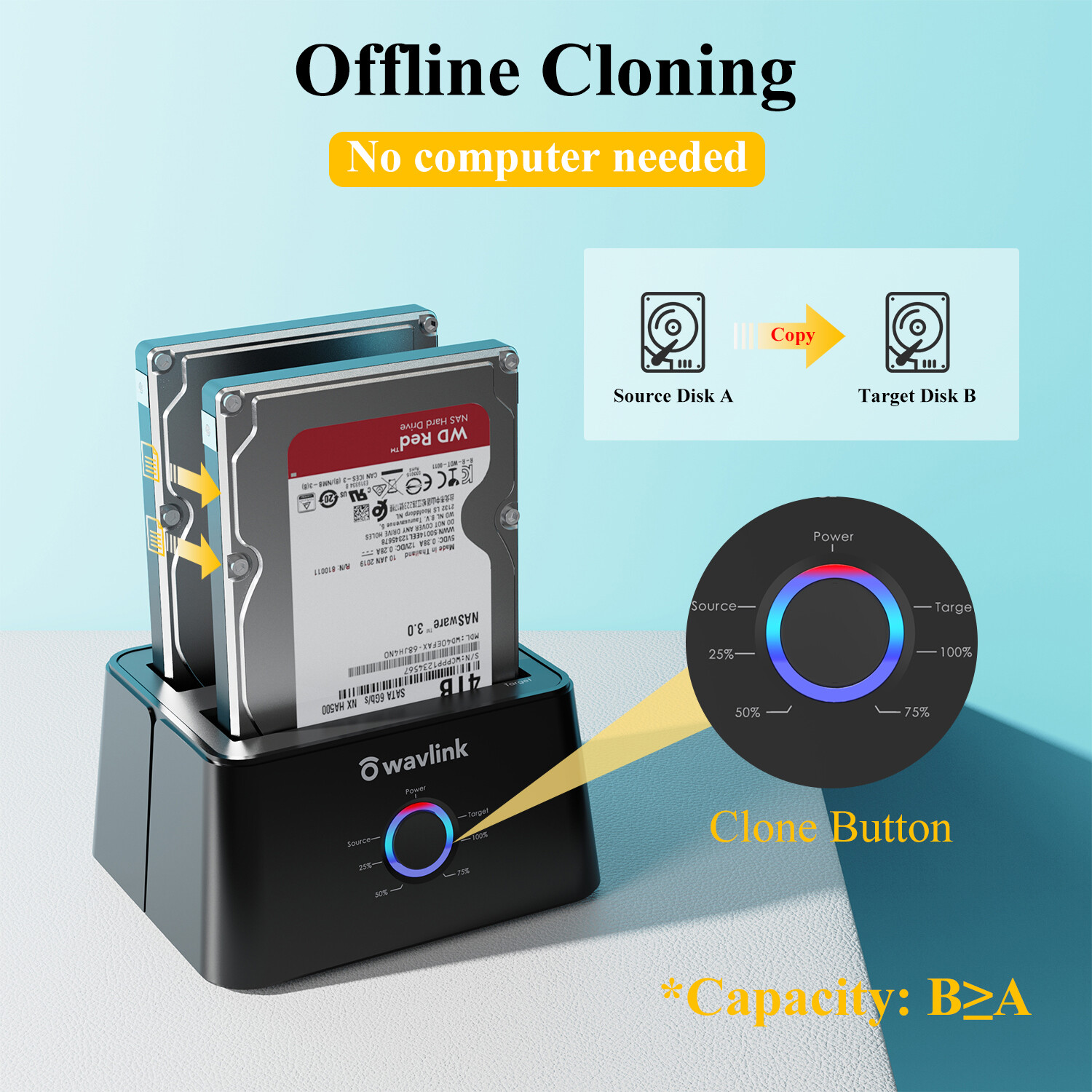
USB 3.0 to SATA Dual-Bay External Hard Drive Docking Station 2.5/3.5" SSD HDDAbout this item - 【Offline Clone Function】 - Wavlink hard drive docking station supports offline clone function, it can be used to clone an existing hard drive without connecting to a computer, easy to duplicate data from one to another hard drive by pressing the CLONE button for about 3 seconds. Please note the target disk must be larger than the source disk.Note: m1 mac is not supported
- 【Dual Bay Connections 】 - This dock offers an easy access with two 2.5/3.5 inches HDD SSD SATA I/II/III drives, which is a perfect solution for backup & processing IT data, batch processing data, data recovery, formatting and file transferring. The dust-proof design of the cover gives you a unique experience.
- 【Extensive Capacity】-This dock enables access to 2 drives simultaneously(Up to 2×16TB). LED indicator light shows power and activity status. Support plug and play & hot swap. On/Off power switch for hard drives protection. Compatible with Windows, Mac OS, Linux and Android. {Note: Your phone should support OTG function then you can easily read the hard disk data.}
- 【UASP Accelerated】-Super speed USB 3.0 data file transfers (up to 5 Gbps/420MB/s) from your computer to back-up files and centralize storage for convenient access. Up to 70% faster at read speed and 40% faster at write speed over traditional USB 3.0, downward compatible with USB 2.0/1.1.
- 【We Care For You】- This adapter features a light weight, perfect for the occasion of home office, watching movies, entertainment etc.What you will get: 1 x USB 3.0 Dual Bay Docking Station, 1 x USB-B to USB-A Cable, 1x Power Adapter 12V/3A, 1 x USB-A to USB-C Adapter, 1 x Quick Start Guide. 1-Year worry-free warranty (extra 6 months for registered members) and life-long friendly customer service and technical support.Next page
Previous page
Next pageOffline CloningPS4/PS5HD TVLaptopOne-click cloning instructions & notes How to Operate Offline Clone Function: - Please unplug the DC power adapter to make sure that the power is off before starting. Insert Source Disk into hard drive bay A, then insert Target Disk into hard drive bay B.
- Make sure the USB cable is disconnected from computer. Connect the power adapter and turn the"ON-OFF" switch on.
- Hold the CLONE button for about 3 seconds, when all leds turn on, the clone progress will start.
- Four lights (25%, 50%, 75%, 100% ) will turn solid blue when the cloning process is completed.
- Finally turn the "ON-OFF" switch off, disconnect the power adapter and eject your drives
Tips for Offline Clone: - The capacity of target disk must be larger than the source disk.Please confirm that your source drive and target drive can both work properly.Please connect the 12V power adapter to ensure a stable power supply for transmission.
- To avoid data transfer errors, overheating and damage to the device, please make sure that there are no faulty driver cells.To avoid data loss, do not remove or insert drives when one drive is working in the docking station. Please power off the dock before removing.
- Please confirm the target drive have no data. If you have existing data on the target drive, the cloning process will eliminate your target drive's data. Because the target drive will be cloned to be the same as the source drive, partition, format and data are the same too.
Dual Bay Docking With High Compatibility Tool-free installation for all 2.5"/3.5" SATA II/III HDD SSD Compatible with Windows, Mac OS, Linux and Android. {Note: Your phone should support OTG function then you can easily read the hard disk data.} Incredible Data Transfer Super speed USB 3.0 data file transfers (up to 5 Gbps/420MB/s) from your computer to back-up files and centralize storage for convenient access. Up to 70% faster at read speed and 40% faster at write speed over traditional USB 3.0, downward compatible with USB 2.0/1.1. Previous page - 1. If you are not satisfied when you receive your item, please return it within 30 days for a replacement or money back.
Please contact me before you return it.2. For all return products customers MUST contact us for the returning address. 3. All returned items MUST BE in the original packaging and you MUST PROVIDE us with the shipping tracking number,
specific reason for the return, and your ID. 4. If you need return, please check twice to confirm the item not work and contact our customer service representative,
let us know the detailed problem and send us some pictures for confirmation. Then get a unique address for return. About us1.Welcome to Wavlink, we are the leading Design product manufacturer that provides Display solutions,
TV and capture solutions, Wireless and networking solutions, High end PC accessories products. 2.We always pride ourselves on providing the outstanding service and high quality products, make our customer feel confident buying online. 3.By shopping with us, you can get the latest technology for the best price. Contact us1.Please contact us via message if you have any problem. 2.ALL replies will be sent to your email , if you don't get response within 1 business days,
please check your spam box or E-mail us again to avoid any delay!

|
|