When you click on links to various merchants on this site and make a purchase, this can result in this site earning a commission. Affiliate programs and affiliations include, but are not limited to, the eBay Partner Network. When you click on links to various merchants on this site and make a purchase, this can result in this site earning a commission. Affiliate programs and affiliations include, but are not limited to, the eBay Partner Network.
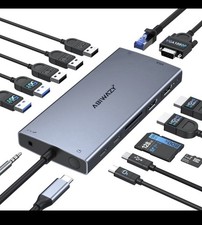
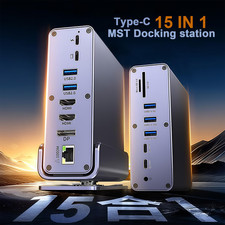
Why Buy This Dock? Triple 4K Monitors:Run three 4K@60Hz displays (HDMI + DP) for multitasking, video editing, or trading. 15-in-1 Mega Hub:3x HDMI/DP, 2x USB-C 10Gbps, 3x USB-A 5Gbps, Ethernet, SD/TF slots, and audio jack. Pro-Level Speed:Transfer files at 10Gbps (USB-C) or 5Gbps (USB-A), perfect for large video/design files. Mac & Windows Ready:Works flawlessly with M1/M2/M3 MacBooks, Dell XPS, HP Spectre, and more. Stable Power & Cooling:40W adapter ensures stable operation without draining your laptop style="font-size: 16.002px; line-height: var(--ds-md-line-height); color: #404040; font-family: DeepSeek-CJK-patch, Inter, system-ui, -apple-system, BlinkMacSystemFont, 'Segoe UI', Roboto, 'Noto Sans', Ubuntu, Cantarell, 'Helvetica Neue', Oxygen, 'Open Sans', sans-serif; white-space: normal; padding-left: 160px;"> Perfect for These Users Remote Workers:Boost productivity with triple screens for spreadsheets, emails, and video calls. IT Teams:Manage multiple devices with Ethernet stability and driver-based style="font-size: 16.002px; line-height: var(--ds-md-line-height); color: #404040; font-family: DeepSeek-CJK-patch, Inter, system-ui, -apple-system, BlinkMacSystemFont, 'Segoe UI', Roboto, 'Noto Sans', Ubuntu, Cantarell, 'Helvetica Neue', Oxygen, 'Open Sans', sans-serif; white-space: normal; padding-left: 160px;">
What’s Included 1× WAVLINK 15-in-1 USB-C Dock 1× 40W Power Adapter 1× USB-C to C Cable (39.4in) 1× Screwdriver & Cable Holder 1× Quick Start style="font-size: 16.002px; line-height: var(--ds-md-line-height); color: #404040; font-family: DeepSeek-CJK-patch, Inter, system-ui, -apple-system, BlinkMacSystemFont, 'Segoe UI', Roboto, 'Noto Sans', Ubuntu, Cantarell, 'Helvetica Neue', Oxygen, 'Open Sans', sans-serif; white-space: normal; padding-left: 200px;">⚠️ Key Notes Driver Required:Download DisplayLink drivers for Windows/Mac (not plug-and-play). No Laptop Charging:This dock powers peripherals only—keep your laptop charger handy. Check Compatibility:Ensure your USB-C port supports video output (see full list in style="padding-left: 200px;"> How to download and install the latest DisplayLink driver?
1. Access the URL: displaylink.com;
2. Find the corresponding driver of your system;
3. Download and install the driver;
4. Start use after easy setting. Multiple Display Resolution(Max. Resolution)
①Single Display:
Under DP1.2 Source: HDMI(Alt. Mode): 3840x2160@30Hz ; Display1/2(HDMI/DP): 3840x2160@60Hz;
Under DP1.4 Source: HDMI(Alt. Mode): 3840x2160@60Hz ; Display1/2(HDMI/DP): 3840x2160@60Hz. ②Dual Display:
a. HDMI(Alt. Mode)+ Display1/2(HDMI/DP):
Under DP1.2 Source: 3840x2160@30Hz+ 3840x2160@60Hz;
Under DP1.4 Source: 3840x2160@60Hz +3840x2160@60Hz. b. DP1.2/1.4 Source: 3840x2160@60Hz+ 3840x2160@60Hz ③Triple Display:
HDMI(Alt. Mode) + Display1(HDMI/DP) + Display2(HDMI/DP):
Under DP1.2 Source: 3840x2160@30Hz+ DP1.4 Source: 3840x2160@60Hz+ 3840x2160@60Hz+3840x2160@60Hz. Compatible Systems
-Windows 11/10/8.1/8/7/XP/Vista
-Mac OS 10.14-14.x and latest
-Android 5.0 or later with USB OTG cable
-Ubuntu 20.04, 22.04, 23.04, 24.04
-Chrome OS and Harmony OS Specification
1.Model: WL-UG69DK13
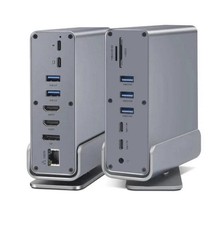
2.Ports: Front Panel: 1x TF Card Slot, 1x SD Card Slot, 2 x USB-C 10Gbps, 1 x USB-A 5Gbps, 1 x 4-Pole Phone Jack;
Rear Panel: 1x RJ45(10/100/1000Mbps), 1 x Display 1(HDMI/DP), 1 x Display 2(HDMI/DP),
1 x 4K HMDI(Alt. Mode), 2 x USB-A 5Gbps, 1x USB-C (Host), 1x DC IN (20V/2A, 40W).
3.Unit Size: 12.2x6.6x18.5cm/4.8x2.6x7.3in (WxDxH)
4.USB-C to C Cable Length: 100cm/39.4in
5.Unit Weight: 570g/20.1oz
6.Housing Material: ABS Plastic
7.Power LED: Blue Warm Tips
1. Do not support Linux, Unix, iOS and iPad OS.
2. Does not support plug and play; driver installation is required. Please visit the website 'displaylink.com' to download the latest driver.
3. Please confirm that the type-c port of your laptop supports video output, or the docking station's HDMI (Alt. Mode) port may not work.
4. Android devices support mirror mode ONLY with the resolution up to 1080P.
5. Windows/Mac OS(12.x or above)-based devices support rotation and clamshell modes.
6. The DP and HDMI in the same video stream(Display 1/2) CANNOT be used simultaneously.
7. Does not support playback of HDCP copyright protected content from Blu-ray/Netflix/Prime/iTunes/Hulu, and other platforms.
8. The DISPLAY 1/2 ports are suitable for office work, handling spreadsheets, documents or browsing the web.
Not suitable for gaming or other high-intensity tasks.
9. For Mac users, it is necessary to grant permission to the DisplayLink Manager to record your screen. Host Devices Compatibility List(Partial):
*Note:Supports almost all common computers, most notably M1/M2/M3-based MacBook.
If your device is not on the list, please let us know and we will be glad to help you check with it. Apple: Mac Studio 2022, iMac(2017, 2019, 2020), MacBook Pro 16-inch (2019, 2021),MacBook Air 13-inch (2018, 2019, 2020),
MacBook Pro 13-inch (2016, 2017, 2018, 2019, 2020),MacBook Pro 14-inch 2021, MacBook Pro 15-inch (2016, 2017, 2018, 2019); Dell: XPS 13 7390 2-in-1 (Ice Lake), XPS 12 9250, XPS 13 9350, XPS 13 9360, XPS 13 9370, XPS 13 9380,
XPS 15 9550 (Intel + Nvidia GPU), XPS 15 9550 (Intel GPU), XPS 15 9560 (Intel + Nvidia GPU), XPS 15 9570,
XPS 17 9700,XPS 12 XPS9250,Dell LATITUDE 7480, Alienware 13 R3, Alienware 15 R3, Alienware 17 R4,
Dell Precision 15 M7510, Dell Precision 17 M7710, Dell XPS 13 9365, Dell Precision 15 5000 Series (5510),
Dell Precision 15 3000 Series (3510), Dell Latitude 7370 (3C7XP), Dell Latitude 12 7275, Alienware 17 R3,
Dell Precision M5510 15.6"; HP: EliteBook Folio G1 (Model V1C43EA), Spectre x360 Convertible 13-w000 (SKU W9A95AV), Spectre x360 - 13-ac003la,
Spectre x360 - 15-ch000, Elite X2 1012 G1, HP Spectre x360 - 13-ae011dx (Late 2017),Elite x2 1012 G2,HP Spectre x360 (2017),
HP EliteBook Folio G1 12.5", HP ZBook 15 G3, HP Zbook 17 G3 Workstation, HP ZBook Studio Series, HP Elite X2 1012 G1,
HP Spectre x360 2-in-1 13-W023DX 13.3"; Intel: NUC8i7HVK (Hades Canyon), NUC8i7HNK (Hades Canyon), NUC9VXQNX (Ghost Canyon), Intel NUC9V7QNX (Ghost Canyon),
Intel NUC9i9QNX (Ghost Canyon), Intel NUC9i7QNX (Ghost Canyon), Intel NUC9i5QNX (Ghost Canyon); Lenovo: Thinkpad P50, Thinkpad P51, Thinkpad P70, Lenovo Yoga C930, Lenovo X1 Carbon 7th Gen, ThinkPad P70 Series
Mobile Workstation, Lenovo Legion Y720, Lenovo ThinkPad T570, Lenovo Miix 720, Lenovo ThinkPad X1 Carbon (5th Gen 2017),
Lenovo ThinkPad X1 Yoga (2nd Gen 2017), Lenovo ThinkPad P50; Others: MSI VR Ready GS43VR Phantom Pro-006; ASUS ZenBook Pro UX501VW and more.

|
|