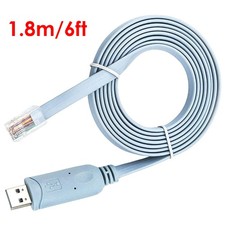
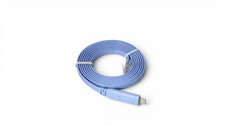
6ft USB Console Cable for Cisco, USB-A to RJ45 8P8C Rollover, FTDI FT232, Blue
The CableLeader U2120-XXXX is a USB to RJ45 serial console cable for configuring network equipment from a laptop. Despite the RJ45 connector, this is not a network cable: the RJ45 end is a mechanical form factor that Cisco adopted for console ports, and the signal travelling through it is RS-232 serial, not Ethernet. Plugging it into a switch port does nothing useful.
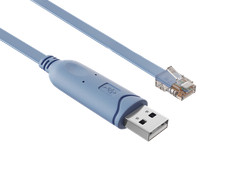
The USB Type-A end carries gold-plated contacts and a 54.5 mm body containing the conversion PCB. On that PCB is an FTDI FT232, a USB to UART bridge that presents the cable to the host as a standard serial port. Chipset choice is the question network engineers ask first, because FTDI drivers are included in Windows 10 and later and in current macOS and Linux kernels, while counterfeit Prolific parts are blocked by the vendor driver and report a Code 10 error.
The RJ45 8P8C end also uses gold-plated contacts in a transparent PC body, wired to the rollover pinout that console ports expect: pin 1 CTS, pin 2 DSR, pin 3 RXD, pins 4 and 5 ground, pin 6 TXD, pin 7 DTR, pin 8 RTS. That pinout has been the de facto standard since Cisco established it, and other vendors adopted the same arrangement, so one cable covers a mixed equipment rack.
Between the two chips sits the piece most product pages omit. The FT232 speaks TTL logic levels, while a console port expects RS-232 at plus and minus five to fifteen volts, so a ZT213 transceiver on the same PCB translates between them. Without that level shifter the link either fails or produces garbled characters. Conductors are 28 AWG x 8C bare copper inside a 94V-1 rated 45P PVC jacket, and all materials comply with the RoHS directive.
Every assembly is tested rather than sampled. Each cable passes a 100 percent open, short and continuity check, with conduction impedance held under 3 ohms and insulation resistance above 2 megohms at 300V, followed by a 100 percent functional test.
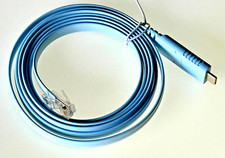
The blue jacket follows the familiar console-cable convention, making the management connection easy to identify in a crowded network rack.
Compatibility & Ordering Information — U2120-XXXX connects any host with a USB Type-A port, running Windows, macOS or Linux, to any device exposing an RJ45 serial console port, including switches, routers, firewalls, wireless controllers, managed PDUs and UPS units. Terminal settings are the standard 9600 baud, 8 data bits, no parity, 1 stop bit, no flow control. The family ships in 6ft, in blue and green. For laptops with only USB-C ports, see the USB-C console cable family, which uses the same rollover pinout and FTDI chipset.
Product Comparison: USB-A vs USB-C Serial Console Cable
Both cables do the same job at the device end: an RJ45 8P8C plug wired to the rollover pinout, driven by an FTDI chipset with a ZT213 RS-232 level shifter. The only real decision is which port your laptop has. The table shows the differences:
Attribute USB-A Console Cable (this product) USB-C Console Cable Host Connector USB Type-A male, gold-plated contacts USB Type-C male, gold-plated terminals, nickel-plated shell Device Connector RJ45 8P8C male, rollover pinout RJ45 8P8C male, rollover pinout — identical Chipset FTDI FT232 plus ZT213 level shifter FTDI FT232RL plus ZT213 level shifter Available Lengths 6 ft 6 ft and 10 ft Colors Blue, Green Blue Terminal Settings 9600 8N1, no flow control 9600 8N1, no flow control — identical Choose It When The laptop or field cart has full-size USB ports The laptop is USB-C only and you want no dongle
Rule of thumb: the device end and the terminal settings are the same either way, so pick by the host port and keep the toolkit simple. Teams running a mix of older and newer laptops often carry one of each rather than a USB-C to USB-A adapter, which adds a failure point in the middle of a console session.
FAQ
What is the difference between an FTDI and a Prolific console cable?
FTDI is the safer choice because its driver is built into Windows 10 and later and into current macOS and Linux kernels, so the cable enumerates without a manual install. Prolific PL2303 parts are heavily counterfeited, and the official Prolific driver detects clones and reports a Windows Code 10 error, leaving the cable dead on modern systems. This cable uses an FTDI FT232.
Which devices and operating systems does this console cable work with?
It works with any device exposing an RJ45 serial console port, including switches, routers, firewalls, wireless controllers, managed PDUs and UPS units, since the rollover pinout Cisco established is used across vendors. On the host side it runs on Windows, macOS and Linux; modern builds already include the FTDI driver, and older systems can install it from the chip vendor.
What serial settings and pinout does this cable use?
Use 9600 baud, 8 data bits, no parity, 1 stop bit, no flow control, the standard console setting. The RJ45 end follows the rollover pinout: pin 1 CTS, pin 2 DSR, pin 3 RXD, pins 4 and 5 ground, pin 6 TXD, pin 7 DTR, pin 8 RTS. Console ports operate as DTE and generally do not use hardware flow control.
How do I connect and use a USB console cable?
Plug the RJ45 end into the device console port and the USB end into the laptop, then open a terminal program such as PuTTY, screen or Tera Term and select the COM or tty port that appears. On Windows check Device Manager under Ports for the assigned COM number; on macOS and Linux look for a tty entry. Set 9600 8N1 and press enter to reach the prompt.
Should I buy the USB-A or the USB-C console cable?
Match it to the laptop. Choose this USB-A version when the machine has full-size USB ports, which is still the case for most business laptops and field carts. Choose the USB-C version for a USB-C-only laptop, since that removes a dongle from the toolkit. Both carry the same FTDI chipset and the same rollover pinout, so the device end and terminal settings are identical.