When you click on links to various merchants on this site and make a purchase, this can result in this site earning a commission. Affiliate programs and affiliations include, but are not limited to, the eBay Partner Network. When you click on links to various merchants on this site and make a purchase, this can result in this site earning a commission. Affiliate programs and affiliations include, but are not limited to, the eBay Partner Network.
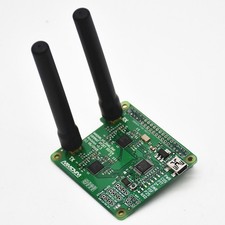
AURSINC Upgraded MMDVM Hotspot Spot Radio Station WiFi Digital Voice Modem Work Contained with Raspberry Pi Zero 2W, Supports C4FM YSF POCSAG NXDN DSTAR P25 DMR, Pi-Star/WPSD, V1.5.2FREE AND FAST SHIPPING! About this item - [Upgrade] The AURSINC MMDVM radio station features the Raspberry Pi Zero 2W, delivering faster processing, more reliable WiFi connectivity and improved overall stability. It supports 64-bit operating systems, and adds lightweight edge AI capability for expanded DIY use cases
- [EASY SET UP] Preload sofeware Pi-Star on TF card, no need to download again. Radio Frequency: (UHF:430-440) This is upgraded version, do not need to set RXOFFSET and TXOFFSET, they're default 0. Note: when you flash the TF card with new version software, please DO NOT copy on the TF card directly, use a write in tool to write the software on TF card
- [EASY CHARGING] Free micro USB charging cable included, charged with power bank or connect to laptop or computer. The Hotspot will also work mobile in your vehicle if you tether it to your mobile phone network
- [FIRMWARE V1.5.2] The MMDVM hotspot board supports updating to V1.6.1 (How to Update MMDVM_HS for WPSD 1.6.1: jumbo5566 .github.io). To speed up the operation, it is recommended to switch to an optimized system:https:// w0chp.radio/ wpsd/
- [SUPPORT] C4FM YSF NXDN DSTAR P25 DMR and default work with UHF. Not compatible with Baofeng UV-5R, Baofeng RD-5R, 5X, 5R+, 5R Plus, etc UV series, BF series. Our test is in DMR mode, if you want to change the working mode, you need to configure it as needed Working mode parameters
- [WIFI SSID] Need the 2.4GHz SSID as Pi Zero 2W doesn't support 5.8GHz. Ensure WiFi Password Type is WPA, not WEP. Power on hotspot for 2 minutes to auto-connect or follow instructions to connect the Hotspot to your router. After power on 2 minutes, go to pi-star /admin/ configure.php
- [Note] Please refer to this website to test whether your device can receive or transmit signals: m7spi .co .uk/mmdvmcal/. If you encounter that the device cannot connect to network after setup, please kindly contact us. We will help resolve this issue
Product We offer a 30-Day Return Policy on items which you are not completely satisfied with. You have the option for a full-refund or an exchange of the item. No returns are available on items shipped outside of the US. Shipping We offer Free Shipping to the US and ship within 2business days of payment, usually sooner. We use UPS express shipping. That's why your products are usually delivered within 3 days. Contact We try our very best to make sure every customer is completely satisfied. If there's a problem, message us! We're happy to help you. 24/7 live chat available.  |
|