WAVLINK Wi-Fi 6E AX5400 PCIe Tri-band WiFi Adapter--Soaring to New Height!compatible with amd
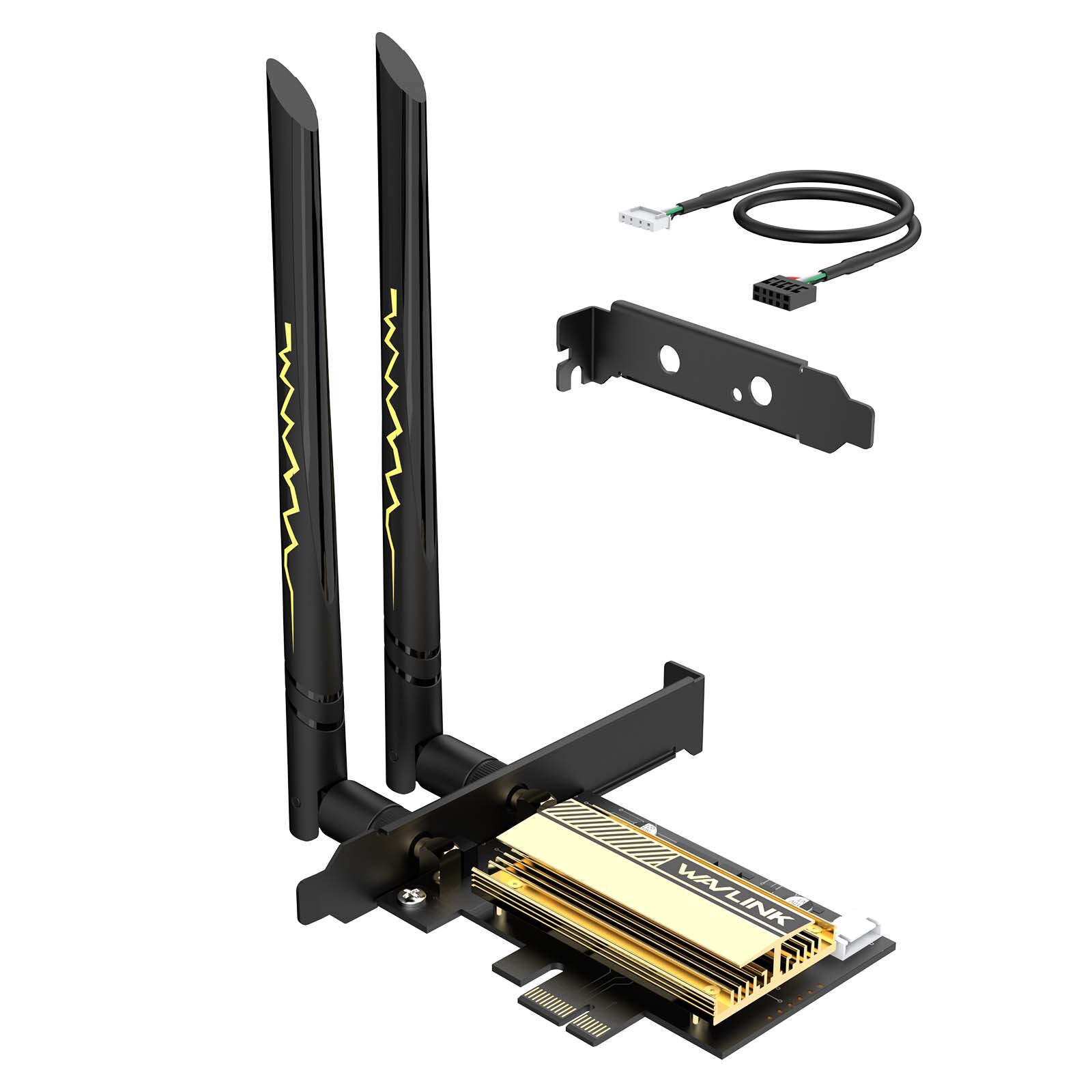
The WAVLINK Tri-Band PCI-E card is an AX5400 wireless adapter designed for desktops, offering the latest Bluetooth 5.3 support. This wireless adapter provides a stable signal, high-speed rates, and superior performance for your desktop system. It complies with the 802.11ax specification, allowing it to support the 2.4GHz, 5GHz, and 6GHz bands. Equipped with 1024-QAM and MU-MIMO technology, the WN675X3-C delivers wireless signals faster and more effectively when used in conjunction with an MU-MIMO compatible router. Experience enhanced connectivity and optimized wireless performance with this advanced wireless adapter.
Latest Bluetooth 5.3
Solve the problem of a poor signal by achieving 2x quicker speeds and 4x greater coverage than BT4.2. Coordinate your game controllers, headphones, and keyboards with the latest Bluetooth standard.
Compatible OS
Support Windows 10/11 64-bit, Linux
*Please note that to utilize 6GHz band, the user must be on Windows 11 version.
WPA3 Security
The latest WiFi security protocol, WPA3, brings new capabilities to improve cyber security. More secure encryption in WiFi password safety and enhanced protection against brute-force attacks combine to safeguard your home network.
Robust Connection with Dual High-Gain Antennas
Two 5dBi high-performance antennas extend your existing WiFi reception capabilities by allowing you to stream throughout your home.
Advanced Heat Sink for Better Stability
The networking card is equipped with an advanced heat sink that effectively dissipates the heat generated by the adapter. This feature not only enhances performance and stability but also contributes to extending the lifespan of the adapter.
Dual Brackets
In addition to the standard bracket, a low-profile bracket is also provided for mini tower computer cases.
Important Note
We put plastic film on its PCI-e interface for protection before the product is shipped. Please remove it before connecting to the PC's PCI-e slot.
Specification
Product Model: WN675X3-C(chipset: Intel AX210)
Transmission Rate: 2.4GHz: 574Mbps, 5GHz: 2400Mbps, 6GHz: 2400Mbps
Protocol Standard: support IEEE 802.11a/b/g/n/ac/ax
Frequency Band: 2.4GHz, 5GHz, 6GHz
Technical Support: MU-MIMO,OFDMA, BSS Coloring, 1024QAM, Target Wake Time(TWT)
Support System: Win 11/10 (64 bit), Linux
Bluetooth Version: Bluetooth 5.3
Interface: Compatible with PCI-E X1/X4/X8/X16
Wireless Security: WPA2/WPA3, WPA2-PSK encryption
Package Contents
-1x WiFi 6E AX5400 PCIe Adapter
-1x Bluetooth Cable
-2x External Antenna
-1x Low Profile Bracket
-3x Screws
-1x Drivers Download Card
-1x User Manual
Warm Tips
1. For desktops only. A bluetooth power cable needs to be connected to the motherboard 9-pin interface, or the bluetooth function won't work.
2. Recommended to use a wifi6 or wifi6e compatible router for faster wireless speed and better network performance of our PCIE wifi adapter.
3. This Wi-Fi card will not boost the speed of the original router, which only helps your computer to receive a better signal and speed of the router(Increase the maximum wireless bandwidth limit).
4. It has nothing to do with the quality of this adapter when you can't get the maximum speed. The network environment, router, barriers, laptop and PC 's internal memory…the interference of many factors can affect the speed.
5. Please turn off the built-in Wi-Fi when using on a desktop pc.( If there is a built-in Wi-Fi function on your desktop pc).
6. Please note that to utilize 6GHz band, the PC must be on Windows 11 version.
7. Please remove the plastic film on gold-plated fingers before connecting to the PC's PCI-e slot.
WAVLINK Wi-Fi 7 BE8800 PCIe Tri-band WiFi Adapter--Innovative Wireless Connectivity!
Incompatible with amd
WAVLINK Wi-Fi 7 Tri-Band PCI-E is a BE8800 wireless adapter for desktops that supports the latest Bluetooth 5.4. It has the MLO feature that effectively reduces signal interference and transmission delays, providing a faster and more reliable wireless networking experience. Compliant with 802.11 be specification,the wireless adapter supports 2.4G, 5G and 6G bands. With 4096-QAM and MU-MIMO technology, WN685BE3-B delivers wireless signal faster and more effective by cooperating with an MU-MIMO compatible router.
Latest Bluetooth 5.4
Solve the problem of a poor signal by achieving 2x quicker speeds and 4x greater coverage than BT4.0. Coordinate your game controllers, headphones, and keyboards with the latest Bluetooth standard.
Compatible OS
Support Windows 10/11 64-bit
*Please note that to utilize 6GHz band, the user must be on Windows 11 version.
WPA3 Security
The latest WiFi security protocol, WPA3, brings new capabilities to improve cyber security. More secure encryption in WiFi password safety and enhanced protection against brute-force attacks combine to safeguard your home network.
Robust Connection with Dual High-Gain Antennas
Two 5dBi high-performance antennas extend your existing WiFi reception capabilities by allowing you to stream throughout your home.
Advanced Heat Sink for Better Stability
The networking card is equipped with an advanced heat sink that effectively dissipates the heat generated by the adapter. This feature not only enhances performance and stability but also contributes to extending the lifespan of the adapter.
Dual Brackets
In addition to the standard bracket, a low-profile bracket is also provided for mini tower computer cases.
Important Note
We put plastic film on its PCI-e interface for protection before the product is shipped. Please remove it before connecting to the PC's PCI-e slot.
Steps to Install the Wi-Fi Card
1. Power off the PC, open the case, find one available PCIe slot.
2. Insert the PCIe into the corresponding slot. Works with PCIe x1, x4, x8, x16.
3. Plug the BT cable into the 9-pin USB connector on the motherboard and the 4-pin connector on the card.
4. Install the antennas, adjust the angle accordingly for better signal.
5. Download and install the driver from WAVLINK official website. Then, enjoy!
Specification
Product Model: WN685BE3-B(chipset: Intel BE200)
Transmission Rate: 2.4GHz: 574Mbps, 5GHz: 2400Mbps, 6GHz: 5800Mbps
Protocol Standard: support IEEE 802.11a/b/g/n/ac/ax/be
Frequency Band: 2.4GHz, 5GHz, 6GHz
Technical Support: MU-MIMO,OFDMA, BSS Coloring, 320MHz, 4096QAM, Target Wake Time(TWT), Multi Link Operation(MLO), Multi-RU, Enhanced Multi-Link Single Radio(eMLSR)
Support System: Win 11/10 (64 bit)
Bluetooth Version: Bluetooth 5.4
Interface: Compatible with PCI-E X1/X4/X8/X16
Wireless Security: WPA3/WPA2 encryption
Package Contents
-1x WiFi 7 BE8800 PCIe Adapter
-1x Bluetooth Cable
-2x External Antenna
-1x Low Profile Bracket
-3x Screws
-1x Drivers Download Card
-1x User Manual
Warm Tips
1. For desktops only. A bluetooth power cable needs to be connected to the motherboard 9-pin interface, or the bluetooth function won't work.
2. This Wi-Fi card will not boost the speed of the original router, which only helps your computer to receive a better signal and speed of the router(Increase the maximum wireless bandwidth limit).
3. It has nothing to do with the quality of this adapter when you can't get the maximum speed. The network environment, router, barriers, laptop and PC 's internal memory…the interference of many factors can affect the speed.
4. Please turn off the built-in Wi-Fi when using on a desktop pc.( If there is a built-in Wi-Fi function on your desktop pc).
5. Please note that to utilize 6GHz band, the PC must be on Windows 11 version.
6. Please remove the plastic film on gold-plated fingers before connecting to the PC's PCI-e slot.
Model675X3-C685BE3-BWi-Fi GenerationWi-Fi 6EWi-Fi 7ChipsetIntel Wi-Fi 6E AX210Intel Wi-Fi 7 BE200Wireless 2402Mbps6GHz 5800Mbps5Ghz 2402Mbps5GHz 2400Mbps2.4Ghz 573Mbps2.4GHz 574MbpsBandwidth20MHz & 40MHz & 80MHz & 160MHz20MHz & 40MHz & 80MHz & 160MHz & 320MHzBluetoothBluetooth 5.3Bluetooth 5.4TX/RX Streams2x22x2QAM1024 QAM4K QAMMU-MIMOYesYesOFDMAYesYesIntel vPro TechnologyYesYesSecurity MethodsWPA2/WPA3, WPA2-PSKWPA4/'WPA2/WPA3, WPA2-PSKCompatibilitywin 10/11win 10/11External x Wireless-AX210 Adapter
1 x Bluetooth Cable
2 x External Antena
1 x Baffle
1 x Quick Installation
Several Screws1x Wireless-be200 Adapter
1 x Bluetooth Cable
1 x External Antena
1 x Baffle
1 x Quick Installation
Several ScrewsUsed ForDesktopDesktop