UBB Store

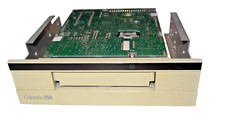
Colorado Jumbo 350 Internal FDC Advanced QIC-3020 5.25 Tape Backup 34-pin floppy
When you click on links to various merchants on this site and make a purchase, this can result in this site earning a commission. Affiliate programs and affiliations include, but are not limited to, the eBay Partner Network.
Colorado Jumbo 350 Internal FDC Advanced QIC-3020 5.25 Tape Backup 34-pin floppy
Price: US $29.99
Here are the full technical specifications and compatibility details for the Colorado Jumbo 350MB Internal Tape Backup Drive, developed by Colorado Memory Systems (later acquired by HP):
🧠 Product Overview: Colorado Jumbo 350
  • Manufacturer: Colorado Memory Systems (later acquired by Hewlett-Packard)

  • Model Name: Jumbo 350

  • Type: Internal Tape Backup Drive

  • Storage Capacity: 350MB (uncompressed, QIC-3020 standard)

  • Media Type: DC-2120XL/QIC-3020 minicartridge tapes

  • Interface: Floppy Disk Controller (FDC) – connects via 34-pin floppy ribbon cable

  • Drive Bay Requirement: 5.25″ half-height internal bay

  • Power Connector: Standard Molex 4-pin

  • Transfer Rate: Approx. 1MB/min (uncompressed)

  • Data Compression: None natively, though some backup software supported software compression

  • Operating System Compatibility:

    • MS-DOS

    • Windows 3.x

    • Windows 95/98/ME

    • Windows NT 3.51/4.0

    • Some Linux distributions with ftape/QIC drivers (legacy kernel support)

  • Software Required: Colorado Backup for DOS/Windows (or third-party software supporting QIC-3020 drives)

🧩 Features & Notes
  • Advanced QIC-3020 format, allowing 350MB per cartridge—an upgrade from the QIC-80 and QIC-40 series (120MB/250MB models).

  • FDC interface made it highly compatible with systems of the era (1988–1999).

  • Can typically coexist with floppy drives if controller supports daisy-chaining.

  • Known for reliable build and low failure rate due to few moving parts.

  • Supported by backup software like:

    • Norton Backup

    • Colorado Backup

    • Seagate Backup Exec (early versions)

    • Arcserve (legacy builds)

🖥️ Compatible PC Systems

The Jumbo 350 can be installed in any system meeting the following conditions:

✅ System Requirements:
  • Free 5.25″ internal bay

  • Standard ISA/PCI motherboard with an integrated or add-on floppy disk controller

  • BIOS support for legacy tape/floppy interface (standard in 386/486/Pentium-class PCs)

  • Available Molex power connector

✅ Example Compatible Systems:
  • Compaq Deskpro 486/586/ProLinea series

  • IBM Aptiva, PS/1, PS/2 towers

  • Gateway 2000 486/Pentium-class PCs

  • Dell Dimension P90 – PII era systems

  • HP Vectra VL/ES/XP series

  • Packard Bell multimedia towers with internal FDC

🔧 Installation & Operation
  1. Mount in an open 5.25″ drive bay.

  2. Connect to floppy controller via 34-pin cable (may share with floppy drive).

  3. Connect to Molex power.

  4. Use backup software to initialize and operate the tape mechanism.

  5. Insert DC-2120XL/QIC-3020 cartridge to begin backups.


Buy Now