Graphical head/sector diagnostics with per-headread speed/seek tests, translator/GList tools, adjustable adapter voltage andauto architecture detection; Windows XP/7/8/10; compatible with Seagate SATAHDDs and select Maxtor units produced by Seagate.
The included adapter automatically detectsdifferent Seagate drive architectures and can adjust its output voltage tomatch the target, helping establish a reliable terminal link on a wide range ofboards. Supported host operating systems for the software are Windows XP(suggested), Windows 7, Windows 8, and Windows 10.
Limitations: certain newer Seagate SATAmodels that enforce locked firmware or restrict terminal access may not befully supported; on such drives some functions can be limited or unavailable.
Compatibility (examples)
Diagnostics for Seagate is compatible with Seagate SATA hard drives, and withselect Maxtor DiamondMax units produced by Seagate. DfS can solve the BSY(busy) issue on the following models, among others.
Barracuda 7200.11:
ST31000333AS, ST31000340AS, ST31000528AS, ST31000640AS,
ST31500341AS, ST3160813AS, ST3320613AS, ST3320813AS,
ST3500320AS, ST3500620AS, ST3500820AS, ST3640323AS,
ST3640330AS, ST3640530AS, ST3640623AS, ST3640630AS,
ST3750330AS, ST3750630AS
Barracuda 7200.12:
ST31000528AS, ST3250318AS, ST3160318AS, ST3320418AS,
ST3500410AS, ST3500418AS, ST3750528AS
Barracuda ES.2:
ST31000340NS, ST3750330NS, ST3500320NS, ST3250310NS
DiamondMax 22 (Maxtor produced by Seagate):
STM31000334AS, STM31000340AS, STM31000640AS, STM3160813AS,
STM3320614AS, STM3500320AS, STM3500620AS, STM3500820AS,
STM3640323AS, STM3750330AS, STM3750630AS
DiamondMax 23 (Maxtor produced by Seagate):
STM3160318AS, STM3250318AS, STM3320418AS, STM3500418AS,
STM3750528AS, STM31000528AS
Firmware/diagnostic functions included:
Check heads condition
Check bad/reallocated sectors per head
Record and view bootup Seagate terminalmessages
Fix 7200.11 Busy (BSY) bug
Correct zero-capacity (0 LBA) error
Get drive/firmware/temperature information
Test read speed per head
Test seek time
Test specific sector accessibility
Erase specific sector
Clear SMART buffers
Stop background reallocation and backgroundprocesses
Set Con Gen settings/buffers defaults
Clear GList
Clear Slip List
Move GList entries to PList
Regenerate translator
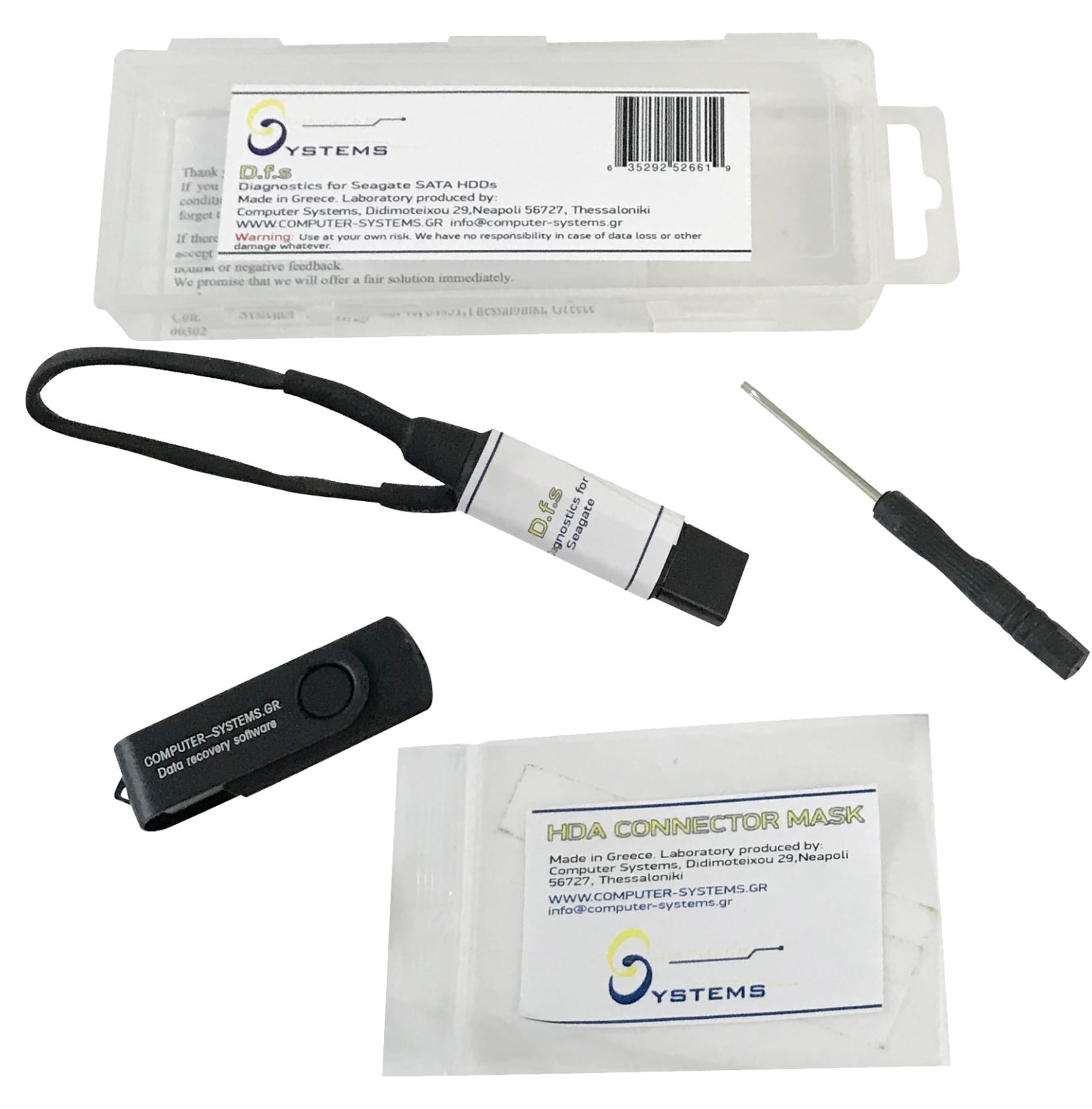
Packet includes:
• 1 × DfS USB adapter that connects the HDD to the computer (adapter color maydiffer from photos)
• 1 × HDA connector mask for precise terminal pin alignment
• 1 × USB drive with drivers, software, and detailed user manual (WindowsXP/7/8/10)
• 1 × screwdriver
• 1 × storage box
Warnings:
This toolkit exposes powerful functions that intervene in drive settings.Improper use can cause permanent drive damage and data loss. Use on drives withimportant data only if you are an experienced data recovery technician;inexperienced users should practice only on test drives with no important data.
Guarantee:
1year guarantee is provided for the toolkit.
Bullets:
• Evidence driven triage for Seagate SATA drives: visualize head health, per-headbad/reallocated sectors, and read speed variance to decide quickly whether toimage first, stabilize firmware, or escalate.
• Targeted firmware utilities for frequent cases: address translator andcapacity problems, correct BSY and 0LBA states, inspect bootup terminal logs,and disable background reallocation to stabilize reads before imaging.
• Automatic architecture detection and adjustable adapter voltage establishreliable terminal sessions across multiple Seagate families, reducing guessingand setup retries on the bench.
• Detailed user manual included: model-specific connection photos, step-by-stepflows for common fault patterns, and troubleshooting tips help experiencedusers work efficiently without relying on external guides.
• Practical bench kit: USB adapter, HDA connector mask, USB media withsoftware/manual, screwdriver, and storage box—everything in one package tostart diagnosis and firmware work.
• Realistic scope and limitations: DfS can help recover nearly 80% of firmware-relatedSeagate cases that do not require component replacement; newer models withlocked firmware may restrict some functions.
Tags: Seagate diagnostics; firmwareutilities; data recovery tool; HDD repair
Keywords: Diagnostics for Seagate, DfS,Seagate SATA HDD, BSY bug, 0 LBA, translator regeneration, GList clear,SlipList clear, ConGen defaults, SMART clear, background reallocation stop,head test, read speed per head, seek test, terminal messages, sector test,Windows XP/7/8/10, automatic architecture detection, adjustable voltage, data recoveryworkflow