When you click on links to various merchants on this site and make a purchase, this can result in this site earning a commission. Affiliate programs and affiliations include, but are not limited to, the eBay Partner Network. When you click on links to various merchants on this site and make a purchase, this can result in this site earning a commission. Affiliate programs and affiliations include, but are not limited to, the eBay Partner Network.
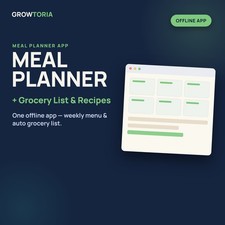
Meal Planner & Grocery List - Plan the Week, Shop From One List For families and busy home cooks: plan breakfast, lunch and dinner for 7 days, keep a grocery list by aisle and save your go-to recipes in one offline app. 🔒 Works 100% offline📱 Any device with a browser♾️ One-time - no subscription⚡ Instant download Meal Planner & Grocery List is a single-file offline app (.html) that opens in any web browser - no install, no account. It has three tabs: a 7-day Weekly Plan for breakfast, lunch and dinner, a Grocery List grouped into 6 aisles with tick-off boxes, and Recipe cards with ingredients and steps. A quick-start PDF guide is included. What you can do🍽️7-Day Meal GridType breakfast, lunch and dinner for every day from Monday to Sunday.🛒Grocery List by AisleAdd items under Produce, Meat & Fish, Dairy, Pantry, Frozen and Other, then tick them off as you shop - bought items are crossed out.📖Recipe CardsSave each go-to recipe with its name, ingredients and steps, and remove any card with one click.🌙Dark / Light ModeSwitch themes with one button, then click Save to keep your plan, list and recipes in this browser.How it works - Open the app Double-click Meal-Planner-and-Grocery-List.html - it opens in your web browser, no install, no account, no internet needed.
- Plan and list Type your meals in Weekly Plan (example meals on Monday and Tuesday show the idea), then add groceries and recipes in their tabs.
- Save and print Click Save to keep everything on this device, and PDF to open the print window - print the open tab or choose Save as PDF.
What's included - ✔️ 1 offline app: Meal-Planner-and-Grocery-List.html (single file - opens in any modern web browser)
- ✔️ 1 quick-start guide (PDF): customers choose it🗓️The Whole Week at a GlanceAll 21 meal slots sit on one screen, so you decide once instead of every evening.🧾One List for the StoreGrocery items are grouped by aisle, so you shop in order and tick them off as you go.🔒Private, No SubscriptionYour data stays in your browser on your device - nothing is uploaded and there is no account.Buy with confidence
Instant electronic delivery • One-time purchase • Friendly support — just message us on .Quick answersDo I need any software?
No install needed - it is a single .html file that runs in any modern web browser (Chrome, Edge, Safari or Firefox) on a computer, tablet or phone. The quick-start guide is a PDF.How is it delivered?
Delivered electronically right after purchase through messages - nothing is shipped.Does it build the grocery list from my meal plan?
No - you type grocery items yourself into 6 aisle groups and tick them off as you shop. The meal plan and the list are kept side by side in separate tabs.Is my plan saved automatically?
No - click Save to keep your plan, list and recipes in this browser on this device; they load again the next time you open the app.Can I print it?
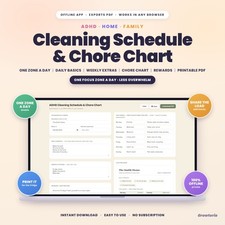
Yes - the PDF button opens your browser's print window for the tab you have open; print it or choose Save as PDF. It prints the screen as shown, not a separate printable layout.More from our storeRunning the household too? See our ADHD Cleaning Schedule & Chore Chart and Paycheck & Annual Budget Planner.Instant download after purchase - plan this week's meals in minutes.License & buyer notice
This is an electronically delivered product — nothing is shipped. The buyer is only receiving a revocable license with specific limitations: one user, for personal or internal business use; the files may not be resold, shared or redistributed. Electronically delivered goods do not qualify for the Money Back Guarantee. What you need: Any modern web browser (Chrome, Edge, Safari or Firefox) on a computer, tablet or phone; a free PDF reader for the quick-start guide. If anything is not right, message us on and we will fix it.

|
|