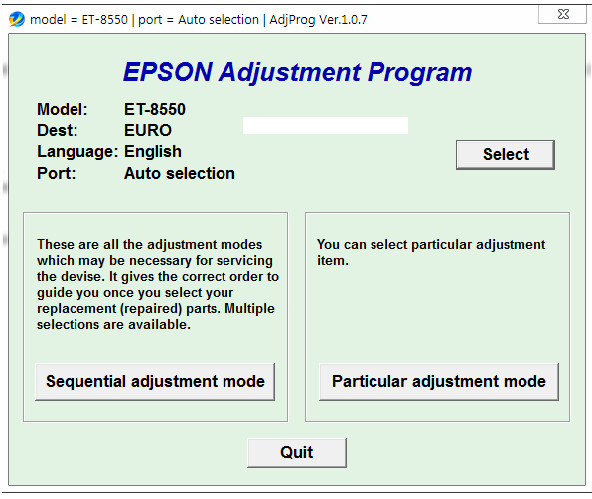
Epson ET-8550 Adjustment Program Reset Software
The Epson ET-8550 Adjustment Program software (the most popular version currently being WIC Reset Utility) is a third-party tool created to address this issue.
- The Epson ET-8550 Adjustment Program is specialized software used to reset the waste ink counter and restore system parameters on the Epson ET-8550 printer to their original default state. When the printer displays errors such as "Service required," "Ink pad is at the end of its service life," or fails to print due to the counter reaching its limit, this software helps clear the errors and reactivate the printer without needing to take it to a service center.
The Epson EcoTank ET-8550 printer is a powerful device for photography enthusiasts and content creators, delivering excellent print quality. However, like any electronic device, printers can sometimes experience performance issues or require regular maintenance to operate optimally. That's where the Epson ET-8550 Adjustment Program software comes in handy. This article will delve into understanding this crucial service tool.
What is Epson ET-8550 Adjustment Program?
- The Epson ET-8550 Adjustment Program software is an official service utility specifically designed for the Epson EcoTank ET-8550 printer series (European version). This tool provides users with access to advanced maintenance functions, allowing them to troubleshoot common problems and maintain printer performance. It is not a typical end-user software but rather a tool for technicians or users with technical experience who want to perform more in-depth maintenance tasks.
AdjProg_ET-8550 : ADJPROG Reset error The printer's borderless printing ink pad is nearing...
- This tool is commonly used by printer repair technicians to restore functionality after maintenance or replacement of the waste ink unit. The software operates via USB connection and allows for service operations such as:
- Reset waste ink pad counter
- Clear protection counter
- Check the machine's status.
- Test print and nozzle check
- Other service tweaks (depending on the version)
WARNING!!! The program does not reset Maintenance Box counter
[Need change only Box chip]
Instructions on how to use the Epson ET-8550 Adjustment Program
To use the Epson ET-8550 Adjustment Program software effectively and safely, you need to follow these steps. Remember that this software is for maintenance and repair purposes, so please proceed with caution.
Printer Initialization:This function allows you to reset the printer's settings to their original default state, just like when the printer was new.
It can be useful for troubleshooting unexplained software errors or when the printer is malfunctioning after firmware updates or incorrect operations.
Print Head ID Registration:
When you replace a print head in your printer, you need to register the new print head ID with the printer.
This function allows you to enter and store the ID of the new print head, ensuring the printer correctly identifies the print head and operates with optimal parameters.
Read Printer Information:The software allows you to read detailed technical information about your printer, including error codes, component operating status, and settings. This information is very useful for troubleshooting.
Firmware Change - Limitations:Some versions of the Adjustment Program may support firmware changes, for example, updating to a specific firmware version to fix recovery mode issues. However, changing firmware requires extreme caution.