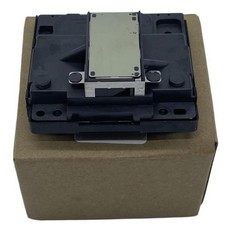
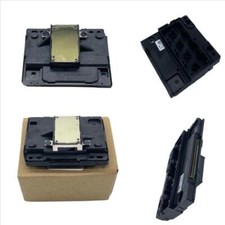
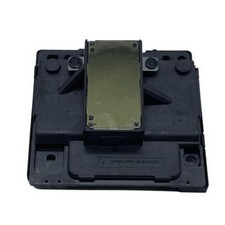
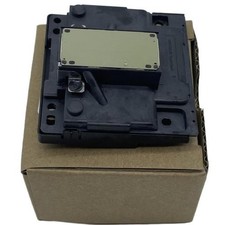
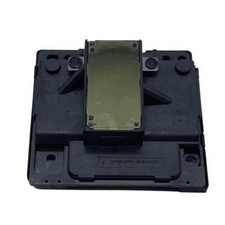
Printer Print Head Fits For Epson EcoTank Pro ET16500 EC C7000 ET-16605 16650U
65.99 USD
Free Kind Reminder – Printhead Installation & Ink Flow Instructions
After installing the printhead, you may notice small gaps or missing lines on the test page.
This is completely normal — the ink needs some time to flow smoothly.
🛠 Recommended Steps: Deep Cleaning Procedure
Please follow these steps on your printer:
Press Settings
Go to General Setup → Press OK
Select Maintenance → Press OK
Choose Print Head Cleaning → Press OK
Select:
🔘 Black only
🔘 Colour only
🔘 All → Press OK
Choose Cleaning Strength:
🟢 Normal
🟡 Strong
🔴 Strongest
Press Start – The machine will begin cleaning the printhead.
🕒 After Cleaning:
Leave the printer powered ON and idle (do not use it)
Let it sit for at least 6 hours
After the waiting period, print multiple test pages
✅ In most cases, print quality will return to normal
🔁 Still Not Perfect?
If minor imperfections remain, perform a second deep cleaning cycle.
💬 If you have questions about this process or run into issues, feel free to contact us via messages — we're here to help!
🔧 Troubleshooting & Installation Precautions
Please read carefully before purchasing or installing a new printhead. Proper handling can prevent damage to your printer and extend the life of your printhead.
❗ 1. Red Light Flashing When Powering On
This does not necessarily mean the printhead is faulty.
➡ The issue may come from the printer frame or mainboard.
✅ Please fix any error codes or system issues before replacing the printhead.
❗ 2. Printer Does Not Detect Cartridges
This is often due to a blown fuse on the mainboard.
🔧 Solution: Replace the mainboard or its fuse.
🔍 3. Check the Data Cable
Before installation, check if the data cable is:
🔥 Burned
⚡ Corroded
🚫 Loosely connected
A damaged or unstable cable can burn the printhead and the mainboard.
✅ Please ensure your cable is in perfect condition before proceeding.
💧 4. Use High-Quality Ink & Cartridges
The lifespan of your printhead depends heavily on the quality of ink used.
🛡 We recommend using premium ink, cartridg
🔧 Kind Reminder – Printhead Installation & Ink Flow InstructionsAfter installing the printhead, you may notice small gaps or missing lines on the test page.
This is completely normal — the ink needs some time to flow smoothly.
🛠️ Recommended Steps: Deep Cleaning ProcedurePlease follow these steps on your printer:
Press Settings
Go to General Setup → Press OK
Select Maintenance → Press OK
Choose Print Head Cleaning → Press OK
Select:
🔘 Black only
🔘 Colour only
🔘 All → Press OK
Choose Cleaning Strength:
🟢 Normal
🟡 Strong
🔴 Strongest
Press Start – The machine will begin cleaning the printhead.
🕒 After Cleaning:Leave the printer powered ON and idle (do not use it)
Let it sit for at least 6 hours
After the waiting period, print multiple test pages
✅ In most cases, print quality will return to normal
🔁 Still Not Perfect?If minor imperfections remain, perform a second deep cleaning cycle.
💬 If you have questions about this process or run into issues, feel free to contact us via messages — we're here to help!
🔧 Troubleshooting & Installation PrecautionsPlease read carefullybefore purchasing or installinga new printhead. Proper handling can prevent damage to your printer and extend the life of your printhead.
❗ 1. Red Light Flashing When Powering OnThisdoes not necessarily mean the printhead is faulty.
➡️ The issue may come from theprinter frame or mainboard.
✅ Please fix any error codes or system issuesbefore replacing the printhead.
❗ 2. Printer Does Not Detect CartridgesThis is often due to ablown fuse on the mainboard.
🔧 Solution: Replace themainboardor itsfuse.
🔍 3. Check the Data CableBefore installation, check if the data cable is:
🔥 Burned
⚡ Corroded
🚫 Loosely connected
A damaged or unstable cable canburn the printhead and the mainboard.
✅ Please ensure your cable is inperfect conditionbefore proceeding.
💧 4. Use High-Quality Ink & CartridgesThelifespan of your printheaddepends heavily on the quality of ink used.
🛡️ We recommend usingpremium ink, cartridges, or CISS systemsto ensure stable performance and avoid clogging or damage.
Special statement
We have an ample supply of all items in our store. If you require additional quantities, please do not hesitate to contact us. Furthermore, if you need any other parts that are not listed in our inventory, please feel free to reach out to us. We offer a wide range of printer accessories, some of which may not be currently listed. Simply send us a message, and we will assist you in finding the specific item you need.
SHIPPING & HANDLING
International Post Airmail:
We charge a fixed fee for Shipping & Handling, which covers packing, warehousing, distribution, order handling, and processing expenses. Upon receiving payment, we will ship the item to you within 24 hours. The parcel containing the item will be sent from either Hong Kong or China via Flat Air Mail or Registered Air Mail.
Typically, delivery takes 1-2 weeks (maximum 3 weeks). U.S. customers: taxes are included.
We kindly request your understanding that the shipping charge encompasses various costs beyond the actual shipping expenses, such as stock fees, human resources, PayPal fees, final value fees, listing fees, insurance fees, packaging material fees, handling fees, and more. Your support in accepting the shipping charge is greatly appreciated as it enables us to continue providing quality service.
PAYMENT METHODS
We accept most payment method. If you have payment problem, please send a message to contact us. In normally, we will reply you in 24 hours in working days. Payment should be madewithin 14dayssince the winning of the first item.
Non-paying winners will be reported to . Serious buyers only please.Please email us with any questions you may have during the transaction.
TERMS OF SALES
Our top priority is customer satisfaction. All products undergo quality checks and are in good condition when shipped to our customers. In the event of a defective or damaged product upon arrival, or if the wrong product was shipped, please contact us immediately. Returns are accepted within 30 days of the delivery date, provided the item is in its original new condition with attached tags and packaging intact. Please note that altered or worn items cannot be returned. Return shipping costs are the responsibility of the buyer.
Please contact us first if you have any problems/questions/concerns. We will be happy to resolve any issues you may have in a cordial and friendly manner.
Your positive response is highly appreciated, and we will reciprocate the same. We kindly request that you refrain from leaving negative response without communicating with us first. Please allow up to 1 business days for us to respond.
CONTACT US
Please use "Ask Seller a Question" link to contact us for any queries. We normally reply to every message within 24 hours.
If you print a test page and notice some lines are missing, don't worry. This could be due to air entering the print head pipe during transportation, or there might be air trapped in the ink cartridges or the Continuous Ink System (CIS).
If you're using a CIS (Continuous Ink System), please ensure it's positioned higher than the printer by at least 2cm. You may observe ink leaking into the ink cartridges, followed by the print head entering standby mode. After 2 minutes, adjust the CIS to the same level as the printer, attempt to clean the print head, and you should see an improvement in the test page with some lines appearing. If you require high-quality printing immediately, continue cleaning. If the printing quality is acceptable, keep the printer powered on and in standby mode. After 24 hours, the quality should improve. As you continue printing, the quality will gradually improve even further.
If you're using ink cartridges, please power on the printer and keep it in standby mode. After 24 hours, try executing the print head cleaning function. Standby for 30 minutes, clean the print head, standby for another 30 minutes, clean the print head again, and repeat this process. You'll notice the printing quality improving with each cycle.
If you have any questions, please don't hesitate to message may also like
Print Head Cable fits for EPSON L132 L300 L312 L303 L335 L301 L120 L313 L222
12.99 USD
Free shipping
6sets Printhead Carriage Sensor Cable For Epson XP 430 455 435 405 411 442 424
26.99 USD
Free shipping
Printhead Print Head Fit For Epson ET 2826 2980U 2860 2956 2856 2811 2803 2950U
45.35 USD
Free shipping
Printhead Carriage Motor EM-601 Fits For Epson XP-342 XP-320 XP-313 XP-241
14.99 USD
Free shipping
Print Head Cable fits for EPSON L3153 L3158 L3151 L3109 L3161 L3110 L3115 L3167
12.99 USD
Free shipping
78CM Thermal Print Head Fits For Epson TM-L90 TM-L90 PLUS M313A L90II TM-L90II
56.99 USD
Free shipping
Printer Print Head Fit For Epson ET 1810 ET-2720 ET-1810 ET-2711 ET-2701
42.99 USD
Free shipping
21PIN Printer Print Head Fit For Epson 231 201 212 205 220 XP 225 103 102 202
19.99 USD
Free shipping
Full Color Print Head Fits For Epson EcoTank WF-2910 WF-2861 WF-2960 WF-2880
35.63 USD
Free shipping
Printer Print Head Carriage Fits For EPSON WF-2010W WF-2520 WF-2540 WF-2530
15.99 USD
Free shipping
Printer Print Head Fit For Epson ET 2856 4500 2400 4700 2800 2400 4500 2840
45.35 USD
Free shipping
Printer Print Head Carriage Fits For EPSON L4267 L4263 L4260 L4261 L4366 L4360
17.99 USD
Free shipping
Print Head Fits For Epson ET 2750 ET 2400 ET 2760 ET 2720 ET 2850 ET 2400
50.39 USD
Free shipping
Printer Print Head Fits For Epson EW-M571T EW-M530F EW-M530F EW-M5071FT WF 7840
65.29 USD
Free shipping
F173050 DTF Printhead Fits For Epson Stylus Photo R1390 EP-4004 D870 G4500
87.49 USD
Free shipping
Printhead cable fits for EPSON ET-2871 ET-2914 ET-2864 ET-2922 ET-2956 ET-2920U
16.93 USD
Free shipping
1set printhead Carriage Sensor Cable for Epson WF-2520 WF-2530 WF-2510
1.99 USD
6.0 USD
1set Printhead Carriage Sensor Cable for Epson WF-2010W WF-2631 WF-2521 WF-2540
9.99 USD
Free shipping
Printer Print Head Fit For Epson WF 2521 WF 2520 WF 2530 WF 2630 WF 2010
45.35 USD
Free shipping
78CM Thermal Print Head Fits For Epson L90P L90II M313A 313A TM-L90 TM-L90II
56.99 USD
Free shipping
Printer Print Head Fits For Epson L210 L120 L313 L132 L303 L222 L301 L220 L310
51.99 USD
Free shipping
Printer Print Head Carriage Fits For EPSON XP 400 430 432 441 422 412 405 420
17.99 USD
Free shipping
Print Head Carriage Belt Pulley fits for Epson L 5190 L 5296 L 5198 L 5298
12.99 USD
Free shipping
Printhead Cable Fits For EPSON L4268 ET-2751 ET-2700 ET-2955 ET-2950UE ET-2760
12.99 USD
Free shipping
Printhead Carriage Fits For EPSON ET-3930 ET-3900 ET-3750U ET-4958 ET-3830
19.99 USD
Free shipping
6pcs Print Head Frame Fits For Epson ET-2815 ET-2803 ET-2711 ET-2856 ET-2720
12.99 USD
Free shipping
Printhead Carriage Assembly Fits For Epson L655 WF2651 WF-2660 WF2750 WF-2661
16.99 USD
Free shipping
Printhead Carriage Fits For EPSON ET15000 ET3700 ET3750 ET3750U ET3930 ET3850
19.99 USD
Free shipping
Printhead Fit For Epson XP-440 XP-400 XP-435 XP-403 XP-420 XP-410 XP-412 XP-401
42.99 USD
Free shipping
Printhead Fit For Epson L4163 L4170 L4159 L4150 L4158 L4166 L4169 L4168 L4160
42.99 USD
Free shipping
Printer Print Head Carriage Fits For EPSON L4159 L4167 L4151 L4166 L4150 L4158
19.99 USD
Free shipping
6pcs Print Head Gasket Fits For Epson L 3101 L 3158 L 3110 L 3152 L 3115 L 3100
12.99 USD
Free shipping
Printhead Carriage Fits For Epson XP-850 XP-700 XP-620 XP-701 XP-640 XP-601
40.99 USD
Free shipping
1set Printhead Carriage Sensor Cable for Epson XP305 XP344 XP352 XP330 XP303
9.99 USD
Free shipping
Printer Print Head Fit For Epson WF-3721 WF-3725 WF-3821 WF-3733 WF-3820 WF-3823
59.99 USD
Free shipping
6pcs Print Head Gasket Fits For Epson WF2631 WF2530 WF2531 WF2010W WF2010 WF2521
12.99 USD
Free shipping
L3216 l3560 L3106 L3268 L1270 L3266 Printer Print Head Carriage Fits For EPSON
15.99 USD
Free shipping
Printer Print Head Fits For Epson L15160 L15180 L15158 L15168 L15150 L15188
65.29 USD
Free shipping
Print Head ICC Cable xp-202 fits for Epson XP102 XP202 XP100 ME570W XP212 SX445
12.99 USD
Free shipping
Printhead Fit For Epson L3153 L3161 L3150 L3070 L3258 L3115 L3165 L3117 L3110
42.99 USD
Free shipping
Printer Print Head Fits For Epson L4167 L4153 L4156 L4163 L4168 L4158 L4151
51.99 USD
Free shipping
1108266 Thermal Printer Print Head Fits For Epson z5400 MODEL-M165B TM-L90 165C
26.99 USD
Free shipping
6sets Printhead Gold Cover Frame Screw For EPSON PX650 EP-702A A60 EP-301 EP-302
19.99 USD
Free shipping
6pcs Print Head Frame Fits For Epson ET2700 ET2751 ET2750U ET2760 ET2714 ET2711
12.99 USD
Free shipping
1set Printhead Carriage Sensor Cable for Epson XP 431 403 430 405 432 441 435
9.99 USD
Free shipping
6pcs Print Head Gasket Fits For Epson XP-422 XP-413 XP-415 XP-424 XP-435 XP-446
12.99 USD
Free shipping
Print Head 3A58D7FPOC Fit For Epson EcoTank FA04010 ET-1810 ET-2825 ET-4500
51.99 USD
Free shipping
6pcs Print Head Gasket Fits For Epson L 5310 L 5316 L 5198 L 5290 L 5296 L 5196
12.99 USD
Free shipping
Ink Pump Printhead Captop Fits For Epson L312 L130 L220 L300 L301 L121 L313
24.99 USD
Free shipping
1Set Printhead Gold Cover Frame Screw For EPSON A920 PM-A920 R360 L1800 G4500
12.99 USD
Free shipping