Product Description
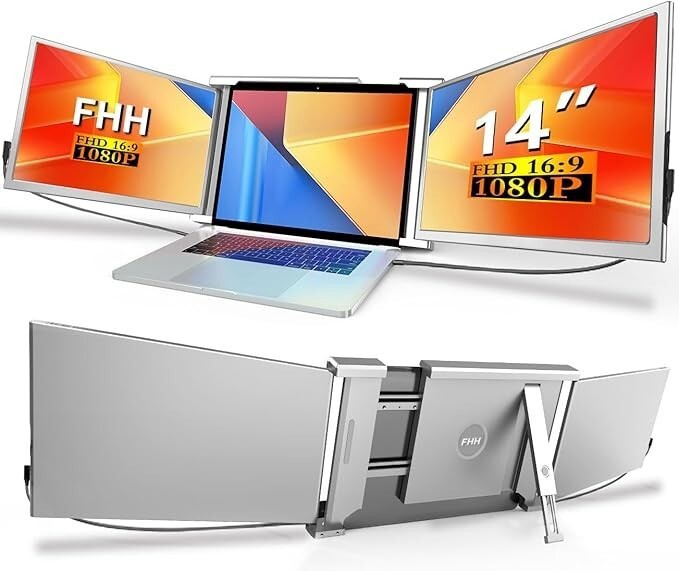
- ➤【Improve Efficiency 300% & Convenient Work & Save Time】-Our 14” Triple Monitor for Laptop Screen with 2 extra screens support you open multiple tasks at the same time and improve your work efficiency up to 300%!Laptop Screen Extender can extend or mirror laptop content help you no need switch workspace save lot time.Carry it with you to start enjoy your travels ,remote work, video conference ,gaming etc (Applicable for 13-16.5 IN Laptops).
- ➤【Widely applicable & Plug and Play No Need Drive】-The Portable Triple Monitor for Laptop compatible most Windows,Mac OS,Linux,Intel ,Chrome,Switch,PS4/5,Xbox One (Suit Mac M1 Pro/Max , M2 Pro/Max, M3 Pro/Max chip laptop,Not suit M1/ M2 /M3 chip laptop If use need hub) . Please make sure your laptop has 2 C ports or C + HDMI port or 2 HDMI ports. Tips:Some laptops USB-C port is not full function (only support power or video signal),Please check before use.
- ➤【Multiple Use Mode & 315°Sharing Angle】-The Portable Triple Monitor for Laptop Screen is portable design easy to take out even in travel. can be set as extend/ mirror/ landscape/ portrait. Each monitor of this laptop monitor extender supports 0-315°(VS other only 180°)rotation, making it easy to share the screen with your colleagues and friends in all directions in a more simple way.
- ➤【1920x1080P FHD IPS Monitor & Support Independently Adjust 】-14" Full IPS 1080P Laptop Monitor Extension configured with 1920x1080 resolution/ 178°clear view angle/ 300 nit brightness / 1:1000 ratio/ 60 HZ refresh provide a bright vivid & immersive visual experience.Each Laptop Monitor can be independently connect use and adjust (brightness,font size,etc) together with menu button design.
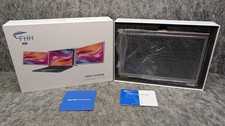
- ➤【Package & Service】-FHH provide all accessories for using the Dual Monitor Extender for laptop (Monitor Screen S1 *1, USB-C to C cable *2, USB-A to C cable *2, HDMI to mini HDMI cable *2, Premium Leather Bag*1).USB-C to C (support power & video) / USB-A to C (power only) / HDMI to HDMI (video only).High-quality materials with 100% QC Attachable Laptop Monitors Screen,Please message us if you need any help , We will reply you in 24H.
FHH Triple Monitor for Laptop / Portable Monitor Screen
Support you open multiple tasks at the same time and improve your work efficiency up to 300%!Carry it with you to start enjoy your travels ,remote work, video conference ,gaming etc .
Specification:
Compatible :Most Windows,Mac OS,Linux,Intel ,Chrome,Switch,PS4/5,Xbox One (Suit Mac M1 Pro/Max , M2 Pro/Max, M3 Pro/Max chip laptop,Not suit M1/ M2 / M3 chip laptop If use need extra hub)
Applicable :13-16.5 IN Laptops,Plug and play, no need driver .
Support:Extend/ Mirror/ Landscape/ Portrait
Rotation Angle :Support monitor 0-315°rotation
Individually connected:2 monitors can be Individually connect.
Design with button support independently adjust: 2 monitors can be independently adjust Brightness, volume, font size etc together with menu button design easy use.
Screen:14” FHD IPS 1920X1080 resolution/ 178°clear view angle/ 300 nit brightness / 1:1000 ratio/ 60 HZ refresh
Package :
Monitor Screen S1 *1 / USB-C to C Cable *2 / USB-A to C Cable *2 / HDMI to mini HDMI Cable *2 / Premium Bag*1 / User Manual*1
Tips: USB C to C cable (offer power & video signal ),USB A to C cable ( offer power),HDMI to mini HDMI cable (offer video signal).
Advantage :
1.Improve Efficiency 300% & Convenient Work & Save Time
Our 14” Triple Monitor for Laptop Screen with 2 extra screens support you open multiple tasks at the same time and improve your work efficiency up to 300%!Laptop Screen Extender can extend or mirror laptop content help you no need switch workspace save lot time.Carry it with you to start enjoy your travels ,remote work, video conference ,gaming etc (Applicable for 13-16.5 IN Laptops).
2.Widely applicable & Plug and Play No Need Driver
The Portable Triple Monitor for Laptop compatible most Windows,Mac OS,Linux,Intel ,Chrome,Switch,PS4/5,Xbox One (Suit Mac M1 Pro/Max , M2 Pro/Max, M3 Pro/Max chip laptop,Not suit M1/ M2 /M3 chip laptop If use need hub) . Please make sure your laptop has 2 C ports or C + HDMI port or 2 HDMI ports. Tips:Some laptops USB-C port is not full function (only support power or video signal),Please check before use.
3.Multiple Use Mode & Extend Mirror Landscape Portrait
The Portable Triple Monitor for Laptop Screen is portable design easy to take out even in travel. can be set as extend/ mirror/landscape/portrait. Each monitor of this laptop monitor extender supports 0-315°(VS other only 180°)rotation, making it easy to share the screen with your colleagues and friends in all directions in a more simple way.
4.1920x1080P FHD IPS Monitor & Support Independently Adjust
14" Full IPS 1080P Laptop Monitor Extension configured with 1920x1080 resolution/ 178°clear view angle/ 300 nit brightness / 1:1000 ratio/ 60 HZ refresh provide a bright vivid & immersive visual experience.Each Laptop Monitor can be independently connect use and adjust (brightness,font size,etc) together with menu button design.
Ways of connection :
1.If your laptop has 2 full function USB-C Port ( Thunderbolt 3, Thunderbolt 4, DP 1.2), you can connect each monitor with USB C to C cable.
2.If your laptop has USB C Port & USB A+ HDMI Port , you can connect 1st monitor with USB C to C cable , 2nd monitor with USB A to C cable(offer power) + HDMI to mini HDMI cable (offer video signal)
3.If your laptop do not have C port only HDMI and USB A port , you need connect extra hub for 2nd monitor (offer video signal)
Q: How to check USB-C port on laptop is an full-function port or not ?
A: If your laptop has a full function port as the above picture symbols (Thunderbolt 3, Thunderbolt 4, DP 1.2),It means the USB-C port is function can support power and video signal. (You also can online check laptop port parameters)
Q : What should I do when it shows "No Signal" on display ?
A :1> If plug USB C to C cable show no signal, You can plug extra USB A to C (5V/2A)cable or HDMI to mini HDMI cable( Some USB-C ports are on laptops not full function only support power or video signal) .
2>If plug USB A to C cable show no signal , You can plug extra HDMI to mini HDMI cable.
3>If plug HDMI to mini HDMI cable show no signal , You can plug extra USB A to C cable .
Q : What should I do when "Flickers & Black Screen" happen ?
A : Caused by low battery or insufficient voltage of your laptop, try an external 5V/2A adapter with cable offer power for monitor.
Q : Why does the monitor not light up after connecting?
A : Monitor can not light up always caused by laptop can not offer enough power . Please try an extra 5V/2A adapter with cable offer power for monitor. Also active your laptop screen to avoid extender screen into sleep mode.