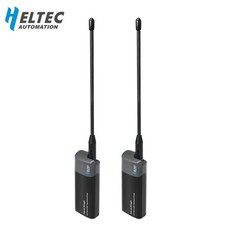
Heltec HD01 Wi-Fi HaLow Dongle
Ultra-Long-Range Wireless Ethernet Bridge, 1km Range, 915MHz
📡 Extend Your Network Further
The Heltec HD01 is a plug-and-play Wi-Fi HaLow network bridge built on the IEEE 802.11ah standard. It extends traditional Wi-Fi and Ethernet networks up to 1km, with lower power consumption and stronger wall-penetration than standard Wi-Fi. Pair two HD01 units for point-to-point communication, or combine with a compatible HaLow router for star networking.
Key Features🔌 Three Connection Methods
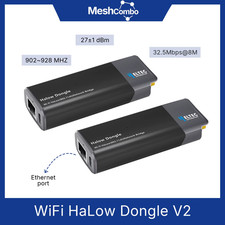
Connect via USB Type-C, Ethernet (RJ45), or 2.4GHz Wi-Fi for flexible deployment.
📶 Long-Range Sub-1GHz
Operates on the 902-928MHz band with up to 32.5Mbps data rate @ 8MHz bandwidth.
⚡ Low Power, High Penetration
Designed for efficient power use while maintaining strong signal penetration through walls and obstacles.
🛠️ Plug and Play
Factory-matched configuration, lightweight aluminum alloy and plastic housing, easy to deploy.
Choosing Your Option
AP Mode - 1Pc: One HD01 dongle configured as Access Point.
STA Mode - 1Pc: One HD01 dongle configured as Station (client).
AP And STA 1Pair: Two HD01 dongles, one pre-configured as AP and one as STA, ready for immediate point-to-point pairing.
Note: A single AP or single STA unit requires a matching counterpart (either another HD01 or a compatible HaLow router) to establish a HaLow ModuleHT-HC01Wi-Fi StandardIEEE 802.11 b/g/nHaLow StandardIEEE 802.11ahFrequency902-928MHzMax TX Power21±1 dBmBandwidth Modes1/2/4/8 MHzMax Data Rate32.5 Mbps @ 8MHzEthernet PortRJ45 (10/100M), USB-CAntenna InterfaceSMA FemalePower InputUSB-C, 5V, ~300mA typicalOperating Temp-20°C to +70°CShell MaterialAluminum Alloy, PlasticWeight53.5g (with antenna), 40g (without)Dimensions87.5 x 32.5 x 20mm (antenna excluded)Package Contents
1x HD01 Dongle (per selected mode), 1x Antenna, 1x USB-C Cable, 1x Reset Button Trigger Pin, 1x Ethernet Jumper, 1x Paper User Guide
Product ImagesFAQCan the dongle be configured over Wi-Fi while a network cable is connected?
No, do not enter configuration mode via Wi-Fi while the Ethernet cable is connected. If this occurs, unplug both power and network cable, then re-enter configuration mode.
How do I find the device's IP address?
Check your upstream router's connected device list, or connect to the dongle's 2.4GHz Wi-Fi and enter 192.168.1.1 or 10.42.0.1 in your browser to view connected device IPs.
Is this waterproof?
No, the HD01 does not have waterproof or ingress protection features and is intended for indoor or sheltered use.