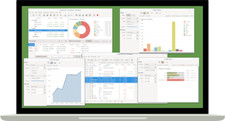
Personal Finance & Budget Software -- Windows 10 & 11 -- USB Flash Drive HomeBank for Windows.
Track Spending, Set Budgets & Manage Your Finances. No Subscription.
HomeBank -- Full Version -- Windows 10 & 11 -- USB Flash Drive
✓ No Subscription ✓ No CD Drive Needed ✓ Your Data Stays Private ✓ No Product Key Required ✓ 30-Day Returns
HomeBank is an intuitive personal finance manager for Windows -- track your income and expenses, set monthly budgets, monitor your accounts, and generate visual reports that show exactly where your money is going. Import transactions directly from your bank using standard CSV or OFX export files. All of your financial data stays on your computer -- HomeBank does not connect to your bank, does not sync to the cloud, and does not share your information with anyone. No subscription, no activation code, and no product key required.
🔒 Your Financial Data Stays On Your Computer
Unlike online budgeting apps that store your data in the cloud, HomeBank keeps everything local. No bank login credentials are ever entered into the software -- you export a statement from your bank's website and import it into HomeBank yourself. Complete privacy, complete control.What You Can Do:Track All Your Accounts in One Place
Add checking accounts, savings accounts, credit cards, cash, and investment accounts. See your complete financial picture at a glance with running balances and account summaries.Set Monthly Budgets & Track Spending
Create budgets by spending category and monitor how you are tracking against them each month. Visual budget progress bars show exactly where you are overspending before the month is over.Import Bank Transactions Automatically
Export a statement from your bank's website in CSV or OFX format and import it directly into HomeBank. Transactions are automatically categorized based on payee rules you set up once.Generate Visual Reports & Charts
See where your money goes with pie charts by category, income vs expense trend lines, budget vs actual comparisons, and net worth over time. Export reports for tax preparation or personal review.Key Features:
- Multi-Account Management -- checking, savings, credit cards, cash, and investments
- Budget Planning -- set monthly budgets by category and track progress visually
- Transaction Import -- import CSV and OFX files exported from your bank's website
- Automatic Categorization -- set payee rules once and transactions are sorted automatically
- Visual Reports & Charts -- spending breakdowns, trends, and net worth tracking
- Complete Privacy -- no bank connection, no cloud sync, all data stays on your computer
- No Subscription -- pay once, own it permanently, no renewals or expiration
- No Product Key -- no activation code or registration required, ever
What You Will Receive:
- 💾 HomeBank full installer on USB Flash Drive
- 🛠 Step-by-step installation guide (on USB drive)
- 🔌 Reusable 8GB USB 2.0 Flash Drive -- keep it after installation
No retail box is included. USB drive ships loose inside a bubble mailer.
System Requirements:Operating SystemWindows 10 or Windows 11Memory2 GB RAM minimumDriveUSB 2.0 port or higher required