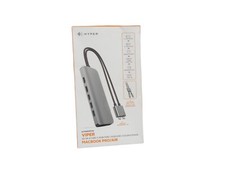
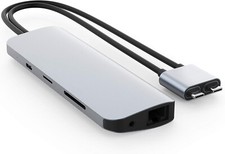
NewHyperDrive 10-in-2 USB C Docking Station, Dual HDMI 4K@60Hz, 60W USBC Power Delivery, Gigabit Ethernet, USB-C Hub Adapter for MacBook Pro with M1 Pro/Max 2021, MacBook Pro, MacBook Air, Sliver
About this item
- [ 10-Port USB-C Hub for MacBook Pro/Air ] Turns two USB-C ports into 10 ports with 2 x 4K 60Hz HDMI, 3 x USB-A, Gigabit Ethernet, MicroSD/SD, 60W USB-C power delivery, and a 3.5mm audio jack.
- [ Dual Monitor 4K 60Hz Support ] Enhance your productivity and gaming with dual 4K 60Hz HDR monitor support (requires 2 x USB-C connections). To connect two extended displays, both USB-Cs must be plugged into the host device. If only one is plugged in, the Viper will only extend to one additional monitor. Both cables should either be HDMI or an active converter to HDMI. *MacBook M1 can only support one extended monitor.
- [ Works with Any USB-C Device ] Slide back to separate USB-C cables to connect to any USB-C device as a 9-port USB-C Hub (with 4K60Hz HDMI) or USB-C to 4K60Hz HDMI adapter.
- [ Convenient Expansion Ports ] Additional three USB-A 3.0 ports, microSD and SD memory card slots for quick data transfer. *Apple SuperDrive not supported.
HYPERDRIVE 10-in-2 USB-C Hub - Universal USB-C hub for MacBook, Chromebook, and PC.Compatible Devices
2025-2016 MacBook Pro
2025-2018 MacBook Air
2025-2015 MacBook (12 inch)
2025-/2018 iPad Pro
2020 iPad Air
Windows laptop with Thunderbolt 3 or USB-C*
Chrome OS laptop with USB-C*
Any other device with USB-C*
* Requires DisplayPort over USB-C + charge + data
USB-A ports will not support Apple SuperDrive or charge iPads. Both USB-C cables must be plugged into your computer to extend to more than one display.
This USB-C adapter adds 10 ports:
- 2 x HDMI 4K60Hz
- 3 x USB-A 5Gbps
- Gigabit Ethernet
- SD UHS-I 104MB/s
- MicroSD UHS-I 104MB/s
- USB-C PD (Power Delivery) 60W
- 3.5mm Audio Jack
How to connect multiple monitors to 10-in-2 USB-C Hub(Note: This model can only extend to one additional display for M1 Macbook.)
To connect two extended displays, both USB-Cs must be plugged into the host device. If only one is plugged in, the Viper will only extend to one additional monitor. Both cables should either be HDMI or an active converter to HDMI.
Please Note:This model can only extend to one additional display for M1 Macbook.(If you need to extend two displays for M1 Macbook ,please view our model No.: HDM1H or HDM1)
For Windows devices or devices that use Chrome OS or Linux, you would need to check if your computer is DisplayPort 1.4 compatible through the USB-C port. Otherwise, you could only use the direct USB-C to HDMI line on the HyperDrives to get 4K60Hz.
Dual Monitor 4K 60Hz Support
Enhance your productivity and gaming with dual 4K 60Hz HDR monitor support (requires 2 x USB-C connections).*MacBook M1 can only support one extended monitor.
Fast and Reliable Ethernet
Get the most reliable and fast internet connection for work, play, and video conferencing.
Convenient Expansion Ports
Additional MicroSD and SD memory card transfer data or files at speed up to 104 Mb/s slots for quick data.
USB-A 3.1 Gen 1 Transfer Speed x3
Connect your USB-A accessories with your modern USB-C device. Get 3 high-speed USB 3.1 Gen 1 capable of 5Gb/s transfer speed.
FAQ for HYPERDRIVE 10-in-2 USB-C Hub
*How do the cables work?
The Viper Hub utilizes two cables, one being a direct USB-C to HDMI, and the other running the rest of the Hub. The picture below illustrates which cable works with which.
*How to connect multiple monitors to 10-in-2 USB-C Hub
To connect two extended displays, both USB-Cs must be plugged into the host device. If only one is plugged in, the Viper will only extend to one additional monitor. Both cables should either be HDMI or an active converter to HDMI.
*Is HyperDrive compatible with the new Apple M1 chip? How many displays can I connect?
Our HyperDrives are compatible with the latest Mac computers with the new M1 chip,but this model can only extend to one additional display for M1.The USB 4/Thunderbolt 3 ports are backwards compatible, allowing them to read devices like on previous Intel Macs.
Mac computers utilizing the M1 chip can only extend to one additional display. This is due to limitations in these models, as opposed to Intel based Macs that can extend to two displays when utilizing this dual USB-C HyperDrives. The only exception to this is the Mac Mini, which can extend to two displays, but only when using the built-in HDMI port as one of the displays.
*Ethernet is not detected
If the Ethernet is not detected, it's most likely the USB-C connection to computer is not securely connected.Please do the trouble shooting steps below:1.) Connects the second USB-C cable to computer securely2.) Look at the Ethernet port, the activity LED should be running.3.) Once the Ethernet port is running, then plug in the other USB-C cable to computer.
If you having Ethernet, Self assigning IP address and other network issues OR Connectivity or charging issues using HyperDrive on your Mac/Windows, tell us directly at Amazon messages so we can fix it quickly.
Quick-Charge with USB-C 60W PD
Charge while you work or play, with USB-C pass-through charging. * Requires DisplayPort over USB-C + charge + data.
10-Port USB-C Hub for MacBook
If only one is plugged in, the USB-C Hub will only extend to one additional monitor. Both cables should either be HDMI or an active converter to HDMI.