SHIPS FROM THE USA, SAME OR NEXT BUSINESS DAY
INCLUDES 25% OFF ANY SWINGNERDS PLAN (UP TO $50 VALUE)
Every order ships with a code for 25% off any 1-year SwingNerds Pro, Premium, or Ultimate plan. Use it if you want sim-bay swing analysis on top of the camera, or ignore it and just use the camera with whatever software you already have.
These are off-the-shelf, UVC-compliant USB cameras. Use them with SwingNerds Vision, OBS, Kinovea, Zoom, or any other application that accepts USB webcams. Not locked to any platform.
About this camera
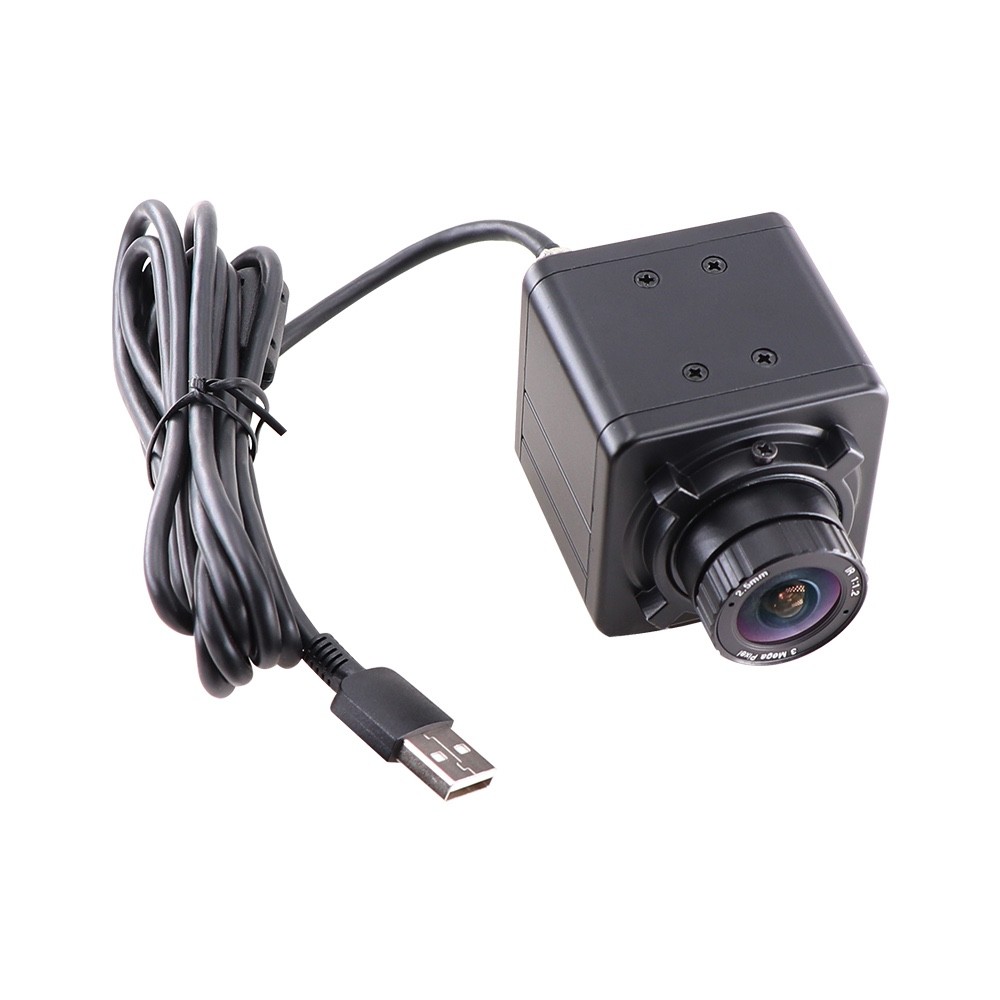
A USB golf simulator camera built for recording swings in indoor sim bays. Captures 1280x720 at 120 FPS with a true global shutter, so every frame of your golf swing is sharp and free of the rolling-shutter skew that ruins fast-motion video on most webcams. The standard pick for most golf simulator bays (the same exact model Protee now ships with their units): fast enough to nail every impact frame, forgiving enough to work in bays without studio-grade lighting. Pair it with any launch monitor for swing-analysis playback that actually shows what happened at impact.
Works with your launch monitor
Compatible with virtually any indoor golf simulator setup. Use this camera alongside GSPro, Rapsodo MLM2PRO, Uneekor EYE XO / QED, SkyTrak / SkyTrak+, FlightScope Mevo / Mevo+, Square Golf, Garmin R10, ProTee VX, or any other launch monitor that runs on a Windows or macOS PC. The camera records the visual swing; your launch monitor handles the ball data. SwingNerds sync the two together for frame-by-frame swing analysis with your shot data overlaid.
Features
- Global shutter (no rolling-shutter distortion on fast swings)
- 1280x720 @ 120 FPS color USB
- PLEASE SELECT LENS
- 1.7mm wide-angle (3-5ft from ball ~150 FOV),
- 2.1mm wide-angle (4-6ft from ball ~140 FOV),
- 2.5mm wide-angle (6-8ft from ball ~120 FOV),
- 2.8-12mm adjustable (8-15ft from ball ~40-100 FOV)
- Aluminum mini case
- UVC compliant: plug and play, driverless, works on Windows, macOS, Linux, Android
- USB 2.0 powered (DC 5V, no external power needed)
- Auto exposure, auto white balance, manual KYT-U100-MCS25GS1
- Sensor: CMOS
- Resolution: 1280x720 MJPG @ 120 FPS
- Compression: MJPG
- Shutter: Global
- LENS: PLEASE SELECT LENS
- 1.7mm wide-angle (3-5ft from ball ~150 FOV),
- 2.1mm wide-angle (4-6ft from ball ~140 FOV),
- 2.5mm wide-angle (6-8ft from ball ~120 FOV),
- 2.8-12mm adjustable (8-15ft from ball ~40-100 FOV)
- Housing: Aluminum mini case
- Interface: USB 2.0
- Voltage: DC 5V (USB-powered)
- Operating temperature: -20C to 70C
What's in the box
- 1x Kayeton KYT-U100-MCS25GS1 global shutter USB camera
- 1x 2.5mm wide-angle CS-mount lens (pre-installed)
- 1x USB 2.0 cable
Best for
Golf simulator bays.The most popular pick for new sim builds and the safest default if you are not sure where to start.
FAQDoes this work with my launch monitor?
Yes. Any golf launch monitor that runs on a Windows or macOS computer (GSPro, Rapsodo MLM2PRO, Uneekor EYE XO / QED, SkyTrak / SkyTrak+, FlightScope Mevo / Mevo+, Square Golf, Garmin R10, ProTee, etc.) can be paired with this USB camera through SwingNerds, OBS, Kinovea, or any other USB camera application.
What lens distance do I need?
- 1.7mm wide-angle (3-5ft from ball ~150 FOV),
- 2.1mm wide-angle (4-6ft from ball ~140 FOV),
- 2.5mm wide-angle (6-8ft from ball ~120 FOV),
- 2.8-12mm adjustable (8-12ft from ball ~40-100 FOV)
For tighter or longer bays, message us through before ordering and we can recommend the right lens (we may have 4mm, 6mm, 8mm, 12mm, or 16mm options available).
Can I use this for non-golf applications?
Yes. It is a standard UVC-compliant USB camera. Use it with OBS for streaming, Zoom for video calls, Kinovea for any motion analysis, or any other application that accepts USB webcams.
Should I get the 120 FPS or the 180 FPS version?
Start here with 120 FPS unless you have a specific reason to go higher. 120 FPS captures every key swing position cleanly (address, top, transition, impact, follow-through) and works in bays with normal indoor lighting. The 180 FPS version gets you 50 percent more frames around impact for ultra-slow-motion playback, but it needs noticeably more light to expose properly. If your bay has dim or moderate lighting, 120 FPS is the safer pick.
Need a different lens for your bay?
Bay too tight or too long for the lens options? Send us a message through before you buy with your bay dimensions and we can recommend the right lens. We may have 4mm, 6mm, 8mm, 12mm, or 16mm options available for sim bays where the camera sits closer than 6 ft or farther than 8 ft.