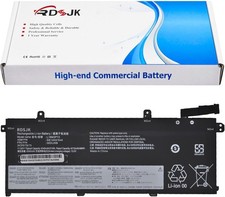
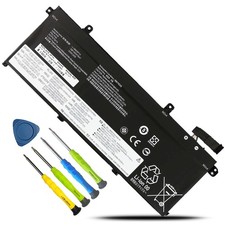
L18M3P74 L18L3P73 L18C3P72 L18M3P73 Battery for Lenovo ThinkPad T490 P43S T14 USBattery Specification
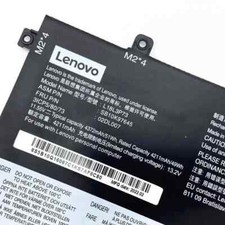
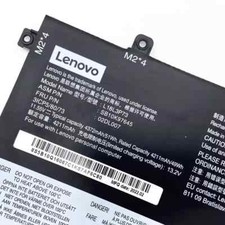
- Model Name:L18M3P74
- Battery Type:Li-ion
- Battery capacity:51Wh/4345mAh
- Battery cells:3-cell
- Condition:100% New from Manufacturer, Grade A Cell
Replacement for Part Number:
- L18M3P73, L18M3P74, L18M4P74, L18C3P71, L18L3P71, L18C3P72, L18L3P73, L18M3P73, L18M4P73, L18S3P71
- 02DL007, 02DL008, 02DL009, 02DL010, 02DL011, 02DL012, 02LD012, 5B10W51829, 5B10W51830, 5B10W13906, 5B10W13905, 5B10W13877, 5B10W13954, 5B10W13907, 5B10W13913, 5B10W51827,
- SB10K97645, SB10K97646, SB10K97647, SB10K97648, SB10K97649, SB10K97650, SB10T83122, SB10T83148, SB10T83149, SB10T83197, SB10W51928, SB10W51929, SB10T83150, SB10T83156, SB10W51926
- 3ICP5/79/73
Compatible Models (Use "Ctrl+F” to find your model quickly)
- Lenovo ThinkPad T490 Series:Type - 20Q9 20QH 20RY
- Lenovo ThinkPad T495 Series:Type - 20NJ 20NK
- Lenovo ThinkPad P43S Series:Type - 20RH
- Lenovo ThinkPad P14S Gen 1st Series
- Lenovo ThinkPad P14S Gen 2nd Series
- Lenovo ThinkPad T14 Gen 1st Series:Type - 20S2 20S3 20UD
- Lenovo ThinkPad T14 Gen 2nd Series
- Lenovo ThinkPad T14 Gen 1 Series
ThinkPad T14 Gen 1 20S1S2MM07, ThinkPad T14 Gen 1 20S0005XFE, ThinkPad T14 Gen 1 20S0002UED, ThinkPad T14 Gen 1 20S0006JGM, ThinkPad T14 Gen 1 20S00073GB, ThinkPad T14 Gen 1 20S0000BMX, ThinkPad T490 20N2S2QU00, ThinkPad T14 Gen 1 20S00045HV
- Lenovo ThinkPad T14 Gen 2 Series
ThinkPad T14 Gen 2-20XK008WAD, ThinkPad T14 Gen 2-20W0012BIV, ThinkPad T14 Gen 2-20W0011SHV, ThinkPad T14 Gen 2-20W000NUPB, ThinkPad T14 Gen 2-20W000LGGQ, ThinkPad T14 Gen 2-20W000ARRA, ThinkPad T14 Gen 2-20W000A5MS, ThinkPad T14 Gen 2-20W0000DSC, ThinkPad T14 Gen 2-20W1S59E00, ThinkPad T14 Gen 2-20XK001NRI, ThinkPad T14 Gen 2-20XK009MIV, ThinkPad T14 Gen 2-20XK00A7MS, ThinkPad T14 Gen 2-20W00141ED, ThinkPad T14 Gen 2-20W000TKFE, ThinkPad T14 Gen 2-20W000DMEE, ThinkPad T14 Gen 2-20W00097RT, ThinkPad T14 Gen 2-20W0006BEQ, ThinkPad T14 Gen 2-20W10088BM, ThinkPad T14 Gen 2-20W000WEEE, ThinkPad T14 Gen 2-20W000X4RK, ThinkPad T14 Gen 2-20W000WVED, ThinkPad T14 Gen 2-20W000VMGR, ThinkPad T14 Gen 2-20W000JUHV, ThinkPad T14 Gen 2-20W000J8MZ, ThinkPad T14 Gen 2-20XK009CEQ, ThinkPad T14 Gen 2-20W0012KMZ, ThinkPad T14 Gen 2-20W00121AD, ThinkPad T14 Gen 2-20W000P3MD, ThinkPad T14 Gen 2-20W000MKZA, ThinkPad T14 Gen 2-20W000B1UE, ThinkPad T14 Gen 2-20W000AEAD, ThinkPad T14 Gen 2-20W0002MAU, ThinkPad T14 Gen 2-20XK000MIU, ThinkPad T14 Gen 2-20XK002HHV, ThinkPad T14 Gen 2-20XK009VCX, ThinkPad T14 Gen 2-20XK00AFMB, ThinkPad T14 Gen 2-20W0013QGQ, ThinkPad T14 Gen 2-20W000Q3PB, ThinkPad T14 Gen 2-20W000ECAD, ThinkPad T14 Gen 2-20W0004VPE, ThinkPad T14 Gen 2-20W00048RT, ThinkPad T14 Gen 2-20W000V9SC, ThinkPad T14 Gen 2-20W000UCFE, ThinkPad T14 Gen 2-20W000HVEE, ThinkPad T14 Gen 2-20W000H9EE, ThinkPad T14 Gen 2-20W0011NRA, ThinkPad T14 Gen 2-20W000XTUK, ThinkPad T14 Gen 2-20W000PAYA, ThinkPad T14 Gen 2-20W000NRPB, ThinkPad T14 Gen 2-20W000A0YA, ThinkPad T14 Gen 2-20W0009BIX, ThinkPad T14 Gen 2-20W10006HV, ThinkPad T14 Gen 2-20XK0011YA, ThinkPad T14 Gen 2-20XK002RPB, ThinkPad T14 Gen 2-20XK00A3MX, ThinkPad T14 Gen 2-20W0S0BX00, ThinkPad T14 Gen 2-20W000QBHV, ThinkPad T14 Gen 2-20W000EMMD, ThinkPad T14 Gen 2-20W00055ED, ThinkPad T14 Gen 2-20W0004HCK
- Lenovo ThinkPad P14s Gen 1 Series
ThinkPad P14s Gen 1 20S40047MD, ThinkPad P14s Gen 1 20S40005TX, ThinkPad P14s Gen 1 20S4000FIV, ThinkPad P14s Gen 1 20Y10005MH, ThinkPad P14s Gen 1 20S4000WAD, ThinkPad P14s Gen 1 20Y1000EEQ
- Lenovo ThinkPad P14s Gen 2 Series
ThinkPad P14s Gen 2(Intel)20VX0009ML, ThinkPad P14s Gen 2 21A00008FE, ThinkPad P14s Gen 2(Intel)20VX00AAKR, ThinkPad P14s Gen 2(Intel)20VX00B2EQ, , ThinkPad P14s Gen 2(Intel)20VX00F5ZA, ThinkPad P14s Gen 2(Intel)20VX00HNGP, ThinkPad T14 Gen 1-20UD004GMX, ThinkPad P14s Gen 2(Intel)20VX00E2CY, ThinkPad P14s Gen 2(Intel)20VX00BGRA, ThinkPad P14s Gen 2(Intel)20VX005GEQ, ThinkPad P14s Gen 2(Intel)20VX005WPE, ThinkPad P14s Gen 2(Intel)20VX00DJCK, ThinkPad P14s Gen 2-21A00048CY, ThinkPad P14s Gen 2-21A0004YIW, ThinkPad P14s Gen 2(Intel)20VX00KQCK, ThinkPad P14s Gen 2(Intel)20VYS37G00, ThinkPad P14s Gen 2(Intel)20VX000HPB, ThinkPad P14s Gen 2-21A1000XAU, ThinkPad P14s Gen 2-21A0000GGE, ThinkPad P14s Gen 2(Intel)20VX00AQSP, ThinkPad P14s Gen 2(Intel)20VX00BAEE, ThinkPad P14s Gen 2(Intel)20VX00FFEQ, ThinkPad P14s Gen 2(Intel)20VX00JYRT, ThinkPad P14s Gen 2(Intel)20VX00DUMS, ThinkPad P14s Gen 2(Intel)20VX00E7SC, ThinkPad P14s Gen 2(Intel)20VX005LIW, ThinkPad P14s Gen 2(Intel)20VX0065PB, ThinkPad P14s Gen 2(Intel)20VX00DLMH, ThinkPad P14s Gen 2-21A0004HIW, ThinkPad P14s Gen 2-21A00058MS, ThinkPad P14s Gen 2(Intel)20VY001MMH, ThinkPad P14s Gen 2(Intel)20VX0005MS, ThinkPad P14s Gen 2(Intel)20VX000RSC, ThinkPad P14s Gen 2-21A0000ARI, ThinkPad P14s Gen 2-21A0007RUE, ThinkPad P14s Gen 2(Intel)20VX00AYMH, ThinkPad P14s Gen 2(Intel)20VX00BUMD, ThinkPad P43s 20RH002HGB, ThinkPad P14s Gen 2(Intel)20VX00GGAU, ThinkPad P14s Gen 2(Intel)20VX00K7GB, ThinkPad P14s Gen 2(Intel)20VX0070MZ, ThinkPad P43s 20RH0013US, ThinkPad P14s Gen 2(Intel)20VX00EDCX, ThinkPad P14s Gen 2(Intel)20VX005SRK
- Lenovo ThinkPad P43s Series
ThinkPad P43s 20RH0021CY, ThinkPad P43s 20RH002UCA, ThinkPad P43s 20RH0042RI, ThinkPad P43s 20RH0029GE, ThinkPad P43s 20RH004HIW,
- Lenovo ThinkPad T14 Gen 1-20UD005MAD Series
- Lenovo ThinkPad T495 Series:
ThinkPad T590 20N4CTO1WW-C9-L5, ThinkPad T590 20N5S47U01,
- Lenovo ThinkPad T14 Gen 1st Series:
ThinkPad T14 Gen 1-20UD005UIV, ThinkPad T14 Gen 1(Intel)20S1001HCX, ThinkPad T14 Gen 1-20UD002FIU,
To use your battery better, please follow the precautions listed below:
1. Do not modify or disassemble the battery.
2. Do not incinerate or expose battery to excessive heat, which may result in an exposure.
3. Do not expose the battery to water or other moist matters.
4. Do not pierce, hit, step on, crush or abuse the new battery .
5. Do not place the battery in device for a long period of time if device is not being used.
5. Do not short circuit the terminals or store your Lenovo battery pack with metal objects such as necklaces or hairpins
Intelligent protection board: (New Upgrade To Ensure Battery Safety)
1.Overheating protection
2.Overcurrent protection
3.Overvoltage protection
4.Overcharge protection
5.Over discharge protection
6.Short circuit protection
How to confirm that the battery is suitable for your laptop?
Method 1: Use System Information to find your laptop model
Step 1: Press Windows + R to open Run window.
Step 2: Input "msinfo32" in the empty box and click OK to open System Information.
Step 3: Keep in the System Summary section, and you will find the System Model item in the right pane.
Method 2: Remove Battery from Laptop to find your laptop battery part number
Step 1: Switch off the laptop and unplug the power cable in case of electric shock
Step 2: Remove the back panel with the screwdriver. You should to this with care avoiding any harm to the laptop components.
Step 3: Disconnect the cable connected to the battery and then take out the battery. After that, you can check the specifications of your battery.
PaymentDelivery detailsTerms of salesAbout usWarranty PolicyPayment
We accept payment via PayPal, Visa, Mastercard, Apple Pay, Google Pay etc.
Delivery detailsShipping timeItem locate California and New Jersey of Unites States of America.Usually, delivery time less than 7 days in California. Except holiday, weekend, weather delay etc.Other states in U.S.A, the whole shipping time may be in 7 to 15 working days.Package sent from which above warehouse, according to inventory stock quantity , and post address distance.Through message let us know, if you have shipping time request. Such as send item through other shipments. Before you made payment.Whole shipping time is estimated time, it may be different at actual. Hope get your understanding.1 to 3 days shipmentCurrently, delivery successful in California Only. Other states in U.S.A, it may be later delivery in 3 days. Hope you consider carefully before select this shipment. No freight refund, but providecoupon as remedy.ivery detailsy detailsTerms of salesOrder cancellationAt purchase history , find paid order and send cancel request. Usually, request would be agree in 24 hours.Item sent , request failed. Let seller know your request through message, try decline package , or ask seller send return label, or provide other better solution.Revised addressWe only accept shipping address at PayPal's account, per your and ours account security demand. It is better revised your new address at PayPal account, before you made payment.Bother you send message to us, if you forget revised.It may be our service officer is rest. If you have not received our reply in time, accept our apologies sincerely.ReplacementWe accept 60 days return and refund request, after you get item.You would get a brand new item, or refund full payment, if item is defective.It is better hassle return request through message, and provide photo at message.. We set automatically respond to return request, it may be cause solution is not your and our expected. For example, you want replace item, asked buyer return and refund.ExchangeSend message to us, it is better provide photo at message. you would get correct item finally, get return label after exchange, bother you help us return this wrong item.About usWe are a store, mainly run laptop accessory. Such as battery , ac adapter etc.All item passed FCC / CE / ROHS certificates. Help buyer reduce the risk of damage, fire, dangerours mostly.We work with a good quality OEM supplier and factory. Help you and us save money greatly.Warranty PolicyAbout Warranty- You don't need to pay for for getting covered by our warranty policy.- There is a warranty label on our products like batteries and adapter chargers, please keep it safe and sealed.- We don't cover the failure or damage caused by misuse, accident, modification, inappropriate physical or operating environment, natural disaster, power surge, and improper maintenance or storage.- If you misuse the Return Policy, our warranty to your purchase will be revoked.- Please contact us via message if you have any problem and please allow us 24 hours to reply, we will do our best to help you solve it.
On Sep 4, 2025 at 02:52:39 PDT, seller added the following information: