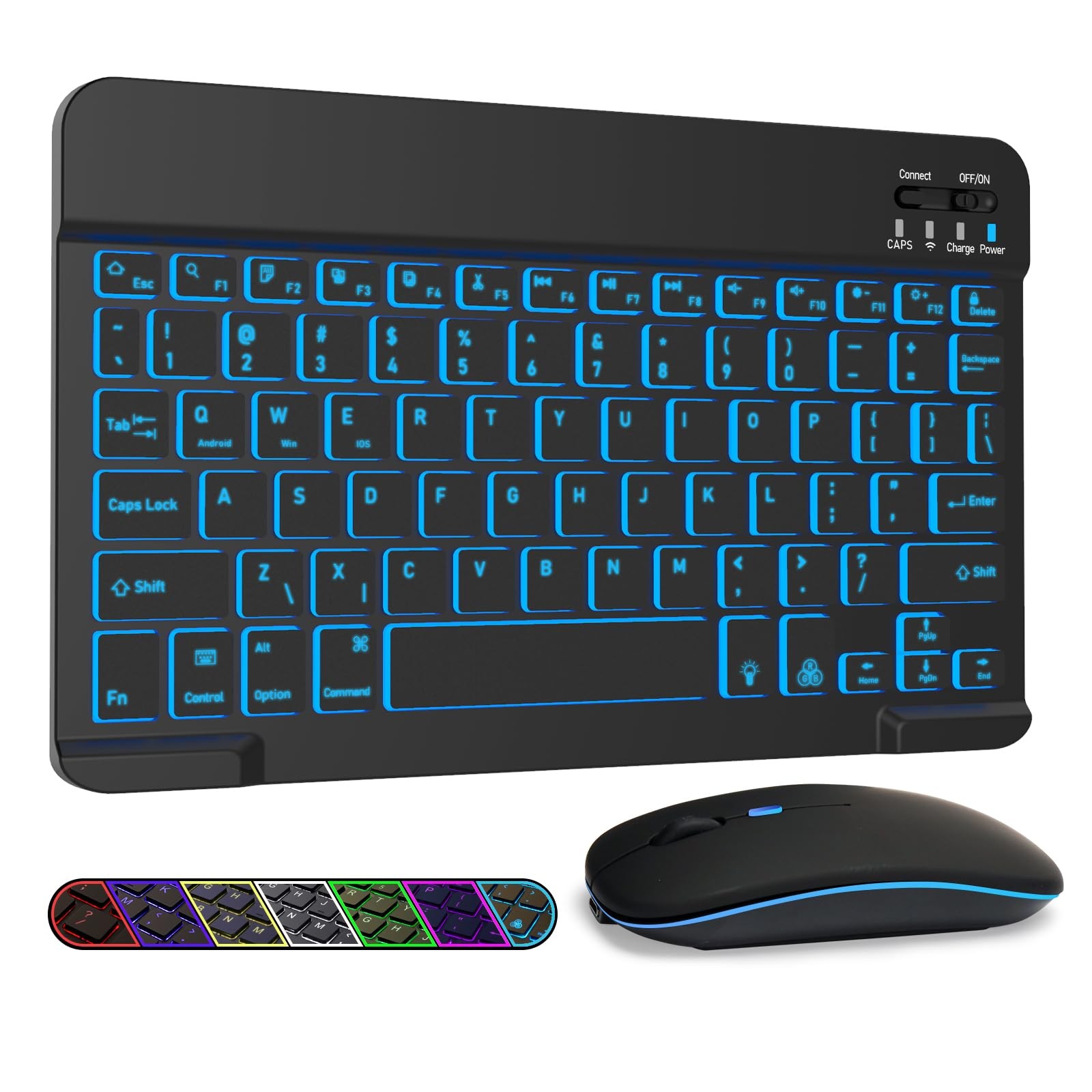
LAMA 7 Colors Backlit Bluetooth Keyboard and Mouse Combo for iPad Pro/Air/Mini, Ultra-Slim Rechargeable Wireless Keyboard and Mouse for iPhone 15/14/13
[Broad Compatibility]: The rechargeable bluetooth keyboard and mouse combo compatible with iPad 10.2/iPad mini/iPad air/iPad pro, iPad Mini 4/5/6th gen, iPad Air 10.5/10.9, iPad 10.9/10.2/9.7 inch 5th/6th/7th/8th/9th/10th/11th gen, iPad Pro 11/ 12.9 2nd/3rd/4/5/6th generation, iPhone, Samsung Galaxy, Windows, IOS, MAC and Android operating systems. [Bluetooth mouse compatible with iPad OS/iOS 13 and above, turn on “Assistive Touch”: Setting> Accessibility> Touch> Assistive Touch] [7-Colors Backlit iPad Keyboard and Mouse]: This backlit bluetooth keyboard has 7 switchable backlight colors. It helps you to type easily in the absence of light. Built-in rechargeable lithium battery, this ipad keyboard can be easily charged with included USB charging cable. Standby time is 480hours and continuous working time is more than 20days (When used continuously for 2 hours a day), no need to replace the batteries. [Comfortable and Quiet Typing]: The keyboard adopt QWERTY layout and scissor switch structure keys, which can provide a comfortable, responsive typing experience, effectively improve your work efficiency. Silent mouse click reduces noise and will not interfere with your work environment. The wireless keyboard will automatically go into sleep mode to save energy and press any key to wake up if not used for more than 30mins. [Lightweight and Compact]: This keyboard is much lighter, smaller than traditional keyboard. The dual-mode mouse supports Bluetooth and 2.4GHz connection. You can easily carry them without taking up more space on your desk or bag. Keyboard dimensions: 25 x 15 x 0.6 cm, weight: 180g (Size: 9.84 x 5.9 x 0.24 inch, weight: 6.35ounce). Mouse dimensions: 11 x 5.8 x 2.7 cm, weight: 60g (Size: 4.33 x 2.3 x 1.04 inch, weight: 2.12ounce). [Stable Bluetooth Connection]: The keyboard and mouse adopt advanced Bluetooth chip technology to provide stable and powerful cordless connection, it’s easy to connect and easy to use. The working range up to 10m. This keyboard features volume control, previous, next, and other media hot keys. The mouse supports Bluetooth and 2.4GHz USB connection, the keyboard only supports Bluetooth connection. Specifications:
Bluetooth Keyboard Edition: Bluetooth 3.0
Without backlight:150h working time
Backlight:3h working time
Bluetooth Mouse Edition: Bluetooth 5.2
Keyboard Dimensions: 9.75 X 5.91 X 0.25 inches
Keyboard Weight: 6.1unces
Mouse Dimensions: 4.53 X 2.36 X 1.14 inches
Mouse Weight: 1.78 ounces
Operating Range: Up to 33 ft/ 10 meters
Charging Time: 2-3 hours
The keyboard only supports Bluetooth connection
How to Connect keyboard to iPad/Computer/Cellphone/Tablet?
1. Turn on the keyboard and press the "CONNECT" button.
2. When the led light flashes, the Bluetooth of the keyboard is opened.
3. Select the "Bluetooth Keyboard" for pairing.
4. The Bluetooth will be connected automatically.
The mouse supports Bluetooth and 2.4GHz USB connection Note: The Bluetooth Mouse only compatible with iPad OS/iOS 13 and above. So you need to update the system of your ipad and iphone to iPad OS/iOS 13 and above, and turn on “Assistive Touch”: Setting> Accessibility> Touch> Assistive Touch, then connect the mouse.
How to connect Bluetooth mouse:
1: Turn on the power ON/OFF, switch to Bluetooth.
2: Then Turn on the Bluetooth switch of your tablet or mobile phone, and search for Bluetooth mouse.
3: Click the Bluetooth mouse on tablet phone or other devices to connect to your device.
How to connect 2.4GHz USB mouse:
1: Turn on the power ON/OFF, switch to 2.4G.
2: Then insert the USB receiver into the USB port of the notebook or computer, and then you can use it.
Package Included:
1x Bluetooth Keyboard
1x Dual Mode Mouse (Bluetooth+2.4GHz)
1x Charging Cable Bluetooth mouse only compatible with iPad OS/iOS 13 and above.
Shipping
All U.S. orders include complimentary shipping, and free shipping is also available to select international locations(see the Shipping section of the listing for destination-specific details).
The stated handling time appears at the top of the listing page.
Orders are shipped via major carriers based on the most appropriate service for the shipment.
Storepickup is currently not offered.
Where applicable, combined international shipping options may be provided.
Return
- You can return a product for up to 30 days from the date you purchased it.
- Any product you return must be in the same condition you received it and in the original packaging. Please keep the receipt.
Payment
We accept payments.
response
Customer satisfaction is our priority.
If you experience any issue with your order, please reach out to us directly, and we will work promptly to resolve it to your satisfaction.
Contact Us
If you have any queries, please contact us via . We usually respond within 24 hours on weekdays.
Please visit our store to check out other items for sale!
Thank you for shopping at our store.