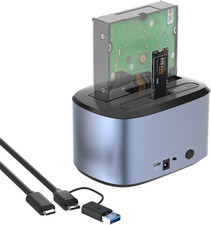
Features:
1. Support maximun capacity up to 2x16TB.
2. Support UASP accelerated transfer protocol.
3. Automatic replication of HDD or SSD (clones from Source Disk A to Target Disk B) at a click of the button.
4. Use the dedicated DC power adapter certified by PSE.
5. Plug and play. No software, drivers or complicated installation required.Instructions on How to Connect the Dock to the Computer:
1). Please unplug the DC power adapter to make sure that the power is off before starting.
2). Insert HDDs/SSDs into the slots vertically and slowly until them stick.(One HDD/SSD is also supported)
3). Connect the power adapter and turn the "ON-OFF" switch on.
4). Connect the USB cable to the computer then you can use it as your computer's external hard drive.
How to Operate Offline Clone Function:
ѧ Please unplug the DC power adapter to make sure that the power is off before starting.
ѧ Insert Source Disk into hard drive bay A, then insert Target Disk into hard drive bay B.
ѧ Make sure the USB cable is disconnected from computer.
ѧ Connect the power adapter and turn the"ON-OFF" switch on.
ѧ Hold the CLONE button for about 3 seconds, when all leds turn on, the clone progress will start.
ѧ Four lights (25%, 50%, 75%, 100% ) will turn solid blue when the cloning process is completed.
ѧ Finally turn the "ON-OFF" switch off, disconnect the power adapter and eject your drives.
Tips for Offline Clone:
- The capacity of target disk must be larger than the source disk.
- Please confirm that your source drive and target drive can both work properly.
- Please connect the 12V power adapter to ensure a stable power supply for transmission.
- To avoid data transfer errors, overheating and damage to the device, please make sure that there are no faulty driver cells.
- To avoid data loss, do not remove or insert drives when one drive is working in the docking station. Please power off the dock before removing.
- Please confirm the target drive have no data. If you have existing data on the target drive, the cloning process will
eliminate your target drive's data. Because the target drive will be cloned to be the same as the source drive, partition, format
and data are the same too.
We Care For You - This adapter features a light weight, perfect for the occasion of home office, watching movies, entertainment etc.What you will get: 1 x USB 3.0 Dual Bay Docking Station, 1 x USB-B to USB-A Cable, 1x Power Adapter 12V/3A,
1 x USB-A to USB-C Adapter, 1 x Quick Start Guide. 1-Year worry-free warranty (extra 6 months for registered members) and
life-long friendly customer service and technical support.
USB-C(20Gbps), M.2 SSD 2280/2260/2242/2230, 2x 4TB
WAVLINK Dual M.2 SSD Enclosure with Offline Clone
The M.2 dual-bay SSD enclosure is a convenient and fast storage solution designed to provide users with an efficient data migration
and backup experience. The box has a unique design and supports dual bays with M.2 interface, allowing users to connect two
M.2 SSDs at the same time. The transfer rate is up to 20Gbps, using the USB-C to C data cable of USB3.2 Gen2, you can quickly
transfer pictures, videos, etc. The one-click offline cloning function provides users with a convenient way to copy data,
which saves users valuable time and is especially suitable for scenarios that require frequent backup or upgrade of storage devices.
One-Button Offline Clone
Before installing the SSD, you must clearly check the specified models of the source disk and target disk,
and the capacity must be larger than the source disk; otherwise, the cloning task will not start normally.
Detail & Design
Metal shell, sliding cover design, no tools required, easy to disassemble and install; equipped with ventilation holes on the side for heat dissipation.
Compact & Portable
Length, width and height - 118.1 x 73.25 x 15.78mm /4.65 x 2.88 x 0.62in, weight 132.7g, lightweight and compact, easy to store and take out for office use.
LED Indicator
The blue progress indicator light only lights up when the cloning task is in progress; the blue work indicator light only lights up when data is read.
How to Install the SSD?
① Push the cover in the direction of the arrow to open the top lid of the Enclosure.
② Insert the SSDs into the slots.
③ Tear off the protective films on both sides of the two thermal silicone pads, and stick them on two SSDs respectively.
④ Reassemble the top lid in the direction of the arrow.
⑤ Connect the USB-C cable to the Host.
⑥ Finally, plug it in and it’s ready to ST348
2.Ports: 1 x DC IN Port, 1 x USB-C Port
3.Button: 1 x Offline Cloning Key
4.Status LED(Blue): 1 x Source, 1 x Target
5.Offline Cloning Indicator(Blue): 25%, 50%, 75%, 100%
6.Power Adapter: DC 5V/4A
7.Unit Dimensions: 118.1 x 73.25 x 15.78mm /4.65 x 2.88 x 0.62in (L x W x H)
Compatibility
Systems: Microsoft Windows 10/11; Mac 10 or later; Chrome OS; Linux; Android; Harmony OS; iPad OS; iOS
Devices: Computers with USB-C or A ports that support data transmission; mobile phones and tablets with USB-C ports.
SSD: Support M and B+M key PCIe NVMe(target disk) and AHCI(source disk) in sizes of 2230/2242/2260/2280; not support SATA or mSATA SSDs.
What’s in the Package?
- 1 x USB-C 20Gbps Dual M.2 SSD Enclosure with Offline Clone
- 1 x USB-C to USB-C with USB-A Cable
- 2 x Thermally Conductive Silicone Pad
- 1 x DC 5V/4A Power Adapter
- 2 x Silicone Buckles
- 1 x Quick Start Guide
Note:
- Supports OTG mobile phones to read and write USB peripherals and SSD.
- Please start cloning after disconnecting the data connection from the computer.
- The target disk capacity must be larger than the source disk. Please check your SSD before installation.
- Compatible with NVMe and AHCI, not suitable for SATA or mSATA interfaces. Please confirm your hard drive type before purchasing.
USB-C(10Gbps), 2.5"/3.5" SATA HDD/SSD/M.2 NVMe, 8TB +18TB
Dual-Bay Flexibility - With two slots, you’re no longer limited to a single drive. Mix capacities, balance speeds,
or separate system storage from data – all without compromise. The dual‑bay design gives you the freedom to configure or
clone drives on the fly. Whether you need massive storage, redundant backups, or a high‑performance working set,
dual bays adapt to your workflow.
10Gbps High-speed - With true USB 3.2 Gen 2 support, this enclosure delivers up to 10Gbps of data transfer–
fast enough to handle 4K video editing, large database transfers, or game library backups. No more waiting around for file copies;
just plug in and experience transfer rates that keep up with your workflow.
Offline Clone - Built-in offline clone function supports one-to-one full disk duplication without a computer. It enables data copying between
M.2 NVMe drives and 2.5"/3.5" SATA drives in both directions. Free from PC limitations, it delivers stable and high-speed data replication.
You can easily migrate all contents to a new drive, protect your valuable data, and simplify hard drive upgrades and file backup tasks.
Wide Compatibility - Fully compatible with a wide range of hard drive types and form factors. Supports M.2 NVMe SSDs in 2230, 2242, 2260,
and 2280 form factors, as well as standard 2.5-inch and 3.5-inch SATA HDDs and SSDs. Seamlessly compatible with Windows, Mac,
and Linux systems, making it ideal for everyday storage, backups, and hard drive upgrades.
Aluminum Alloy Shell - Made from high-quality aluminum alloy, it offers robust protection and excellent heat dissipation.
The durable casing is not only scratch-resistant but also effectively protects the hard drive from everyday bumps and damage,
while featuring a stylish metallic finish.
Specification
- HDD/SSD Supported: M.2 SSD,2.5"/3.5" SATA HDD/SSD'
- HDD/SSD Bay: 2 bays
- External Port: Type-C
- Material: Aluminum alloy shell + plastic middle bracket
- Function: 1:1 offline clone, offerirectional clone (NVMe to 2.5"/3.5" SATA, 2.5"/3.5" SATA to NVMe), date transmission
- Speed: USB3.2 Gen2 x1, SATA 6Gbps, NVMe 10Gbps
- Size: 189 x 109.5 x 35mm/7.44 x 4.31 x 1.38 inches/0.620 x 0.359 x 0.115 ft
In the Box
1 x M.2 NVMe & 2.5"/3.5" SATA HDD/SSD Dual-Bay Enclosure
1 x Power Adapter
1 x USB-C to USB-C Cable
1 x USB-C to USB-A Cable
1 x Silicone Thermal Pad
1 x Aluminum Sheet
1 x Screwdriver
4 x Non-Slip Silicone Feet
3 x Silicone Screw Buckles
9 x Small Screws (1 backup screw)
5 x Medium Screws (1 backup screw)
1 x Quick Start Guide
System Requirement
- Windows
- Mac OS
- Linux
USB4 (40 Gbps), M.2 NVMe 2230/2242 /2260/2280, 2x 8TB
WAVLINK USB4 PCIe NVMe Dual SSDs Enclosure-Speedy USB4 Data Transmission Dupulicator!
The RapidFire U4D features two M.2 SSD slots for swift computer storage expansion, meeting growing capacity demands.
It offers easy-to-use, highly effective offline cloning, OTG functionality for mobile phone data access, and a blazing-fast 40Gbps
USB4 interface ensuring speedy, stable transfers. The read speed can be up to impressive 3300MB/s, and the write speed can be 3000Mb/s.
A protective aluminum case safeguards internal SSDs, while efficient heat dissipation maintains optimal temperatures for extended hard drive life.
One-Click Offline Clone
Featuring offline clone function, this enclosure can achieve seamless data migration and system upgrade,
freeing you from the hassle of system and software reinstalltion.
Lightning-Fast Data Transfer
The enclosure uses USB4 technology, providing speedy 40Gbps data transfer, transmitting files in seconds.
The read speed can achieve remarkable 3300MB/s, and the write speed reaches to impressive 3000MB/s.
8TB/16TB Capacity for Storage
This PCIe NVMe enclosure supports 2 slots, up to 8TB per drive or 16TB in Raid 0,
an ideal choice for quick storage expansion and fast transfer.
360° All-Round Heat Dissipation
A powerful cooling system is required during device operation. RapidFire U4D features heat dissipation airholes,
built-in fan, and aluminum-alloy housing, adopting a combination of measures to keep components safe and effective.
Universal Compatibility
Offering broad compatibility, this PCIe NVMe SSD enclosure is designed for 2230/2242/2260/2280-sized M-key and M&B key
connector NVMe SSDs. It's also plug and play, supporting most devices on the market, like MacBook Pro/Air, iPad Pro,
and Dell XPS. Some common systems like Windows, macOS, iOS, and Android are also applicable to this device.
Professional ASM2464PDX Chip
The ASM2464PDX chip enables high-speed USB4 data transfer. With its firmware, the chip also handles S.M.A.R.T. queries and
TRIM commands between your computer and the connected SSD. This ensures these key drive management functions work properly
in USB4 enclosures, maintaining drive health and performance as if the drive were plugged directly in.
Lightweight and Portable Design
This enclosure is 1.6 x 5.0 x 1.7 inches in size, and 176g in weight. Compared with other devices, its convenient form
factor makes it effortless to carry, offering reliable high-speed storage wherever you work.
Phone OTG Supported, User-Friendly Function
With phone OTG supported, this SSD enclosure provides a super-speed, large, and portable external storage solution for your phone.
This function largely breaks the storage limit of the phone and significantly improves the effectiveness of data transfer.
Warm Tips
- When using the offline clone function, the source and target SSD should be plugged into corresponding slots respectively.
- The capacity of the target SSD must be larger than or equal to that of the source SSD.
- During offline clone, the target SSD will be formatted. Please backup your important files before cloning.
- About the offline clone, for Windows users, connect the enclosure with two SSDs to the computer. One disk partition will be displayed,
while the other remains offline. To read both SSDs simultaneously, please set the offine drive to online in "Disk Management".
- About the offline clone, for Mac users, connect the enclosure with two SSDs to the computer. One disk will be displayed,
while the other remains offine. To read both SSDs simultaneously, please mount the offine drive in "Disk Utility".
Features
- Supports two M.2 M-Key slots, allowing simultaneous insertion of two PCle NVMe SSDs for quick expansion.
- Offline cloning function allows fast and accurate cloning of original disk data to the target disk,eliminating the transmission process.
- Supports mobile OTG function, enabling easy reading and writing of data from mobile devices to the hard disk.
- USB-C interface with a transfer rate of up to 40Gbps, compatible with Thunderbolt 5/4/3, USB4/3.2/2.0 computers.
- A single PCle 4.0 drive supports a maximum sequential read speed of 3300MB/s and a maximum seauential write
speed of 3000MB/s. If you use PCle 3.0 SSD, the performance will be limited.
- Effcjent heat dissipation desian ensures proper temperature control during prolonged usage.
In the Box
- 1 x USB4 PCIe NVMe Dual SSDs Enclosure
- 1 x USB-C to USB-C 40 Gbps Data Transmission Cable
- 1 x USB-C to USB-C PD Charge Cable
- 2 x Thumb Screw
- 1 x PD Power Adapter
- 1 x Quick Start Guide
System Requirements
- Microsoft Windows & Apple Mac OS
- Thunderbolt5/4/3,USB4/3.2/2.0 computers
- Only compatible with M.2 M-Key and M&B-Key connector
Specification
Model: RapidFire U4D
Size: 1.6 x 5.0 x 1.7 inch
Weight: 176g
Packing List: 1 x USB4 PCIe NVMe Dual SSDs Enclosure,
1 x USB-C to USB-C 40Gbps Data Transmission Cable, 1 x USB-C to USB-C PD Charge Cable,
2 x Thumb Screw, 1 x PD Power Adapter, 1 x Quick Start Guide