 When you click on links to various merchants on this site and make a purchase, this can result in this site earning a commission. Affiliate programs and affiliations include, but are not limited to, the eBay Partner Network. When you click on links to various merchants on this site and make a purchase, this can result in this site earning a commission. Affiliate programs and affiliations include, but are not limited to, the eBay Partner Network.
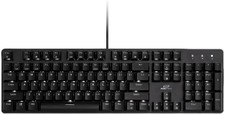
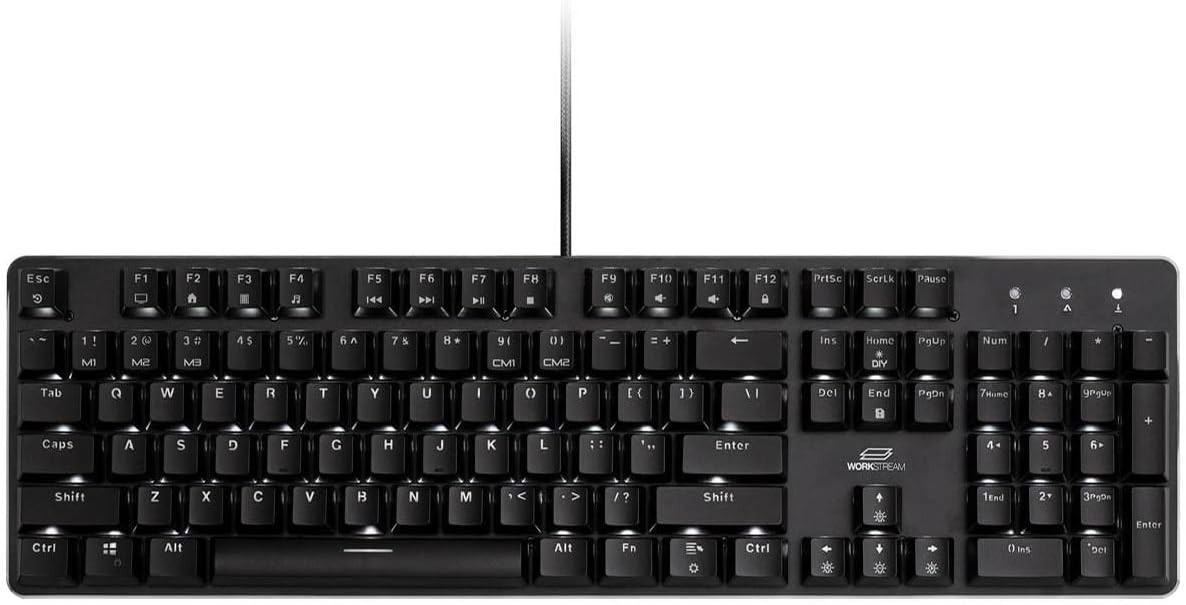
The Workstream by Monoprice Full-Size Mechanical Keyboard with Kailh Box Brown switches (Model 42111) represents a calculated intersection between hardware engineering and corporate ergonomic styling. Developed under Monoprice’s professional-grade "Workstream" line, this peripheral is purposefully designed to bridge the gap between high-performance gaming mechanical keyboards and austere corporate office environments. Rather than adopting the aggressive aesthetics, intense RGB arrays, and plastic constructions typical of mass-market budget keyboards, this device focuses on structural rigidity, premium switch architecture, and functional illumination. By utilizing an integrated aluminum top plate, premium dust-resistant box switches, and a complete 108-key layout, the Model 42111 delivers a highly specialized, tactile data-entry tool optimized for high-volume typists, programmers, data analysts, and modern office personnel. Structural Integrity and the Aluminum Top Plate: The defining physical attribute of this keyboard is its structural top plate. Fabricated from a single sheet of aircraft-grade brushed aluminum, this upper housing functions as both an aesthetic centerpiece and a structural load-bearing frame. In standard membrane keyboards—and even mid-tier mechanical variants—switches are often mounted into flexible plastic matrices or directly onto thin fiberglass printed circuit boards (PCBs). This flex absorbs energy during rapid typing, resulting in a spongy key feel and structural deck deformation over time. The aluminum plate on the Workstream keyboard solves this structural vulnerability by ensuring absolute rigidity. The Kailh Box Brown switches are mounted directly through precision-cut square cutouts in this metal plate before being soldered onto the underlying multi-layer PCB. When a user presses a key and bottoms out, the downward kinetic force is met with an immediate, unforgiving stopping point provided by the aluminum substrate. This lack of deck-flex delivers two key operational benefits: Tactile Consistency means every switch across the 108-key layout feels identical, whether it is in the center of the home row or on the outer edges of the numeric pad; Torsional Rigidity means the frame resists twisting forces completely, remaining completely true to prevent long-term warping of the internal electronics if lifted from one corner or subjected to uneven pressure. Visual Aesthetic and Footprint: The visual language of the Workstream collection relies heavily on understated professionalism. The aluminum top plate is finished with a deep charcoal or space gray anodized coating, featuring a subtle vertical brushed texture that diffuses ambient light rather than reflecting it. This matte metal surface resists fingerprints and oil transfers much more effectively than polished or bead-blasted alternatives, making it remarkably low-maintenance over extended deployable lifecycles. The lower half of the case is composed of high-density injection-molded ABS plastic, structural-ribbed internally to deaden lower-frequency resonance. The physical edge profile utilizes a space-saving bezel configuration. By eliminating excess plastic around the perimeter, Monoprice minimized the desk footprint of this full-size keyboard, allowing users to place their mouse closer to their natural shoulder width, which helps reduce long-term muscular strain. Ergonomic Angling and Base Mechanics: Flip open the underside of the chassis, and you will find an intentionally designed base plate. The keyboard features a natural, integrated rake angle of approximately 4 to 5 degrees when lying flat. For users demanding a steeper typing angle to match specific wrist rests or desk heights, the rear of the case features heavy-duty fold-out feet. These feet deploy with a reassuring snap and are capped with high-durometer, non-slip rubber boots. Combined with the heavy front rubber pads mounted directly to the underside chassis base, the keyboard utilizes its high structural mass—afforded by the internal metal plate—to lock itself firmly onto wood, glass, or composite desk mats. It resists sliding or shifting even during aggressive, high-velocity typing sessions. Switch Technology: The Kailh Box Brown Engineering: While standard mechanical keyboards often rely on generic clones of traditional Cherry MX switch designs, Monoprice chose to outfit the Model 42111 with genuine Kaihua (Kailh) Box Brown mechanical switches. This selection significantly elevates the keyboard's durability, tactile response, and acoustic suitability for professional work clusters. The Architectural Anatomy of a "Box" Switch: Traditional mechanical switches feature a cross-shaped stem that slides up and down within an open-to-the-air top housing. This design leaves the delicate copper leaf contacts inside highly vulnerable to airborne contaminants like dust, dead skin cells, clothing fibers, and micro-spills. Kailh's revolutionary "Box" architecture fundamentally reimagines switch survival mechanics. The stem of the switch is surrounded by a continuous square perimeter wall. This outer wall acts as a shielding barrier that closely clears the inner edges of the switch's top housing. As the key is depressed, this box wall pushes contaminants out of the way, preventing foreign matter from descending into the internal chamber. Internally, the structural magic continues. Unlike a standard switch where the plastic stem directly rubs and bends an exposed metal leaf to close the circuit, the Kailh Box design isolates the electrical contacts inside a secondary, completely sealed internal plastic box. Inside this mini-enclosure sits an IP56-rated gold-plated contact leaf. The stem pushes a small, self-lubricating green plastic pusher rod that extends through a tiny, tightly toleranced rubber seal into the isolated chamber to activate the contacts. This dual-zone isolation prevents corrosion, oxidation, and particle build-up, giving the switch an exceptionally long lifespan of 80 million keystrokes—a 60% increase over standard 50-million-cycle mechanical variants. Actuation Dynamics and Tactile Profiles: The Kailh Box Brown is a "tactile" switch, categorized by a distinct, non-audible physical resistance point that indicates successful actuation without requiring the switch to be completely pushed down to the floor of the housing. The switch starts with an initial resistance of around 45 grams of force ($gF$). As your finger depresses the key, the force curve rises rapidly to a peak tactile force of approximately 60gF at a shallow depth of just 1.1mm. Once your finger pushes past this distinct, crisp "bump," the resistance drops off immediately to 50gF. The switch electrically registers the keystroke (actuates) at exactly 1.8mm of downward travel. The switch completes its full downward path at 3.6mm with a terminal bottom-out force of roughly 60gF. Compared to standard Cherry MX Brown switches, which feature a long, soft, and sometimes "scratchy" or mushy tactile bump, the Kailh Box Brown offers a much sharper, cleaner, and faster tactile event. The square box stem also eliminates horizontal key wobble. When your fingers rest on the home row, the keycaps exhibit virtually zero side-to-side slop, providing a secure, precise centering feel that noticeably boosts typing confidence and typing speeds over long work hours. Acoustic Engineering for the Corporate Office: A common hurdle preventing mechanical keyboards from being used in corporate open-office layouts is noise pollution. Clicky switches (like Blues) create disruptive high-frequency sound waves that echo across office walls. The Kailh Box Brown switch provides a solid, professional acoustic profile. Because it relies on a smooth internal pusher rod and a rounded tactile leg rather than a free-floating click-jacket, it generates no high-frequency click sound upon actuation. The acoustic signature consists purely of low-frequency, deep thuds generated when the plastic stem bottoms out against the housing and tops back up against the upper casing. Because these vibrations are absorbed by the heavy aluminum top plate, the keyboard produces a hushed, deep, satisfying "thock" sound rather than a hollow, high-pitched clacking, making it perfectly acceptable for corporate cubicles and shared workspaces. Advanced Backlighting Layout and Customization Engine: To maintain its professional visual identity, the Workstream Model 42111 eschews multi-colored, distracting RGB lighting animations in favor of a clean, high-contrast, pure monochromatic white LED backlighting matrix. This system is engineered to maximize text legibility across all ambient lighting conditions—from brightly lit glass conference rooms to dimly lit late-night editing suites. On-Board Logic and Firmware Mapping: The backlighting is entirely controlled via the keyboard's internal micro-controller unit (MCU), requiring no bloated, resource-heavy corporate software packages to be installed on the host computer. All lighting adjustments, brightness levels, and profile modifications are executed via hardware-level Fn key combinations, ensuring seamless cross-compatibility across locked-down corporate enterprise machines where user installation privileges are strictly prohibited. Pre-Programmed Lighting Configurations: The firmware contains 13 distinct, pre-baked lighting modes that users can cycle through using the Fn + App key command. These modes span functional static illumination, subtle dynamic patterns, and localized lighting arrays engineered for specific computing workflows. Full Static Luminescence illuminates the entire 108-key deck evenly, with brightness adjustable across multiple steps using Fn + Up/Down Arrows to prevent eye fatigue. Directional Reactive Modes cause lighting to fade or ripple outwards only from the keys currently being struck, providing an elegant, interactive visual response loop that doesn't overwhelm peripheral vision. Localized Zone Illuminations utilize hardcoded geometric maps that illuminate only specific clusters of keys; for example, Fn + 1 isolates illumination exclusively to the W, A, S, D cluster and the four hardware arrow keys, while Fn + 3 illuminates only alphanumeric letters and direction keys, casting the surrounding function rows and numeric pads into darkness to focus the user's attention entirely on prose text or code entry. Deep Customization via On-Board Recording: For specialized enterprise software suites, industrial control terminals, or complex accounting applications where a user needs specific macro shortcuts visually segregated, the keyboard features an independent, non-volatile memory layout capable of storing two entirely custom user-created backlighting profiles (CM1 and CM2). To record these arrays, the user selects the profile via Fn + 9 or Fn + 0, enters editing mode by hitting Fn + Home, taps any key sequentially to toggle its individual LED light state on or off, and saves the final selection by pressing Fn + End. This hardware-level custom layout mapping allows users to quickly build bespoke visual layouts, highlighting only the modifier keys, function calls, or macro locations required for specialized enterprise tools. Because these maps are written directly to the keyboard's physical EEPROM chip, the custom illumination profiles remain saved in the hardware even if the keyboard is unplugged, moved to a completely different office, or hot-swapped between different computer setups. Keycap Profiles, Layout Architecture, and Interface Metrics: The human-to-machine interface points of the Workstream Model 42111 are configured to conform to traditional computing standards while incorporating structural optimizations that maximize typing longevity. Full-Size 108-Key Extended Layout: The keyboard utilizes a traditional, unmodified ANSI US Full-Size 108-key layout. Unlike TKL or ultra-compact 60% keyboards that omit crucial functional zones to save physical space, the Model 42111 provides a complete desktop interface, including a standard Alphanumeric Cluster for typing, a dedicated Navigation Cluster (Insert, Delete, Home, End, Page Up, Page Down), physically isolated Inverted-T Arrow Keys for blind string navigation, a full 10-Key Numeric Pad mandatory for financial modeling, and four additional utility keys positioned above the numpad for instant access to critical OS utilities. Keycap Ergonomics and Legend Architecture: The keycaps are molded using an OEM profile, featuring an elegant, cylindrical top scoop that conforms comfortably to the natural curvature of human fingertips. The row profiles are sculpted across a progressive curved plane: the lower rows rake upwards, the middle home row sits flat, and the upper function layers tilt gently downward toward the user's hands. This staggered alignment minimizes the reach distance for your fingers, reducing knuckle extension strains during extended typing shifts. The legends (text characters) are applied using a modern, clean, non-stylized sans-serif font. This design maintains a strictly corporate aesthetic, replacing the blocky, aggressive "gamer" typography found on typical mechanical keyboards with highly readable, thin-line text. The legends are created via a translucent molding method, allowing the underlying white LEDs to shine directly through the characters for clear, shadow-free legibility in dark environments. Firmware Intelligence, Media Controls, and OS Integration: Beneath the physical aluminum and plastic hardware sits an exceptionally fast integrated micro-controller capable of handling high-speed data transmission and advanced input recognition. Advanced Input Processing: N-Key Rollover and Anti-Ghosting: Standard office keyboards often utilize a cheap matrix circuit design that limits them to registering only 2 or 3 simultaneous keypresses. If a user typist strikes keys too quickly or holds down multiple modifier keys while inputting data, the keyboard can lock up, dropping inputs or creating "phantom" keystrokes (ghosting). The Workstream Model 42111 is engineered with Full N-Key Rollover (NKRO) and 100% Anti-Ghosting across its entire USB connection. Every single switch on the 108-key layout features its own dedicated fast-switching blocking diode soldered directly to the multi-layer circuit board. This architecture allows the internal processing chip to scan, read, and transmit the electrical status of every single key simultaneously. No matter how fast you type, every single input is processed in the exact microsecond order it was struck, preventing dropped inputs during high-speed data entry. Integrated Secondary Function Layer: To expand efficiency without expanding the physical footprint, the Model 42111 integrates a comprehensive secondary command layer accessed via the hardware Fn modifier key. Please note: this keyboard is listed "as is" and was not tested, therefore there may be further issues not listed. Keyboard may have non functional keys. This layer gives users direct, one-handed control over system operations and media playback without needing to break workflow to move the mouse. System Navigation Shortcuts provide instant utility: Fn + F1 opens "My Computer" File Explorer, Fn + F2 returns the browser to the default Homepage, Fn + F3 launches the system Calculator utility (an invaluable shortcut for quick calculations), and Fn + F4 launches display layout configurations or search functionality. Media Playback Controls mapped from Fn + F5 through Fn + F8 control media streams, allowing users to instantly skip tracks, repeat audio recordings, play/pause video presentations, or stop background media entirely. The Audio Auditing Subsystem across Fn + F9 through Fn + F11 directly controls the master volume mixer, allowing users to Mute, Decrease Volume, or Increase Volume on the fly during incoming digital calls. System Lock Mechanics add operational security: Fn + F12 instantly locks all keys on the keyboard surface for physical cleaning, Fn + Windows activates a strict "Win-Lock" mode disabling the Start menu key to prevent accidental menu pop-ups during fullscreen presentations, and holding Fn + ESC for 5 seconds triggers a hard factory default reset, clearing the on-board EEPROM memory and resetting all configurations to factory specifications. Connectivity Protocols and Technical Specification Matrix: The keyboard relies entirely on a hardwired digital connection, ensuring zero input latency, absolute immunity to corporate wireless RF interference or eavesdropping, and zero battery management overhead. The high-grade, copper-core USB cable is permanently anchored into the rear center wall of the housing, utilizing a robust injection-molded strain relief boot to prevent cord failure from accidental pulling forces. It uses a standard USB Type-A termination plug, offering instant plug-and-play compatibility with all modern operating systems—including Microsoft Windows, macOS, Linux, and ChromeOS—without requiring manual driver updates or background cloud software synchronization. To review the technical specs under model number 42111 (Workstream Collection), it features a full-size extended form factor with genuine Kaihua Kailh Box Brown switches, delivering a tactile, non-clicky, low-acoustic profile. The actuation travel metric is $1.8\text{ mm} \pm 0.4\text{ mm}$ with a total travel depth of $3.6\text{ mm} \pm 0.3\text{ mm}$ and a peak tactile resistance of $60\text{ gF} \pm 15\text{ gF}$. It possesses an 80 million continuous keystroke lifespan rating, an anodized brushed aluminum top plate, a monochromatic true-white LED matrix offering 13 hardware presets and 2 custom EEPROM profiles, a full N-key rollover matrix protocol with 100% anti-ghosting, a wired USB Type-A plug-and-play interface connection, and 12 multimedia and OS shortcuts via the integrated logic layer. Ideal Deployment Target Demographics: The specific mix of premium structural hardware and professional, understated styling makes the Workstream Model 42111 ideal for several core professional user groups. Financial Specialists and Data Entry Clerks benefit from the heavy-duty integrated 10-key numeric pad, matched with the instant-launch calculator shortcut and crisp tactile response of the Box Brown switches, creating an ideal workspace for high-velocity spreadsheet building and data analysis. Software Engineers and Programmers heavily benefit from the structural stiffness of the aluminum plate and the stable, wobble-free profile of the box stem design, where the ability to use the on-board memory to map custom LED patterns over specific coding shortcuts or debugging keys significantly optimizes development environments. Corporate Environments with Open-Floor Layouts gain a major upgrade because the Kailh Box Brown switches generate a quiet, low-frequency sound profile rather than a sharp, high-pitched clacking click, allowing individuals to enjoy the satisfying feel of a premium mechanical layout without disturbing nearby coworkers. Heavy Typists Seeking Ergonomic Support find solace in the combination of an integrated rake angle, sculpted keycap steps, and a clean, responsive tactile bump that helps prevent finger bottoming-out shock, noticeably reducing hand fatigue over long, intense daily writing sessions.  |
|