 When you click on links to various merchants on this site and make a purchase, this can result in this site earning a commission. Affiliate programs and affiliations include, but are not limited to, the eBay Partner Network. When you click on links to various merchants on this site and make a purchase, this can result in this site earning a commission. Affiliate programs and affiliations include, but are not limited to, the eBay Partner Network.
Details about AGPTEK 7 in 1 External CD/DVD Drive for Laptop Portable USB 3.0 Slim DVD Burner - Incompatible devices and discs:This CD/DVD drive cannot play Blu-ray discs. And it is not compatible with cars, trucks, TVs, projectors, smartphones, iPhones, tablets, iPads, PS4/5, Nintendo Switch, Xbox, surface (some models), Chromebooks and Ubuntu OS.
- Open the tray:For Windows, simply press the button on the front of the drive to eject the tray. For mac OS, the drive button is limited by mac OS and cannot open the tray, right-click the icon on the desktop and select "Eject", or select "File" - "Eject". If the device fails and cannot be opened, there is a reset hole next to the pop-up button, a pin can be used to eject the tray through the reset hole.
- Use it on Windows:1.Take out the USB data cable built into the back of the drive. 2.Plug the USB A or Type C connector into your computer's USB port (not through a USB hub). 3.Your computer will recognize the drive. 4.Set the region code to number 1 to play US or Canadian DVDs (CDs do not have region code). 5.Insert your CD or DVD. 6.Use a media player (such as Windows Media Player, VLC Player, etc.) or burning/ripping software to read/write the disc.
- Use it on Mac OS:1.Click “Finder” , select “Preferences” , make sure “CDs, DVDs, and iPods” is selected. 2.Take out the USB data cable built into the back of the drive. 3.Plug the USB A or Type C connector into your mac/macbook/imac USB port (not through a USB hub). 4.Insert your CD or DVD. 5.Your Mac will recognize the drive, read the disc and an icon will appear on the desktop. 6.Use a media player (such as Apple Music, iTunes, DVD Player, etc.) or burning/ripping software to read/write the disc.
- Setting region code in windows :1.Right-click the "DVD-RW Drive" icon and select "Properties". 2.Select the "Hardware" tab and select your CD/DVD drive. 3.Click to open the "Properties" tab at the bottom. 4.Select the "DVD Region" tab. 5.Select the correct region (e.g., USA is 1) and click "OK". (Note: You can only change the region code 4 times.)
- Ensure the drive is recognized:Insert the external optical drive into the computer. After the Windows system recognizes the optical drive, the "DVD RW Drive" icon will be displayed. The Mac OS computer will not display the device icon until the disc is placed in the optical drive and the disc is read successfully. If the computer fails to recognize the optical drive, it may be that the computer's driver is missing or the output current is insufficient.
- About data cable & power cord:1.The USB data cable is built into the bottom of the drive.(Note: The total length of the data cable is only about 10.24 inches / 26 cm.) 2.The charging cord is a separate USB cord that comes with the package. The charging cord cannot be used as a data cable alone, it must be used together with the USB data cable built into the back of the drive. 3.It's better to use the 5V charger/power bank to increase the power if your computer don't have enough power to support the external drive.(Note: For the Apple computers, you need to connect the external CD/DVD drive to the mac/macbook/imac through the USB A/C data cable first, and then connect the 5V charger/power bank to the external CD/DVD drive through the charging cord, otherwise the Apple computer will not recognize the external CD/DVD drive.)
- WINDOWS 11 Requirements:WINDOWS 11 needs a media player (such as VLC ) and a network connection.
- Reading and writing speed:1.This CD/DVD drive supports USB 3.0 and can provide data transfer speeds of up to 5Gbps. Although it has up to 8x DVD read/write speed and 24x CD read/write speed, the drive reads and writes CD/DVD discs at speeds that increase from the inner circle to the outer circle, and the starting speed is usually lower, reaching the maximum speed when reaching the outermost circle. 2.Recommended speeds (CD: Reading Speed: 24x or lower/Writing Speed: 8x to 16x; DVD: Reading Speed: 8x or lower/Writing Speed: 4x to 8x). For DVDs, slower writing speeds like 4x or 8x are often ideal to ensure data integrity, particularly for high-capacity or dual-layer discs. These speeds allow for more precise data encoding, reducing the risk of read errors in the future
How to Play a CD on a Desktop Computer Afer inserted the CD into the drive, click choose what to do with audio CDs, then Double-click your audio CD in the menu and you'll see all of the tracks appear in the center of the window. If nothing happens when you insert your disc, you can start Windows Media Player yourself. How to Back Up Computer Files to CD/DVD - Place a blank writable CD-R/RW (read/writable) or DVD-R/RW in your CD-RW /DVD-RW drive and choose Start→Documents.
- Select all files that you want to copy to disc. Right-click the files that you want and choose Copy To Folder.
- In the Copy Items dialog box, click CD-R/RW or DVD-RW drive and click Copy.
Troubleshooting Steps If your computer does not recognise this CD/DVD drive, please try the following suggestions: - Method 1: a.Use the USB-A and Type-C cables on the back of the machine to connect the laptop. (The cable comes with the package is only for current transmission, not for data transmission.) b.Move the data cable to different USB ports on your computer.
- Method 2: The power supply of the product is insufficient - Please use a 5V charger / power bank supply to supplement it.(Note: For the Apple computers, you need to connect the external CD/DVD drive to the computer first, and then connect the supplementary power supply to the external CD/DVD drive, otherwise the Apple computer will not recognize the external CD/DVD drive.)
- Method 3: Reinstall the driver: a.Press the Windows logo key + R to open the Run dialog box. b.Type devmgmt.msc in the Run dialog box, then press Enter. c.In Device Manager, expand DVD/CD-ROM drives, right-click the CD and DVD devices, and then select Uninstall. d.When you are prompted to confirm that you want to uninstall the device, select OK. e.Restart the computer. After the computer restarts, the drivers will be automatically installed.
- Method 4: WINDOWS 11 needs a media player (such as VLC ) and a network connection.
How to use an Ethernet adapter to access the Internet - 1.The ethernet adapter for laptop is plug and play on Windows 11/10/8, Linux and Mac OS, no need to install driver.
- 2.Windows 7/ Vista system: Insert the CD-ROM drive into the computer > the system will automatically pop up an installation window > click "Run RTK NIC DRIVDR INSTALLER. sfx. exe" to automatically install.
- 3.Windows XP system: Insert the CD-ROM drive into the computer > open the computer's device manager > Other devices > USB 10/100 LAN > right-click > Update driver > the installation window pops up > click Next to complete.
- Tip: After inserting the Ethernet cable, the yellow connection indicator (power) of the RJ45 Ethernet interface is always on, and after connecting to the Ethernet signal, the green signal indicator (transfer data) of the RJ45 Ethernet interface
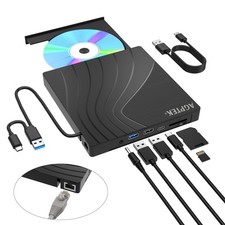
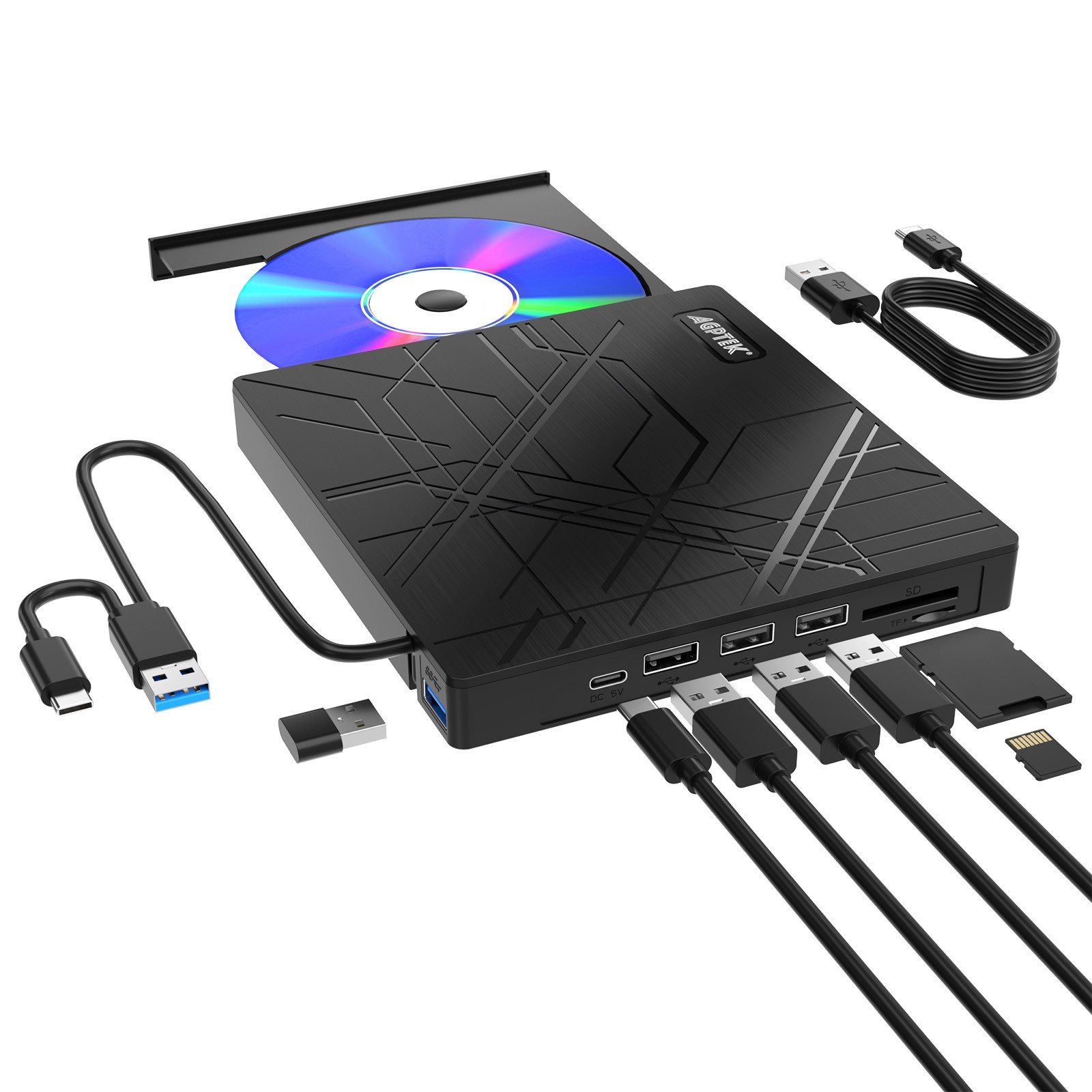
GPtEK External CD/DVD Drive for Laptops- Many modern laptops no longer have built-in CD/DVD drives, making it impossible to insert CDs or DVDs to play music, watch movies, back up data or install systems. The AGPTEK external drive is the perfect solution, plug and play with no additional drivers required. Supports CD & DVD Burning– This optical drive supports reading and writing of CD±R/RW, CD-ROM, DVD±R/RW, DVD-RAM, VCD, and SVCD. Whether you're backing up data or watching videos, this drive covers all your needs. USB 3.0 high-speed data transfer– Equipped with USB 3.0 technology, it offers a data transfer rate of up to 5 Gigabits/S (625MB/S) for faster and more stable data transfer. It is also backward compatible with USB 2.0 and 1.1. The cd drive offers Max 8x DVDR Read Speed and Max 24x CD Write/Read speed. High compatibility- This external drive is compatible with a wide range of devices, including Macbooks, iMacs, Windows laptops, desktops and more. It supports Windows 11/10/8/7/XP, Vista, Linux and Mac OS 10.6 or higher. Not compatible with in-car systems, TVs, tablets, smartphones, projectors or Blu-ray discs. Windows 11 requires media player and network. Ultra-thin and portable design- This external drive is lightweight and compact for easy portability. The embedded data cable eliminates cable clutter, making it easy to organise and use. Perfect for placing in your laptop bag. Note- If your Windows 10/11 laptop does not recognise the CD/DVD drive, please connect the extra power cable to resolve the unrecognised problem caused by insufficient power. Incompatible devices and discs:This CD/DVD drive cannot play Blu-ray discs. And it is not compatible with cars, trucks, TVs, projectors, smartphones, iPhones, tablets, iPads, PS4/5, Nintendo Switch, Xbox, surface (some models), Chromebooks and Ubuntu OS. Open the tray:For Windows, simply press the button on the front of the drive to eject the tray. For mac OS, the drive button is limited by mac OS and cannot open the tray, right-click the icon on the desktop and select "Eject", or select "File" - "Eject". If the device fails and cannot be opened, there is a reset hole next to the pop-up button, a pin can be used to eject the tray through the reset hole. Use it on Windows:1. Take out the USB data cable built into the back of the drive. 2. Plug the USB A or Type C connector into your computer's USB port (not through a USB hub). 3. Your computer will recognize the drive. 4. Set the region code to number 1 to play US or Canadian DVDs (CDs do not have region code). 5. Insert your CD or DVD. 6. Use a media player (such as Windows Media Player, VLC Player, etc.) or burning/ripping software to read/write the disc. Use it on Mac OS:1. Click “Finder” , select “Preferences” , make sure “CDs, DVDs, and iPods” is selected. 2. Take out the USB data cable built into the back of the drive. 3. Plug the USB A or Type C connector into your mac/macbook/imac USB port (not through a USB hub). 4. Insert your CD or DVD. 5. Your Mac will recognize the drive, read the disc and an icon will appear on the desktop. 6. Use a media player (such as Apple Music, iTunes, DVD Player, etc.) or burning/ripping software to read/write the disc. Setting region code in windows:1. Right-click the "DVD-RW Drive" icon and select "Properties". 2. Select the "Hardware" tab and select your CD/DVD drive. 3. Click to open the "Properties" tab at the bottom. 4. Select the "DVD Region" tab. 5. Select the correct region (e.g., USA is 1) and click "OK". (Note: You can only change the region code 4 times.) Ensure the drive is recognized:Insert the external optical drive into the computer. After the Windows system recognizes the optical drive, the "DVD RW Drive" icon will be displayed. The Mac OS computer will not display the device icon until the disc is placed in the optical drive and the disc is read successfully. If the computer fails to recognize the optical drive, it may be that the computer's driver is missing or the output current is insufficient. About data cable & power cord:1. The USB data cable is built into the bottom of the drive.(Note: The total length of the data cable is only about 10.24 inches / 26 cm.) 2. The charging cord is a separate USB cord that comes with the package. The charging cord cannot be used as a data cable alone, it must be used together with the USB data cable built into the back of the drive. 3. It's better to use the 5V charger/power bank to increase the power if your computer don't have enough power to support the external drive. (Note: For the Apple computers, you need to connect the external CD/DVD drive to the mac/macbook/imac through the USB A/C data cable first, and then connect the 5V charger/power bank to the external CD/DVD drive through the charging cord, otherwise the Apple computer will not recognize the external CD/DVD drive.) WINDOWS 11 Requirements:WINDOWS 11 needs a media player (such as VLC ) and a network connection. Reading and writing speed: - This CD/DVD drive supports USB 3.0 and can provide data transfer speeds of up to 5Gbps. Although it has up to 8x DVD read/write speed and 24x CD read/write speed, the drive reads and writes CD/DVD discs at speeds that increase from the inner circle to the outer circle, and the starting speed is usually lower, reaching the maximum speed when reaching the outermost circle.
- Recommended speeds (CD: Reading Speed: 24x or lower/Writing Speed: 8x to 16x; DVD: Reading Speed: 8x or lower/Writing Speed: 4x to 8x). For DVDs, slower writing speeds like 4x or 8x are often ideal to ensure data integrity, particularly for high-capacity or dual-layer discs. These speeds allow for more precise data encoding, reducing the risk of read errors in the
PLUG AND PLAY - No driver installation required, simply connect via USB-A or USB-C and start using immediately. WIDE COMPATIBILITY - Designed for Macbook, iMac, Notebook, Desktop PC, Windows 11/10/8/7/XP, Vista, Linux, Mac OS. Perfect for students, office, and home users. MULTI-FORMAT DISC SUPPORT - Supports CD±R/RW, CD-ROM, DVD±R/RW, DVD±R DL, DVD-ROM, DVD-RAM, VCD and SVCD formats. Read and write a wide range of CDs and DVDs without requiring additional hardware. HIGH-SPEED USB 3.0 - Transfers data up to 5 Gigabits/S (625MB/S), delivers up to 8x DVD and 24x CD read/write speeds for faster media access. BUILT-IN 2-IN-1 CABLE - Integrated USB-A and USB-C connectors eliminate need for adapters, compatible with multiple devices. COMPACT AND PORTABLE - Slim design with integrated data cable, easy to carry for travel or mobile work setups. COMPLETE PACKAGE - Includes External CD/DVD Drive *1, User Manual *1 for easy setup and reference. Terms of sales Payment Delivery details About us Contact us Payment We only accept payment transactions via our online checkout system. We don't collect your financial information. Only Pay pal ID & shipping info is required. If you are a winning buyer to complete purchase, please click on the check-out now button. You will be able to complete your payment and finalize your purchase without waiting for an email confirmation: Click "Checkout" You will be able to complete your payment and finalize your purchase without waiting for an email confirmation. After Winning an item in sale or completing a Buy-It-Now purchase, you have two check-out options: Check-Out Now! If you've already won this or another of our sales, click on the Check-Out button or click here to immediately proceed with the checkout and payment process. - Check-Out Later: Within 2 hours of the end of the sale.
- you will be notified via email that you are the winning buyer.
- There is no need to contact us to arrange payment.
- Our email will contain a link to our checkout site where you will be able to pay for your item.
- Checkout must be completed within 7 days of the end of the sale.
Our secure checkout system will give you a choice to pay with Paypal. All Paypal payments must be made thru the checkout system. Payment is required within 7 days of the end of the sale. Delivery details All of our products are shipped by UPS Ground or by USPS, depending on whichever service has the shortest delivery time to your location. - We only ship to US
- We only ship to paypal confirmed address, Please verify your paypal address is correct before you pay for the item. If you find your paypal address is different from your current address please contact us.
- Items are usually shipped 1-3 business days after payment has been received.We do not ship on weekends and holidays.
- Sellers are not responsible for service transit time. Transit times are provided by the carrier, exclude weekends and holidays, and may vary with package origin and destination, particularly during peak periods.
- International buyers are responsible for duties and customs fees.
- Tracking numbers will be sent to all customers upon package shipment.
- UPS Ground is not available for HI, AK, PR, APO/FPO. UPS only ship to USA continental address.
Remark: - Items will be shipped out in the following business days after payment has been received.
- UPS is not available for HI, AK, APO/FPO and Canada.
- International buyers are responsible for duties and customs fees.
- Transit times are provided by the carrier, exclude weekends and holidays.
Terms of sales Secure Shopping GuaranteeShopping with MamBate is safe and secure. None of our customers have ever reported fraudulent use of their credit cards as a result of shopping with us. You can be assured that the information you give us is confidential. We do not sell, rent or share information of our customers with other parties. Disclaimer:The batteries and other products supplied by our Company are [replacement for] sold for use with certain product manufacturers, and any reference to products or trademarks of such companies is purely for the purpose of identifying the manufacturers with which our products [are replacement for] may be used. Our Company and this Web site are neither affiliated with, authorized by, licensed by, distributors for, nor related in any way to these manufacturers, nor are the products offered for sale through our web site manufactured by or sold with the authorization of the manufacturers with which our products [are replacement for] may be used. Return PolicyReturns are permitted and must be initiated by the buyer within 30 days from the date of purchase. In order to return an item you must contact us to request a Return Merchandise Authorization Number (RMA). All non-defective, undamaged products are subject to a 15% restocking fee (except where prohibited by law) if returned opened or in a non-factory sealed box. There is no restocking fee for damaged or defective products. Shipping and handling fees are absolutely non-refundable. Your return must include the following or it will be rejected by our warehouse and returned back to you: - Original packaging.
- All accessories.
- Manuals, etc.
- Unexpired Return Merchandise Authorization (RMA) number for the correct product. This can be obtained by you either from our website or from our customer service people.
- RMA number written on the outside shipping box or on the return label. The RMA number must not be written on the manufacturer's product box.
Basic Return Merchandise Authorisation (RMA) Processing - If the merchandise is returned on time, in like-new condition, and conforms with the returns policy, then a replacement order will be prepared and shipped, OR the purchase price will be refunded to your PayPal account.
- Please allow up to ten days from shipment for your return to arrive at our Returns Warehouse because the delivery times vary depending upon the shipper.
- Your return will be processed by the Returns Warehouse within 5-7 business days (excluding weekends and holidays).
- Risk of loss for product being returned is yours during shipment between you, our returns center, or back to you. Title to the product being returned remains with you until acceptance by returns center.
About us Mambate US Inc, founded in April 2001, continues to excel in the electronic distribution business, following its goal to be the electronic component distributor of choice, works for providing high quality electronic products at a competitive price. MamBate Inc specializes in Laptop Batteries, Wireless Security Cameras, Wireless Baby Monitors, DVD burners, Watch Cell Phones, MP4 PMP players, Wireless Headphone, AC adapters and other related electronic products with competitive price and reliable quality. MamBate Inc emphasizes product quality. We offer 1 year warranty for all our products and also offers considerate service for our customers. If you have any inquiries or comments for our products, our store and our services, please do not hesitate to contact us. we will do our best to help you. With the excellent service from our customer service team, you can feel free to purchase. Delivery lead time is significantly shorter as our headquarters and shipping department was seated in New York. Contact us Office Hours 9:00 am - 6:00 pm Monday-Friday

|
|