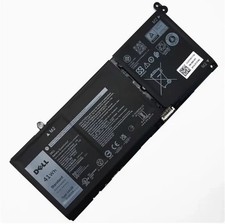
41Wh G91J0 Battery for Dell Latitude 3320 3330 3420 3520 Inspiron 3510 3511 3515 3520 3525 3530 5320 5330 5410 5415 5418 5518
🔎How to find the corresponding model of your laptop?
Method 1
Step 1: Flip the machine and look at the white label at the bottom: Model/Model: such as Inspiron 15 5580, Latitude 5420, XPS 13 9310. Make a picture to view the label MODEL position and enlarge the image
Step 2: Windows system query (available upon startup) Method 1: Settings → About (simplest) Win+I Open Settings → System → About
Step 3: Check the system model/System Model field by pressing Win+R, enter: msinfo32 → Check the system model or dxdiag → Check the system model or cmd on the system tab → Enter wmic csproduct get name
Method 2
Step1: Enter your laptop model on the Dell official website and click to view the battery model code (part number)
NOTE:The above laptops come in 3 battery models (41Wh-G91J0, 54Wh-V6W33, and 64Wh-TN70C). Please choose the appropriate battery for replacement based on the original battery model of your laptop.
Tips: If the new battery cannot be recognized during the first installation, please reinstall and check if the interface is fully connected. Discharge the new battery to 10-20% (do not discharge to 0%), then charge and cycle 3-4 times to wake up the new battery.
On Jun 15, 2026 at 20:35:08 PDT, seller added the following information: