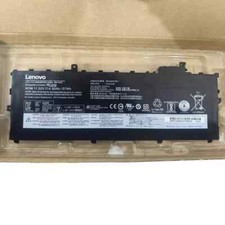
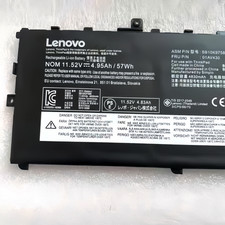
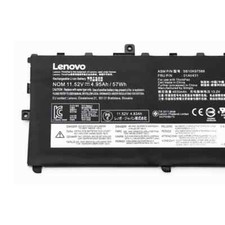
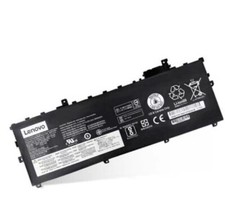
Item Specification:
Battery Type: Li-ion
Voltage: 11.58V
Capacity: 4.95Ah/57WH
Condition: Brand New
Warranty: 1 yearFast ship with a tracking NO from NY US
Compatible Part Numbers:
01AV429, 01AV430, 01AV431, 01AV494, ASM SB10K97587, FRU 01AV430, SB10K97586, SB10K97587, SB10K97588
Compatible Models:
Lenovo ThinkPad X1 Carbon 2017, Lenovo ThinkPad X1 Carbon 2018, Lenovo ThinkPad X1 Carbon G6-20KH006MGE, X1 Carbon 2018, Lenovo ThinkPad X1 Carbon 2018-20KH0025CD, Lenovo ThinkPad X1 Carbon 2018-20KH000BCD, Lenovo ThinkPad X1 Carbon 2018-20KH000HCD, Lenovo ThinkPad X1 Carbon 2018-20KH0009CD, Lenovo ThinkPad X1 Carbon 2018-20KGA0BRCD, Lenovo ThinkPad X1 Carbon 2018-20KHA02FCD, Lenovo ThinkPad X1 Carbon 2018-20KGS03900, Lenovo ThinkPad X1 Carbon G6 2018, Lenovo ThinkPad X1 Carbon 2018-20KGS03900, Lenovo ThinkPad X1 Carbon 2018 G6 KHK, Lenovo ThinkPad X1 Carbon 2018-20KH000JCD, Lenovo ThinkPad X1 Carbon 2018-20KHA005CD, Lenovo ThinkPad X1 Carbon 2018-20KHA004CD, Lenovo ThinkPad X1 Carbon 2018 G6 1HK, Lenovo ThinkPad X1 Carbon 2018-20KHA02JCD, Lenovo ThinkPad X1 Carbon 2018-20KH0027CD, X1 Carbon 2017, Lenovo ThinkPad X1 Carbon G6, Lenovo ThinkPad X1 Carbon G6-20KG0025UK, Lenovo ThinkPad X1 Carbon 2018-20KHA003CD, Lenovo ThinkPad X1 Carbon 2018-20KHA00GCD, Lenovo ThinkPad X1 Carbon 2018-20KHA000CD, Lenovo ThinkPad X1 Carbon 2018-20KHA001CD, Lenovo ThinkPad X1 Carbon 2018 G6 LHK, Lenovo ThinkPad X1 Carbon 2018-20KHA02GCD, Lenovo ThinkPad X1 Carbon G6-20KH006MGE
NOTE:
Please check your battery model before place order.
If you have any questions about the battery, just contact us by email instead of opening the case directly, we will reply will ASAP, sincerely.
-FAQ:
1.Q:why battery don't hold a charge, how to fix it?
A:this is new battery,for first use, we suggest buyer:
Remove the battery for a while
Install battery and full charge it by ac adapter
Leave charger and let the battery drain to shut off
Repeat above charging and discharging at least 2 times.
you charge the battery when power lower than 20%. If available, connect ac charger when doing computer work.
If run the battery shut down often, it will shorten the battery life.
2.Q:battery can't charge fully,how to fix it?
A: Remove the battery for a while
Install battery and full charge it by ac adapter
Leave charger and let the battery drain to shut off
Repeat above charging and discharging at least 2 times.
3.Q:Battery can't be recognised by my laptop, do i need exchange a new one,
A:we met this issue before, maybe beacuse of your laptop system, we suggest you can:
Remove all battery drivers
Remove battery
Connect laptop using AC charger, double check no battery drivers installed
Connect battery
Drivers will install automatically
Full charge the battery by ac adapter
Leave charger and let the battery drain to shut off
Repeat full charge and full discharge about 2 times.
if still not be solved, please contact us and exchange a new one.
4:Q:Battery dies suddenly at about 20%, do i need to recalibrate?
A:Kindly check the battery settngs and BIOS,do reset something,
then:
Remove the battery for a while
Install battery and full charge it by ac adapter
Leave charger and let the battery drain to shut off
Repeat above charging and discharging at least 2 times