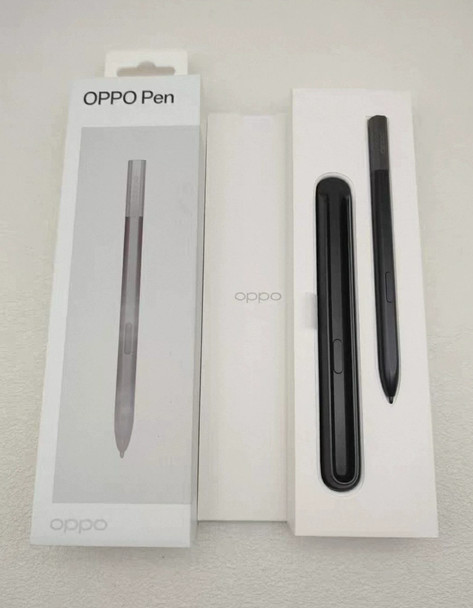
️ OPPO Pen – Active Stylus for Find N5 / N3 / N2 & OnePlus Open (Black)
Wireless Charging Case, 7 g Pressure Sensitivity, 550 g Tip Strength, Haptic response
Compatible Products
️ Not Compatible With: OPPO Pad / tablets, OPPO Find X / Reno / A series phones, or any non‑listed devices.
In The Box
- 1 × Wireless Charging Case (Type‑C input)
Product Overview
The OPPO Pen (Black) is a precision active stylus designed exclusively for OPPO Find N5, Find N3, Find N2 and OnePlus Open foldable phones.
It delivers natural writing and sketching with 7 g activation force, adjustable pressure sensitivity (up to 550 g tip strength), and optimized fountain‑pen stroke tapering. A custom dual‑injection nano tip resists screen scratching while lasting ~156,000 characters per tip (≈300 days of 500‑character daily writing). The included wireless charging case recharges the pen 1.5× via its Type‑C port and extends total standby to 12 days. OPPO’s curve‑fitting algorithm smooths strokes, blends overlapping colors, and supports multi‑layer color stacking for advanced drawing workflows.
Key Features ️ Natural Writing & Drawing
- 7 g Activation Pressure: Strokes appear instantly with light contact.
- Pressure Sensitivity (up to 550 g): Line weight varies naturally with applied force.
- Fountain‑Pen Optimization: Sharper stroke tapering mimics real ink pens; intensity adjustable in settings.
- Curve‑Fitting Algorithm: Recalculates curves for smoother lines; optimizes color blending at overlaps/junctions.
️ Durable Nano Pen Tip
- Dual‑Injection Construction: Withstands up to 550 g writing pressure without damaging screen.
- Ultra‑Long Life: Single tip writes ~156,000 characters (≈300 days @ 500 chars/day).
- 2 Replacements Included: Extend total tip life to years.
Wireless Charging & Long Battery
- Pen Battery: ≥ 4.5 hours continuous writing (haptic response off by default).
- Charging Case: Recharges pen 1.5× wirelessly; case charges via Type‑C.
- Standby Time: ≥ 12 days total (pen + case).
Creative Enhancements
- Multi‑Layer Color Stacking: Supports layered digital painting workflows.
- Edge & Junction Optimization: Reduces color bleeding and aliasing on fine details.
️ Physical Controls
- Side Button: Configurable for eraser, screenshot, or app shortcuts (set in phone settings).
️ Technical Specifications
Usage Tips
- First Use: Insert pen into case → charge via Type‑C until LED turns solid.
- Writing Feel: Enable “Fountain Pen Effect” in Settings → Pen → Stroke Style for realistic tapering.
- Tip Replacement: Use tweezer to pull old tip straight out; press new tip firmly until seated.
- Button Mapping: In phone Settings → Stylus → Shortcuts, assign side button function.
- Haptics: Toggle haptic response on if you prefer tactile response while writing/drawing.
️ Important Notes
- Device Exclusive: Does NOT work with OPPO Pad, Find X/Reno/A series, or non‑OPPO phones.
- Screen Protection: Tip is designed not to scratch; avoid using third‑party metal/ceramic tips.
- Pressure Calibration: If lines feel too thick/thin, recalibrate pressure in Pen Settings.
- Water/Damage: Do not submerge pen or case; liquid damage voids warranty.