8138-MP
- Home
- Cables
- Adapters
- Audio/Video Switches
- Network Tools and Supplies
- Security
- more
Fast Free shipping On Selected Products 30 days money back Guaranteed Secure payments Guaranteed Excellent Customer Support STORE CATEGORIES
- Home & Garden
- Toys & Hobbies
- Business & Industrial
- Health & Beauty
- Sporting Goods
- Consumer Electronics
- Computers/Tablets & Networking
- Crafts
- Clothing, Shoes & Accessories
- Baby
- Cell Phones & Accessories
- Cameras & Photo
- Video Games & Consoles
- Jewelry & Watches
- Musical Instruments & Gear
RJ-11/RJ11 RJ-45/RJ45 Plug Telephone Phone LAN Ehernet Network Cable Tester ToolNewAVAILABLEIN STOCKContact UsNewsletterBuy NowProduct Description
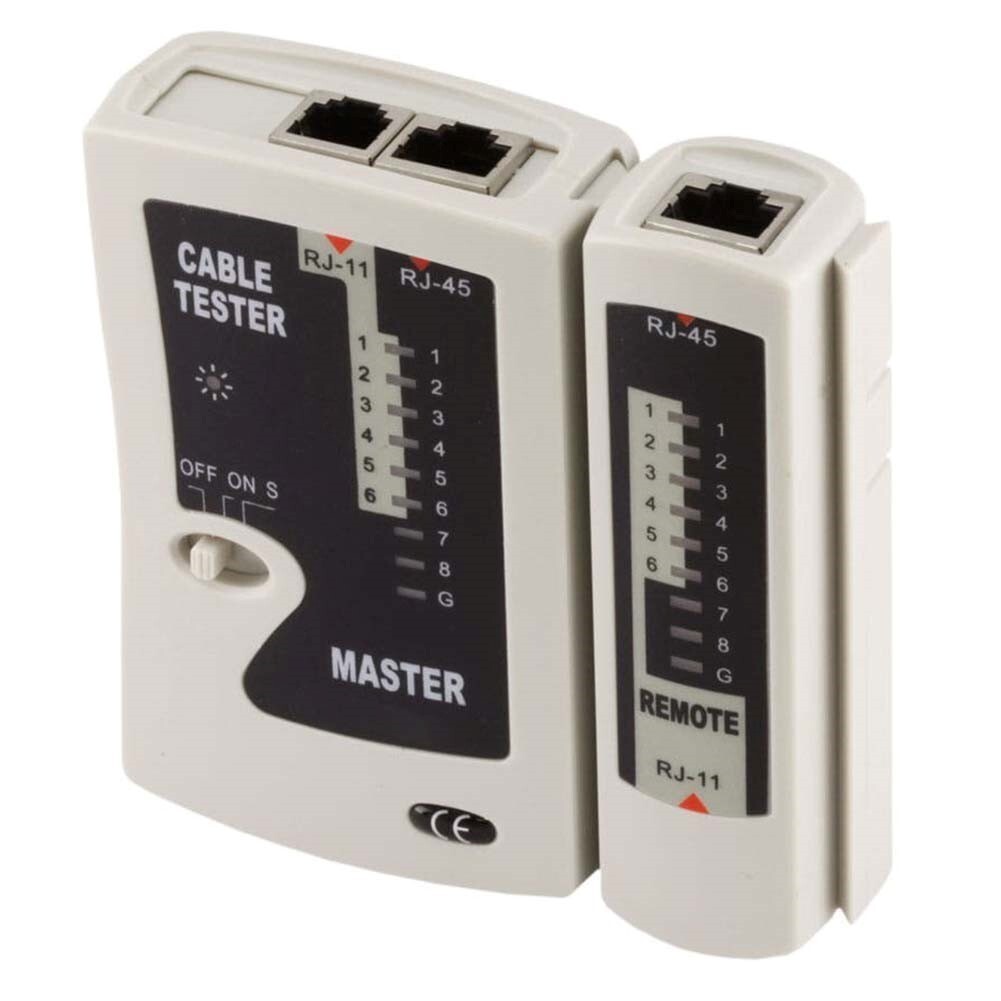
RJ-11 and RJ-45 Modular Plug Tester
Specifications:
Type RJ11/RJ45 tester Function Troubleshoot network and telephone cables for broken wires and crossed connections Components Main Master unit and detachable Remote unit Jacks RJ11 and RJ45 jack on both Master and Remote unit Power 9-volt battery (not included) Storage Zippered, synthetic leather case (included) Indicators 9 LEDs on both Master and Remote unit to show the status of each line on the attached cable Modes Fast automatic and slow automatic mode
Description:
The RJ11/RJ45 tester is a simple yet powerful tool that helps troubleshoot network and telephone cables for broken wires and crossed connections.
It consists of a main Master unit and a detachable Remote unit, each equipped with an RJ11 and an RJ45 jack.
The tester is powered by a 9-volt battery (not included) and comes with a zippered synthetic leather case for storage.
Both the Master and Remote units have 9 LEDs to show the status of each line on the attached cable, with support for both fast automatic and slow automatic modes.
To test a cable:
Insert one end in the appropriate jack on the Master unit and the other in the same type jack on the Remote unit.
IMPORTANT! DO NOT CONNECT TO A CABLE THAT IS PLUGGED IN TO A LIVE CIRCUIT AS THIS MAY CAUSE DAMAGE TO THE TESTER OR OTHER EQUIPMENT ON THE CIRCUIT!
Move the tester power switch to the "On" or "S" position. For best results, use the Slow Automatic mode (S position) to perform the test, as this gives time to watch the light sequence and ensure that the same LEDs illuminate on the Master and Remote simultaneously.
Watch the LEDS on both the Master and Remote units. Under normal conditions, using a straight-through RJ45 cable in good condition, the LEDs will simultaneously illuminate in the sequence 1-2-3-4-5-6-7-8-G on both the Master and Remote units.
A faulty or miswired connection will produce a different result, as follows:
If there a wire is broken or otherwise not connected the LED on the Master unit will illuminate, but no LED will illuminate on the Remote unit.
If a wire is crossed, different LEDs will illuminate on the Master and Remote units.
For example, if the 3rd LED on the Master unit and the 5th LED on the Remote unit both illuminate then the wire is crossed between pin 3 on the Master side and pin 5 on the Remote side.
If there is a short circuit between two or more wires, no LEDs will illuminate on either the Master or Remote unit.
Note that when testing RJ11 or RJ12 cables with a 6P6C connection, only the LEDs 1-6 will illuminate. If using a 4P4C connection, only the LEDs 2-5 will illuminate.
This product requires a 9 volt battery, which is not included!
About Us Payment Shipping Returns Contact Us
Payment can be made by paypal.
(Not Selected)
We hope that you will be happy with your purchase. We will gladly accept returns within 30 days. Please contact our customer service representatives.
NEWSLETTER
Members receive an email when we have new items in stock and are first to know about our special promotions, don’t miss out!
click here to join
read more...
Store Pages
- About Us
- Shipping
- Payment
- Returns & Exchange
- FAQs
- Contact Us
Useful Links
- Visit Shop
- Add to Favourite
- Store Newsletter
- response
- Contact Us
Contact UsClick here to contact us
Smart Box Systems © 2009-2021 . All Rights Reserved.