WAVLINK · 15-IN-1 DISPLAYLINK Triple 4K. Fifteen Ports.
One USB-C Cable. Triple 4K Display DisplayLink Docking Station · 3 × HDMI + 2 × DisplayPort
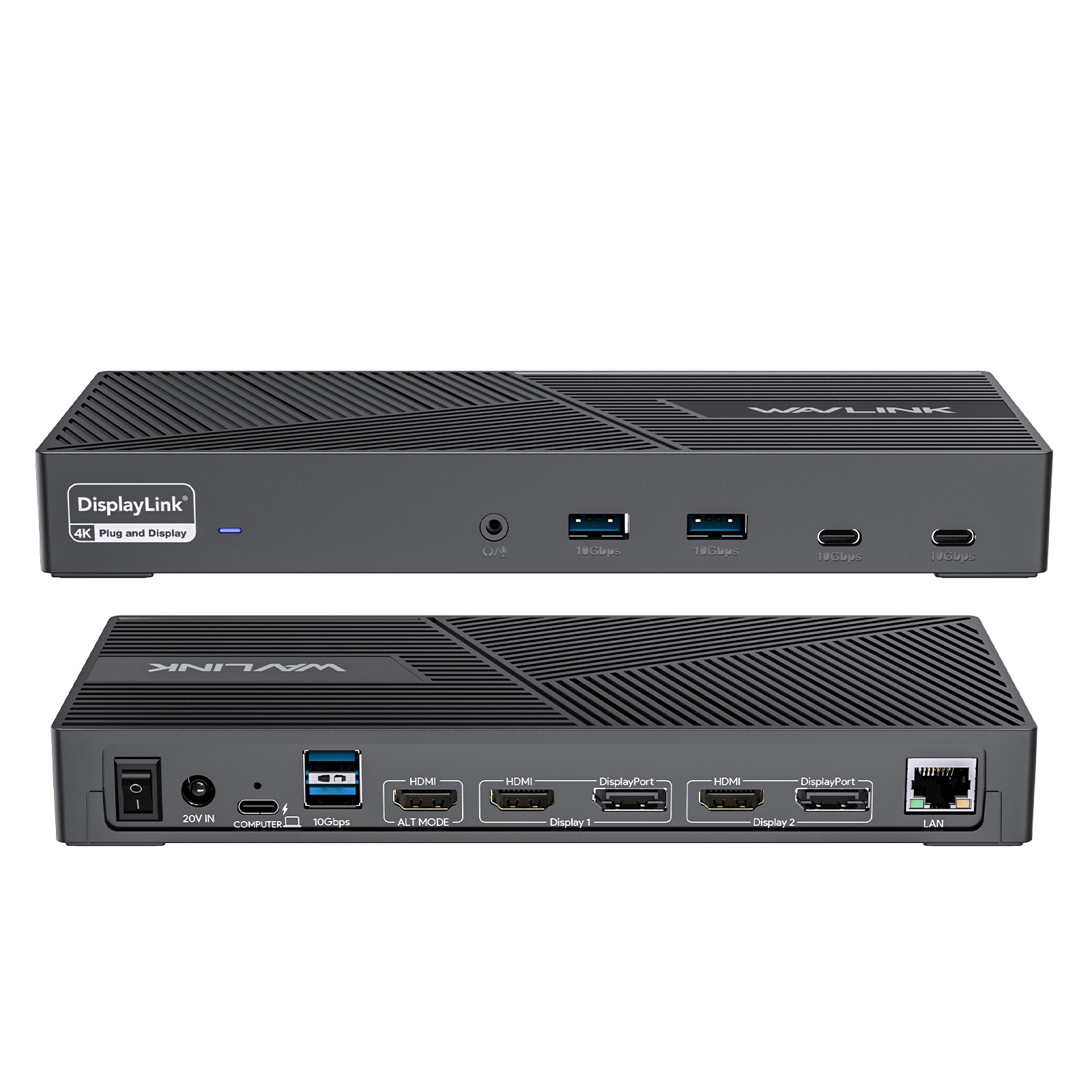
100W PD Host Charging · 10Gbps Data Transfer · For Windows, Mac OS & New MacBook Neo TRIPLE 4K@60Hz15 PORTSPD 100W · 10Gbps15IN-1 PORTS3×4K@60Hz DISPLAYS100WHOST CHARGING10GbpsUSB 3.1 DATA15 PORTS · EXPAND YOUR OPTIONSOne USB-C Connection. A Complete Workstation.All through a single USB-C to C connection, the dock easily turns your laptop's Type-C port into 3 HDMI ports, 2 DisplayPort, a 100W Power Delivery USB-C port (Host), a DC Jack, 2 × USB 3.1-C ports, 4 × USB 3.1-A ports, an RJ45 Ethernet port, and a 4-Pole Phone Jack. A perfect solution for your home or office workstation.🔌 15-in-1 Port LayoutFive video interfaces · two USB-C · four USB-A · Ethernet · audioVIDEO & POWER013 × HDMI (incl. 1 × HDMI Alt Mode)
022 × DisplayPort
031 × USB-C Upstream (Host, 100W PD)
041 × DC Jack DATA · NETWORK · AUDIO052 × USB-C 3.1 (10Gbps)
064 × USB-A 3.1 (10Gbps)
071 × RJ45 Gigabit Ethernet
081 × 4-Pole Phone Jack Note: Only one video port can be used in the same video stream (Display 1 / Display 2) — either a "DisplayPort" or an "HDMI". 🖥️ Multiple Display ResolutionDepends on your host USB-C DP version — DP1.2 vs DP1.4① SINGLE DISPLAY · MAX RESOLUTIONDP1.2 SourceHDMI (Alt Mode): 3840×2160@30Hz
Display 1/2 (HDMI/DP): 3840×
[email protected] SourceHDMI (Alt Mode): 3840×2160@60Hz
Display 1/2 (HDMI/DP): 3840×2160@60Hz② DUAL DISPLAY · MAX RESOLUTIONa. HDMI (Alt Mode)
+ Display 1/2DP1.2: 3840×2160@30Hz + 3840×2160@60Hz
DP1.4: 3840×2160@60Hz + 3840×2160@60Hzb. Display 1
+ Display 2DP1.2 / 1.4: 3840×2160@60Hz + 3840×2160@60Hz③ TRIPLE DISPLAY · MAX RESOLUTIONHDMI (Alt Mode)
+ Display 1 + Display 2DP1.2: 3840×2160@30Hz + 3840×2160@60Hz + 3840×2160@60Hz
DP1.4: 3840×2160@60Hz + 3840×2160@60Hz + 3840×2160@60HzNote: The HDMI (Alt Mode) port requires your laptop's Type-C port to support video output. TRIPLE 4K · 100W PD · 10Gbps · DISPLAYLINK-6950A Game-Changer for Multitasking🖥️ Triple Displays 4K@60HzThanks to five video interfaces (2 DisplayPort + 2 HDMI + HDMI Alt Mode), three external monitors can be displayed at the same time, and each screen can display different content to make multitasking a breeze. Support triple display resolution up to 3840×2160@60Hz under the DP1.4 source.
*Note: HDMI (Alt Mode) port requires your laptop's Type-C port to support video output.⚡ Game-Changer for MultitaskingWith three-group video output ports, you can connect triple monitors with ease. The HDMI (Alt Mode) port supports up to 4K@60Hz output under DP1.4 source, making it perfect for task-intensive activities like video editing and gaming. The DISPLAY 1/2 (HDMI/DP) ports supported by the DisplayLink-6950 chipset output dual 4K@60Hz display, which makes it the perfect solution for expanding multiple displays with different content on even M1/M2-based Macs. Use the DISPLAY 1/2 ports with web and productivity software applications; not recommended for gaming.🔋 Sufficient 100W Power SupplyComes with a powerful 160W power adapter, the USB-C (host) charges your laptop with max. 100W to keep it running all day, as well as powering your connected peripherals while displaying or transferring data. Worry-free about any low battery situation.
Please make sure that the Type-C port of your host supports power delivery.💾 Super-Speed USB 3.1 & Stable Network4 USB-A 3.1 and 2 USB-C 3.1 ports can reach a maximum 10Gbps data transfer speed with no delay and support extended connectivity to USB devices, like external hard drives, U disks and more. A Gigabit Ethernet port ensures a secure and stable wired network performance, backwards compatible with 10/100/1000Mbps.💻 Wide CompatibilityPerfect for laptops with a USB 3.1 full-function Type-C port or Thunderbolt 3/4 port. Support Windows 11/10/8.1/8/7/XP/Vista, Mac OS 10.14–13.x and latest, Chrome OS, Ubuntu, Android and Harmony OS.
Unsupported with Unix systems, Linux and iPad OS. Follow the instructions to download the latest DisplayLink drivers before use.🍎 Perfect for MacBook Neo Multi-Monitor SetupFully optimized for the latest MacBook Neo. While the native system may limit external displays, our DisplayLink-powered UG69PD25Pro breaks the boundary, allowing you to extend dual or triple 4K monitors seamlessly.✅ FEATURES AT A GLANCE • 15 ports through a single USB-C to C connection
• 3 × HDMI (incl. Alt Mode) + 2 × DisplayPort
• Triple 4K@60Hz under DP1.4 source
• 100W PD host charging via 160W adapter
• 2 × USB-C 3.1 + 4 × USB-A 3.1 at 10Gbps
• RJ45 Gigabit Ethernet · 4-Pole Phone Jack
• DisplayLink-6950 chipset for M1/M2 Macs
• Windows, Mac OS, Chrome OS, Ubuntu, Android & Harmony OS 💻 Compatible SystemsWindows · macOS · Chrome OS · Ubuntu · Android · Harmony OSWindows11 / 10 / 8.1 / 8 / 7 / XP / VistamacOSMac OS 10.14–13.x and latestOther OSChrome OS · Ubuntu · Android · Harmony OSNot supported: Unix systems · Linux · iPad OS 📋 USB-C Host Devices Compatibility ListPartial list — please check before purchasing🍎 APPLE MacBook Pro (2016/2017/2018/2019/2020/2021/2022) · iMac (2017/2018/2019/2020/2021) · MacBook Air (2018/2019/2020/2022) · Mac Studio 2022 · Mac mini 2018/2020 🪟 MICROSOFT Surface Book 2 · Surface Go · Surface Go 2 · Surface Laptop 3 · Surface Laptop 4 · Surface Laptop Go · Surface Pro 7 · Surface Pro X 🔷 HP Spectre 13 · Spectre x369 · x360 15 · Spectre x360 13t · Spectre Folio (13t-ak000cto) · EliteBook 840 G5 / 840 G6 / 850 G5 / x2 / 745 G6 / 830 G6 / x360 1030 G3 · 2018 HP Elite 800 G4 · Envy GeForce MX250 · Envy-17t · Envy x360 (15z-ds100) · GTX 4 Pro 15.6 · ZBook 15u G3 / 17 G4 / 14u G6 / 16 G6 / Studio Z5 · Omen laptops · ProBook 440 G7 / 450 G5 / 450 G7 / 650 G5 · ENVY Laptop 13-aq1 · ENVY x360 Convertible 15-ds1xxx 💠 DELL XPS 13 · XPS 13 9365 · XPS 13 9300 · XPS 15 · XPS 15 2018 · XPS 9380 · 5590 · Latitude 3500 / 7490 / 7280 / 7300 / 7370 / 7390 / 7480 / 7400 / 5400 / 5500 / 5490 / 5310 2-in-1 · Inspiron 14 7000 Series 2-in-1 (7405) / 15 7000 Series 2-in-1 / Inspiron 7373 · Precision 7730 / 7750 / 7520 / 5550 / 5540 🔵 ASUS Ling Yao 3 · Ling Yao 3 PRO · Ling Yao X Series · U306 / U321 Series · U4100ROG · U5100UQ Series · ZenBook Flip UX370U · TUF Gaming A15 Laptop · Zephyrus G14 · ROG GX501 · ZenBook UX434F · ZenBook 14 UX433FA 🟢 RAZER Blade Stealth Spirit Blade · Spirit Blade Sneak Edition 🟡 GOOGLE ChromeBook Pixels · PixelBook Pen …… (Not a full list) 🟥 LENOVO Lenovo Yoga C740 · Yoga 5 Pro · Lenovo Xiaoxin Air 12-inch · Miix 720 · ThinkPad X1 · ThinkPad T480 · ThinkPad X390 · Yoga 720/730 · C930 · ThinkPad T490s · X280 · T570 · T14 🟠 MI Air 12.5 / 13.3 inches · Pro 15.6 inches · Millet Game Book 🟩 ACER Aspire 5 2019 · D17W3 Aspire C24-865 · Swift 1 Laptop · Swift 7 SF714-52T-75R6 Laptop ➕ OTHERS Alienware latest series / Alienware 17 R5 · MSI GT76 Titan / MSI B450M Mortar motherboard · Razer Blade 2017 (GTX 1060) · LG Gram 17 Laptop · Philips PHL 328E9Q · Pixel Book Go 2019/2020 Note: Please check the compatibility list below before purchasing. If your laptop is not on the list, please let us know and we will be happy to help you check if the docking station is compatible with your device. 📐 Specification— every detail at a glanceItemSpecificationPorts1 × DC Jack · 1 × USB-C (upstream) · 2 × DisplayPort · 3 × HDMI · 1 × RJ45 · 1 × 4-Pole Phone Jack · 2 × USB-C 3.1 · 4 × USB-A 3.1Unit Size22.3 × 9.1 × 2.9 cm / 8.7 × 3.6 × 1.1 in (L × W × H)Package Size28.1 × 13.7 × 7 cm / 11 × 5.4 × 2.8 in (L × W × H)Cable LengthsUSB-C to C Cable: 100cm / 39.4in
Power Adapter Cable (plug end): 150cm / 59in
Power Adapter Cable (round port end): 110cm / 43inUnit Weight378g / 13.3ozHousing MaterialPlasticShell ColorBlackLED IndicatorDocking Station: Blue
Power Adapter: BluePower Adapter20V / 8A · 160W included📦 IN THE BOX1 × USB-C Triple 4K Display Universal Docking Station
1 × USB-C to C Cable (E-Mark Chip)
1 × 20V / 8A 160W Power Adapter
1 × Quick Start Guide
1 × Driver Link Card💡 WARM TIPS – Please confirm that the Type-C port of your laptop supports charging and video output, or the docking station's host charging function and HDMI (Alt. Mode) port may not work.
– Please follow the instructions to download the latest DisplayLink driver from the official website before use. ONLY plug and play for Chrome OS and Windows 10/11.
– Please keep connected to the power supply when using this docking station (power adapter included in the package).
– Only one video port can be used in the same video stream (Display 1 / Display 2) — either a "DisplayPort" or an "HDMI". Three Screens. Fifteen Ports. One Cable. Triple 4K@60Hz through 3 × HDMI and 2 × DisplayPort, 100W host charging, 10Gbps USB and Gigabit Ethernet —
the DisplayLink-powered workstation dock that even M1/M2 Macs can't outgrow. WAVLINK · 15-IN-1 · TRIPLE 4K · DISPLAYLINK · 100W PDWAVLINKUNIVERSAL DOCKING · 15-IN-1 · TRIPLE 4K · DISPLAYLINK-6950 · 100W PD