Dual 2K+4K Display(3HDMI+2DP)-100W PD-4USB-A-LAN Wavlink Triple Display Universal Docking Station, 15-in-1 USB-C Dock for Intel/M1/M2-Mac/Dell/Asus with 100W Laptop Charging,
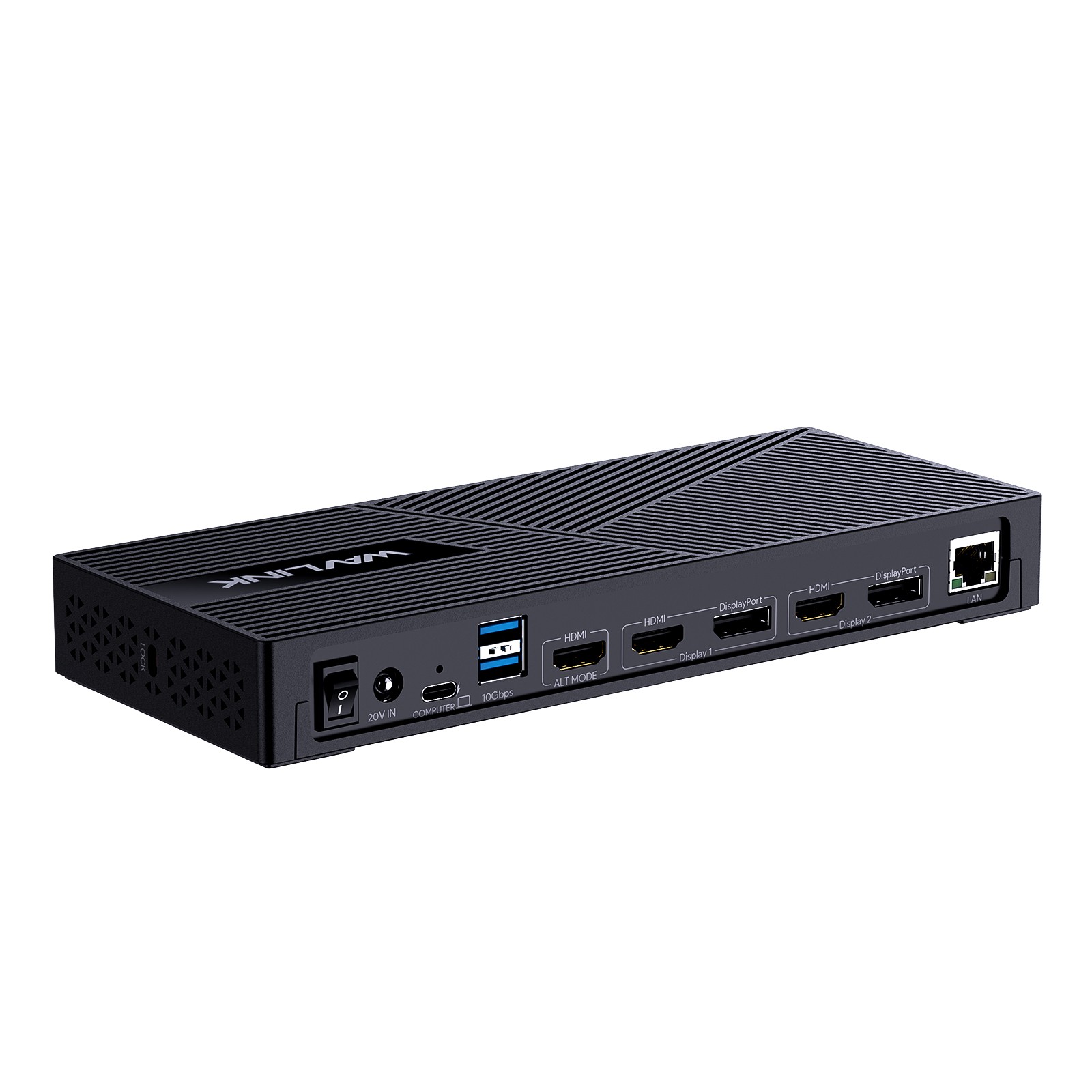
1x4K-HDMI, 2xHDMI&DP, 2xUSB-C, 4xUSB-A, 1xGigabit Ethernet, 1xAudio&Mic, Compatible with New MacBook Neo⭐15-IN-1 Fullfill Your Needs - This universal dock expands 15 connection possibilities with only one USB-C port: DC IN(130W input),
USB-C(Host, 100W output), HDMI Alt Mode(4K@60Hz), Display 1/2(HDMI1/2 or DP1/2), 4xUSB-A 3.1(10Gbps), 2xUSB-C 3.1(10Gbps),
RJ45 Ethernet, Audio/Mic. Note: This dock must connect the power adapter, otherwise it will not work.⭐ Choice For More Devices - Compatible with Windows 11/10/8.1/8/7/XP/Vista, Mac OS 10.14-13.x and latest, Chrome OS, Ubuntu,
Android, Harmony OS. Ideal home&office partner for usb-c devices like Intel/M1/M2-based Mac, Dell, Asus, Lenovo, Surface, Samsung,
and more. Note: NOT suitable for Unix systems, Linux and iPad OS.⭐Ultra 4K HD & Triple Display - Equipped with HDMI Alt Mode and Display 1/2(HDMI+DP) ports, it supports resolutions
up to 4K@60Hz under DP1.4(4K@30Hz under DP1.2) and 2560 x 1600@60Hz. Both Windows and Mac allow you to
extend 3 different external monitors, which can boost your productivity with more screen space. Note: In the same video
stream group (Display 1/2), the DP and HDMI ports cannot be used at the same time.⭐130W AC Power Adapter - The included 130W power adapter offers up to 100W charging for your laptop via the USB-C upstream port,
giving you blazing-fast charging experience and providing you with safe power supply while connecting multiple peripherals.
Also supports 5V/3A, 9V/3A, 12V/3A, 15V/3A output. Note: Please make sure the type-c port of your laptop supports charging.⭐Transfer Like Lightning - Featuring support for the USB 3.1 Gen 2 standard, the 4 USB-A ports and 2 USB-C ports ensure
effortless data transmission with speeds up to 10Gbps. They are also designed for more peripheral connections.
Wired gigabit Ethernet port gives you a more smooth and reliable network than WiFi.⭐Perfect for MacBook Neo Multi-Monitor Setup - Fully optimized for the latest MacBook Neo. While the native system may
limit external displays, our DisplayLink-powered UG63PD25 breaks the boundary, allowing you to extend triple monitors seamlessly.
Please Check Before Purchase
If the USB-C port of your laptop does not support charging and video output, this product will not be able to charge your laptop,
and the HDMI Alt Mode port will not work properly. You can confirm if your laptop's USB-C port supports these two functions by the following steps:
Step 1: Please check the model of your laptop; it should be on the back of the label.
Step 2: Search “brand + the model number of the device + manual” in Google, for example: “asus ux435 manual”.
Step 3: Check the manual, and navigate to the view to check the type-c specification. If the specification states the type-c port supports
display which means it could support video output; if it states it supports power delivery which means it supports charging.
Driver Required Before Use
Please download the latest driver in DisplayLink official website before Use. The download steps are as follows:
Step 1: Access URL:
Step 2: Choose the corresponding driver of your system, and download&install it.
Step 3: Start use after easy setting.
Specification
- Model: WL-UG63PD25
- Ports: 1x DC IN(20V/6.5A, 130W), 1x USB-C(Host, 100W), 2x Displayport, 3x HDMI, 1x RJ45,
4 x USB-A 3.1 Gen2, 2 x USB-C 3.1 Gen2, 1x 4-pole phone jack
- Product Dimension: 22.3x9.1x2.9cm/8.7x3.6x1.1in( L x W x H )
- Product Weight: 378g/13.3oz
- Cable Length:
USB-C to C Cable: 100cm/39.4in
Power Adapter Cable(plug end): 150cm/59in
Power Adapter Cable(round port end): 120cm/47in
- Housing Material: ABS Plastic
- Shell Color: Black
- LED Indicator Color: Blue
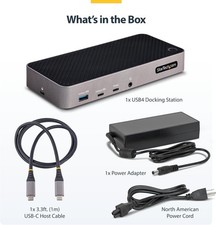
In the Box
1 x USB-C Triple Display Universal Docking Station
1 x USB-C to C Cable
1 x DC 20V/6.5A 130W Power Adapter
1 x Quick Start Guide
1 x Driver Link Card
Multiple Display Resolution(Max. Resolution)
①Single Display(Max. Resolution)
Under DP1.2 Source: HDMI(Alt Mode): 3840x2160@30Hz ; Display1(HDMI1/DP1): 2560x1600@60Hz; Display2(HDMI2/DP2): 2560x1600@60Hz
Under DP1.4 Source: HDMI(Alt Mode): 3840x2160@60Hz ; Display1(HDMI1/DP1): 2560x1600@60Hz; Display2(HDMI2/DP2): 2560x1600@60Hz.
②Dual Display(Max. Resolution)
a. HDMI(Alt Mode)+ Display1/2:
Under DP1.2 Source: 3840x2160@30Hz+ 2560x1600@60Hz;
Under DP1.4 Source: 3840x2160@60Hz + 2560x1600@60Hz.
b. Display1+ Display2:
Under DP1.2/1.4 Source: 2560x1600@60Hz+ 2560x1600@60Hz.
③Triple Display(Max. Resolution)
HDMI(Alt Mode) + Display1+ Display2
Under DP1.2 Source: 3840x2160@30Hz+ DP1.4 Source: 3840x2160@60Hz+ Tips:
- Please keep it connected to the power supply when using this docking station (power adapter included).
- Driver required for this product, please download the latest DisplayLink driver from the official website before use.
- Please confirm that the type-c port of your laptop supports charging and video output, or the product will not be able to
charge your laptop, and the HDMI Alt Mode port will not work properly.
- Only HDMI Alt Mode port supports 4K video output. And it supports 4K@60Hz under DP1.4 while 4K@30Hz under DP1.2.
- Only one video port can be used in the same video stream (Display1/Display2), either a "DisplayPort" or a "HDMI".
- Does not support HDCP, some encrypted or protected content such as Blu-ray/Netflix/Prime/iTunes/Hulu, etc. cannot be played.
- On Windows, screen rotation and clamshell mode are both available. On Mac, screen rotation and clamshell mode
require Mac OS 12.0 or above to be supported.
- Not Compatible with iPad OS/Linux/Unix.
Triple 4K Display(3HDMI+2DP)-100W PD-4USB-A-LAN
WAVLINK Triple 4K Display DisplayLink Docking Station, 15-In-1 USB C Universal Laptop Dock Triple Monitors with 3xHDMI,
2xDisplayPort, PD100W Host Charging, 10Gbps Data Transfer for Windows/ Mac OS/ New MacBook Neo
⭐15 Ports Expand Your Options: All through a single USB C-C connection, the dock easily turns your laptop's type-c port into 3 HDMI ports,
2 DisplayPort, a 100W Power Delivery USB-C port (Host), a DC Jack, 2xUSB 3.1-C ports, 4xUSB 3.1-A ports, an RJ45 Ethernet port,
and a 4-Pole Phone Jack. A perfect solution for your home or office workstation.
⭐Triple Displays 4K@60Hz: Thanks to five video interfaces (2 DisplayPort+2 HDMI+HDMI (Alt Mode)), three external monitors
can be displayed at the same time, and each screen can display different content to make multitasking a breeze. Support triple display
resolution up to 3840x2160@60Hz under the DP1.4 source. *Note: HDMI (Alt Mode) port requires your laptop's type-c port to support video output.
⭐Game-Changer For Multitasking: With three-group video output ports, you can connect triple monitors with ease. The HDMI (Alt Mode) port
supports up to 4K@60Hz output under DP1.4 source, making it perfect for task-intensive activities like video editing and gaming.
The DISPLAY 1/2 (HDMI/DP) ports supported by DisplayLink-6950 chipset, output dual 4K@60Hz display, which makes it the
perfect solution for expanding multiple displays with different content on even M1/M2-based Macs. Use the DISPLAY 1/2 ports with
web and productivity software applications; not recommended for gaming.
⭐Sufficient 100W Power Supply: Comes with a powerful 160W power adapter, the USB-C (host) charges your laptop with max.100W
to keep it running all day, as well as powering your connected peripherals while displaying or transferring data. Worry-free about any low
battery situation. Please make sure that the type-c port of your host supports power delivery.
⭐Super-Speed USB 3.1 & Stable Network: 4 USB-A 3.1 and 2 USB-C 3.1 ports can reach a maximum 10Gbps data transfer speed with no delay
and support extend more connectivity to USB devices, like external hard drives, U disk and more. A Gigabit Ethernet port ensures a secure and
stable wired network performance, backwards compatible with 10/100/1000Mbps.
⭐Wide Compatibility: PerfectforlaptopswithUSB3.1 full-functiontypec portorthunderbolt3/4 port. Support Windows 11/10/8.1/8/7/XP/Vista,
Mac OS 10.14-13.x and latest, Chrome OS, Ubuntu, Android and Harmony OS. Unsupported with Unix systems, Linux and iPad OS.
(Follow the instructions to download the latest DisplayLink drivers before use.)
⭐Perfect for MacBook Neo Multi-Monitor Setup: Fully optimized for the latest MacBook Neo. While the native system may limit external displays,
our DisplayLink-powered UG69PD25Pro breaks the boundary, allowing you to extend dual or triple 4K monitors WL-UG69PD25Pro
2.Ports: 1x DC Jack, 1x USB-C(upstream), 2x Displayport, 3x HDMI, 1x RJ45, 1x 4-Pole Phone Jack, 2 x USB-C 3.1, 4 x USB-A 3.1
3.Unit Size: 22.3x9.1x2.9cm/8.7x3.6x1.1in( L x W x H )
Package Size: 28.1x13.7x7cm/11x5.4x2.8in( L x W x H )
4.USB-C to C Cable Length: 100cm/39.4in
Power Adapter Cable Length(plug end): 150cm/59in
Power Adapter Cable Length (round port end): 110cm/43in
5.Unit Weight: 378g/13.3oz
6.Housing Material: Plastic
7.Shell Color: Black
8.LED Indicator Color(Docking Station): Blue
LED Indicator Color(Power Adapter): Blue
In the Box
1x USB-C Triple 4K Display Universal Docking Station
1x USB-C to C Cable (E-Mark Chip)
1 x 20V/8A 160W Power Adapter
1 x Quick Start Guide
1 x Driver Link Card
Multiple Display Resolution
①Single Display(Max. Resolution)
Under DP1.2 Source: HDMI(Alt Mode): 3840x2160@30Hz ; Display1/2(HDMI/DisplayPort): 3840x2160@60Hz;
Under DP1.4 Source: HDMI(Alt Mode): 3840x2160@60Hz ; Display1/2(HDMI/DisplayPort): 3840x2160@60Hz.
②Dual Display(Max. Resolution)
a. HDMI(Alt Mode)+ Display1/2(HDMI/DisplayPort):
Under DP1.2 Source: 3840x2160@30Hz+ 3840x2160@60Hz;
Under DP1.4 Source: 3840x2160@60Hz + 3840x2160@60Hz.
b. DP1.2/1.4 Source: 3840x2160@60Hz+ 3840x2160@60Hz.
③Triple Display(Max. Resolution)
HDMI(Alt Mode) + Display1(HDMI/DisplayPort) + Display2(HDMI/DisplayPort):
Under DP1.2 Source: 3840x2160@30Hz+ DP1.4 Source: 3840x2160@60Hz+ Tips
- Please confirm that the type-c port of your laptop supports charging and video output, or the docking station's host
charging function and HDMI (Alt. Mode) port may not work.
- Please follow the instructions to download the latest DisplayLink driver from the official website before use.
ONLY plug and play for Chrome OS, Windows 10/11.
- Please keep connected to the power supply when using this docking station (power adapter included in the package).
- Only one video port can be used in the same video stream (Display1/Display2), either a "DisplayPort" or a "HDMI".