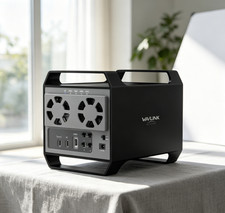
WAVLINK 4-Bay & 2-Bay SATA HDD/SSD Enclosure – Comparison & Details Product Comparison
Two WAVLINK USB 3.2 enclosures, one goal — fast, reliable and spacious storage. Pick the one that matches your setup.
Table 1 · Core SpecificationsItem4-Bay EnclosureWL-RapidFire H42-Bay EnclosureWL-RapidFire H2RDrive Bays4 × SATA 6Gbit/s2 × SATA 6Gbit/sMax CapacityUp to 88TB (4 × 22TB)Up to 44TB (2 × 22TB)Drive Support3.5" & 2.5" SATA HDD / SSD3.5" & 2.5" SATA HDD / SSDData Transfer10Gbps USB 3.2 Type-C10Gbps USB 3.2 Type-CExpansionHDMI 4K@60Hz + extra USB 3.2 Type-C portExtra USB 3.2 Type-C port for peripherals & daisy-chainHousingPremium Aluminum AlloyPremium Aluminum AlloyDimensions18.4 × 12.8 × 16.3 cm / 7.2 × 5.0 × 6.4 in18.4 × 6.6 × 14 cm / 7.2 × 2.6 × 5.5 inWeight1100 g / 38.8 oz581 g / 20.5 oz — easy to carryTable 2 · Features & Everyday ExperienceFeature4-Bay EnclosureWL-RapidFire H42-Bay EnclosureWL-RapidFire H2RCooling SystemDual temp-controlled fans, auto-start at 48°CDual built-in fans, auto-start at 48°CPower Control4 independent ON/OFF switches — one per bayHot-swap support + computer-linked controlData ModeIndependent bay access — power on any drive you need4 RAID Modes — Normal / LARGE / RAID 1 / RAID 0Hot-SwappableYes — swap drives without powering downYes — swap drives without shutting down the hostDisplay Output4K@60Hz HDMI for an extra high-resolution monitorExtra USB 3.2 Type-C port ready for your peripheralsAuto-SleepEnters sleep mode after 15 min of no operationEnters sleep mode after 15 min of no operationBest ForMassive libraries, 4K editing, full-desk workstationsRAID backup & speed, compact desks, mobile setupsWhich One Should You Choose?Choose the 4-Bay (WL-RapidFire H4) if…
- You want the biggest possible space — up to 88TB in a single enclosure.
- You handle large multimedia projects, game libraries or full-system backups.
- You need an extra 4K@60Hz HDMI display output for a dual-screen workspace.
- You like to power each drive on or off independently with 4 dedicated switches.
- You keep your storage on the desk and want it to stay cool under heavy loads.
Choose the 2-Bay (WL-RapidFire H2R) if…
- You want data security — RAID 1 mirrors your files automatically.
- You want speed — RAID 0 boosts read/write performance for big transfers.
- You need flexible modes: Normal / LARGE / RAID 1 / RAID 0 via a simple switch.
- You prefer a compact, lightweight 581g design that fits small desks.
- You want computer-linked control and hot-swap convenience for daily backups.
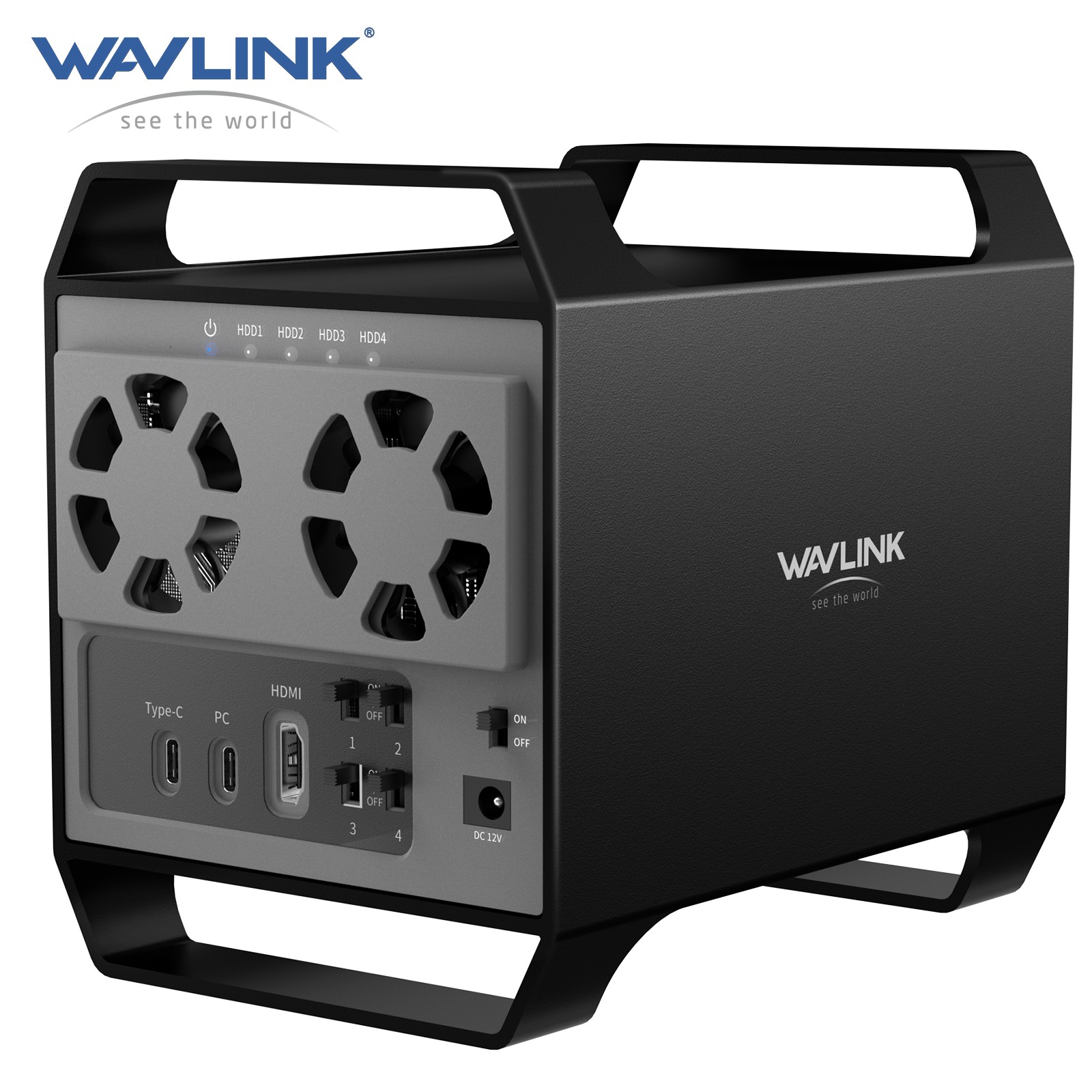
4 SATA BaysWAVLINK 4-Bay Hard Drive Enclosure for 3.5" and 2.5'' SATA HDD/SSD Featuring 10Gbps USB-C 3.2, 88TB Capacity, Built-in Temp-Controlled Cooling Fans, HDMI 4K Stunning Video Output, Aluminum Alloy Shell
The WAVLINK 4-bay SATA hard drive/SSD enclosure is the ultimate solution for professionals who demand high-speed data transfer, large storage capacity, and reliable performance. Ideal for gamers, content creators, and corporate professionals, this docking station combines advanced technology with user-friendly features.
● Ultimate Storage Versatility
Featuring four SATA 6Gbit/s bays, the enclosure supports both 3.5'' and 2.5'' hard drives and SSDs. Effortlessly expand your storage capacity up to 4 × 22TB, ensuring you have ample space for all your critical data, multimedia projects, and extensive game libraries. Note: For 2.5'' hard drives, additional 2.5'' to 3.5'' mounting brackets are required (Not included).
● Blazing Fast Data Transfer
Experience unparalleled data transfer speeds with the USB 3.2 Type-C port, capable of reaching up to 10Gbps. Seamlessly handle massive files and high-volume data transfers with exceptional efficiency and speed, perfect for both professional and personal use.
● Enhanced Connectivity and Display Options
Beyond storage, this docking station features an additional USB 3.2 Type-C port for connecting peripherals or daisy-chaining devices, along with an HDMI interface that supports up to 4K@60Hz resolution (under DP1.4). Create a seamless and efficient workspace with high-speed connectivity and stunning display capabilities.
Note: Please ensure the USB-C port on your host supports video output and use the USB-C to C cable, or the HDMI port will not work.
● Premium Build Quality and Cooling
Constructed from high-quality aluminum, the docking station offers superior heat dissipation and robust structural integrity. Dual built-in fans automatically activate at 48°C, ensuring your drives remain cool and perform optimally, even during intensive tasks.
● Hot-Swappable Flexibility
Designed for convenience, each of the four bays comes with an independent ON/OFF power switch. Easily swap drives in and out without powering down the entire system, streamlining your workflow and enhancing productivity.
Ideal For
- Gamers: Expand your game library and access your games faster with the high-speed USB 3.2 interface.
- Content Creators: Store and manage large multimedia files effortlessly with ample storage capacity and reliable data transfer speeds.
- Corporate Professionals: Efficiently manage and back up critical business data with hot-swappable convenience and robust connectivity options.
Speed and Performance
Harness the power of USB 3.2 Type-C with up to 10Gbps transfer speeds, reducing wait times for large file transfers and backups.
Versatility and Expansion
Four SATA 6Gbit/s bays support up to 4 drives of 22TB each, providing unparalleled flexibility for expanding your storage requirements.
High-Resolution Display
The HDMI interface supports 4K resolution, perfect for professional setups requiring high-quality external displays.
Intelligent Cooling System
High-quality aluminum construction provides excellent heat dissipation. The cooling system runs automatically over 48°C.
User-Friendly Design
Independent ON/OFF power switches for each bay enable hot-swappable convenience. Additional USB 3.2 Type-C port and HDMI output enhance connectivity options.
Auto-Sleep Mode
Automatically entering sleep mode after 15 minutes of no operation, effectively conserving energy and extending product lifespan.
HDD Installation Steps
- Remove the brackets.
- Place HDD 1&2, 3&4 into the brackets.
- Secure the brackets together.
- Reinstall the brackets.
- Tighten the screws on the bottom.
Compatibility Notes
- Systems: Windows, Mac OS, Linux, Android, iOS, Harmony OS, iPad OS
- Host: Computers / Phones / Tablets with a USB-C / USB-A port. (Please ensure the USB-C port on your host supports video output and use the USB-C to C cable, or the HDMI port will not work.)
- HDD/SSD: 3.5'' and 2.5'' SATA HDD/SSD. For 2.5'' hard drives, additional 2.5'' to 3.5'' mounting brackets are required (Not included).
SpecificationModel: WL-RapidFire H4Unit Size: 18.4 × 12.8 × 16.3 cm / 7.2 × 5.0 × 6.4 in (W×D×H)USB-C to C / USB-C to A Cable Length: 80 cm / 31.5 inPower Adapter Cable Length (plug end): 120 cm / 47.2 inPower Adapter Cable Length (round port end): 120 cm / 47.2 inUnit Weight: 1100 g / 38.8 ozHousing Material: Aluminum AlloyPower LED: Blue | HDD LED: White | Power Adapter LED: GreenKey Features
- USB 3.2 Type-C Port: Achieve data transfer rates up to 10Gbps, enabling quick and efficient file transfers and backups.
- Four SATA Bays: Supports up to four 3.5'' or 2.5'' hard drives or SSDs with SATA 6Gbit/s interface, providing vast storage options for your data-intensive tasks.
- Premium Aluminum Construction: Ensures excellent heat dissipation and durability, safeguarding your drives against overheating and physical damage.
- Hot-Swappable Design: With four independent ON/OFF power switches, you can swap drives on-the-fly without powering down the docking station.
- Cooling Fans: Dual fans automatically engage at 48°C, ensuring your drives operate within optimal temperature ranges for enhanced performance and longevity.
- Additional USB 3.2 Type-C Interface: Connect USB peripherals or daisy-chain additional devices with ease.
- HDMI Output: Supports up to 4K@60Hz resolution for high-quality video output to external displays, enhancing your workstation setup.
In the Box
- 1 × Quad Bay 3.5" SATA HDD Enclosure
- 1 × USB-C to USB-C Cable
- 1 × USB-C to USB-A Cable
- 1 × Power Adapter
- 1 × Power Cable
- 1 × Quick Start Guide
- Several Screws
Warm Tips
- The performance will be limited if the host USB-C port standard is lower than USB3.2 Gen2x2.
- For 2.5'' hard drives, additional 2.5'' to 3.5'' mounting brackets are required (Not included).
- The HDMI port will not work if the USB-C port on the host does not support video output or if you use the USB-C to A cable.
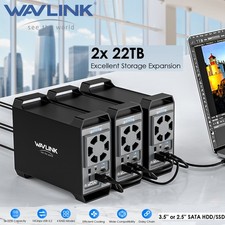
- Connect up to 3 products via Daisy Chain.
- Supports auto-sleep function — automatically sleeps after 15 minutes of no operation.
- When installing the hard disk, use screws for better stability.
- Does not support RAID array setup; configure separately if needed.
- If the SSD is brand-new and unformatted, please perform partition installation so that the computer can read the data normally. If the SSD is formatted and has stored data, you have no need to perform partition installation because the computer can read the data normally.
2 SATA BaysWAVLINK 2-Bay Hard Drive Enclosure for 3.5" and 2.5'' SATA HDD/SSD Featuring 10Gbps USB-C 3.2, 44TB Capacity, Built-in Cooling Fans, 4 RAID Modes (RAID Normal/LARGE/1/0), Aluminum Alloy Shell
The WAVLINK 2-bay SATA hard drive/SSD enclosure is the ultimate solution for professionals who demand high-speed data transfer, large storage capacity, and reliable performance. Ideal for gamers, content creators, and corporate professionals, this docking station combines advanced technology with user-friendly features.
● Ultimate Storage Versatility
Featuring two SATA 6Gbit/s bays, the enclosure supports both 3.5'' and 2.5'' hard drives and SSDs. Effortlessly expand your storage capacity up to 2 × 22TB, ensuring you have ample space for all your critical data, multimedia projects, and extensive game libraries. Note: For 2.5'' hard drives, additional 2.5'' to 3.5'' mounting brackets are required (Not included).
● Blazing Fast Data Transfer
Experience unparalleled data transfer speeds with the USB 3.2 Type-C port, capable of reaching up to 10Gbps. Seamlessly handle massive files and high-volume data transfers with exceptional efficiency and speed, perfect for both professional and personal use.
● Enhanced Connectivity & 4 RAID Modes
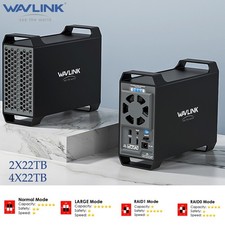
Beyond storage, this docking station features an additional USB 3.2 Type-C port for connecting peripherals or daisy-chaining devices, creating a seamless and efficient workspace. The enclosure offers 4 RAID modes to meet your various needs — whether you want to back up data, transfer files swiftly, read and write on two HDDs simultaneously, or expand storage capacity.
● Premium Build Quality and Cooling
Constructed from high-quality aluminum, the docking station offers superior heat dissipation and robust structural integrity. Dual built-in fans automatically activate at 48°C, ensuring your drives remain cool and perform optimally, even during intensive tasks.
● Hot-Swappable & Computer-Linked Control
Swapping hard disks without shutting down the host, which saves significant time, lowers the risk of system and data disruption, and enhances the flexibility and convenience of hard disk utilization. Also supports computer-linked control, offering a simple management solution to increase data security and operational efficiency.
Ideal For
- Gamers: Expand your game library and access your games faster with the high-speed USB 3.2 interface.
- Content Creators: Store and manage large multimedia files effortlessly with ample storage capacity and reliable data transfer speeds.
- Corporate Professionals: Efficiently manage and back up critical business data with hot-swappable convenience and robust connectivity options.
Speed and Performance
Harness the power of USB 3.2 Type-C with up to 10Gbps transfer speeds, reducing wait times for large file transfers and backups.
Versatility and Expansion
Two SATA 6Gbit/s bays support up to 2 drives of 22TB each, providing unparalleled flexibility for expanding your storage requirements.
4 RAID Modes
This 2-bay RAID storage enclosure allows you to switch drives effortlessly using the mode switch, enabling smooth storage expansion and performance adjustments for your specific needs.
Intelligent Cooling System
High-quality aluminum construction provides excellent heat dissipation. The cooling system runs automatically over 48°C.
Easier Device Management
Enabling hot-swappable drives enables flexible hard disk swapping without requiring host shutdowns, streamlining your workflow and enhancing productivity. Moreover, supporting computer-linked control, synchronized with the computer to switch on and off.
Auto-Sleep Mode
Automatically entering sleep mode after 15 minutes of no operation, effectively conserving energy and extending product lifespan.
HDD Installation Steps
- Remove the brackets.
- Place HDD 1&2 into the brackets and secure them.
- Reinstall the brackets.
- Tighten the screws on the bottom.
Compatibility Notes
- Systems: Windows, Mac OS, Chrome OS, Linux, Android, iOS, Harmony OS, iPad OS
- Host: Computers / phones / tablets with a USB-C / USB-A port
- HDD/SSD: 3.5'' and 2.5'' SATA HDD/SSD. For 2.5'' hard drives, additional 2.5'' to 3.5'' mounting brackets are required (Not included).
SpecificationModel: WL-RapidFire H2RUnit Size: 18.4 × 6.6 × 14 cm / 7.2 × 2.6 × 5.5 in (W×D×H)USB-C to C / USB-C to A Cable Length: 80 cm / 31.5 inPower Adapter Cable Length: 120 cm / 47.2 inUnit Weight: 581 g / 20.5 ozHousing Material: Aluminum AlloyPower LED: Blue | HDD LED: White | RAID LED: BlueIn the Box
- 1 × Dual Bay USB-C 3.5" SATA HDD Enclosure
- 1 × Power Adapter
- 2 × Screwdriver
- 1 × USB-C to USB-C Cable
- 1 × USB-C to USB-A Cable
- 1 × Quick Start Guide
- Several Screws
Warm Tips
- Be sure to make a backup of your data before you set/reset the RAID mode, otherwise your data will be lost.
- The performance will be limited if the host USB-C port standard is lower than USB3.2 Gen2x2.
- For 2.5'' hard drives, additional 2.5'' to 3.5'' mounting brackets are required (Not included).
- Connect up to 3 products via Daisy Chain.
- Supports auto-sleep function — automatically sleeps after 15 minutes of no operation.
- When installing the hard disk, use screws for better stability.
- If the SSD is brand-new and unformatted, please perform partition installation so that the computer can read the data normally. If the SSD is formatted and has stored data, you have no need to perform partition installation because the computer can read the data normally.