WCDTC141W0 Menu
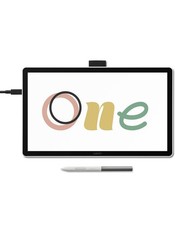
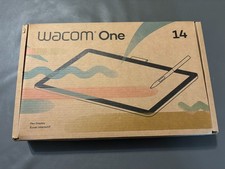
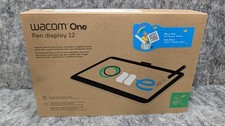
Wacom DTC141W0 One 14 Full HD Pen Tablet with 14" Display and Wacom One Pen
Works with Windows, macOS, Chromebook PRODUCT INFORMATION
Wacom One 14-inch Full HD Pen Display for Beginners and Students
Start your digital adventure with the all-new Wacom One 14. Ideal for casual artists and visual thinkers. With the Wacom One drawing tablet with screen you can draw, sketch, edit photos, take notes, annotate, and discover your creative passion.
Product Highlights:
Bigger Canvas, Better Detail: Redesigned with more drawing area, the laminated 14" crisp IPS Full HD display offers generous space with 98% sRGB color accuracy and a paper-like texture that won't glare or smudge - keeping you in your creative zone longer.
Precise, Natural Feel: Draw with the control that made Wacom a favorite; the battery-free pen never needs charging and captures everything from light lines to bold strokes with Wacom's responsive pressure sensitivity.
Complete Creative Starter Kit: Includes trials of Clip Studio Paint Pro, Magma (Blaze plan), Concepts & Foxit software, and Skillshare training courses - your jumpstart to creating beautiful art right away.
Reliable Performance: Wacom's proven reliability works seamlessly with your computer - no driver headaches, mysterious disconnects, or frustrating "why isn't this working?" moments common with cheaper alternatives.
Compatibility: PC (Windows 10 or later), Mac (OS 13 or later) and Chromebook; Easy plug-in via single USB-C: devices requiring HDMI require Wacom Converter, cables and power adapter (sold separately).
Product Features:
Where Your Creative Dreams Begin
Start your digital adventure with the all-new Wacom One. Ideal for casual artists and visual thinkers, this drawing tablet with screen makes it easy to draw, sketch, edit photos, annotate, and discover your creative passion.
Big Canvas, Compact Design
The 14" widescreen gives you a generous canvas without hogging desk space. FHD resolution delivers crisp visuals perfect for detailed linework. Thin bezels maximize your drawing area while keeping the footprint compact - ideal whether you're at your desk, kitchen table, or anywhere inspiration strikes.
Proven Pen Technology
The Wacom One pen features Wacom's leading pen technology in an easy-to-use battery-free format. It's lightweight and comfortable to grip for extended drawing sessions and never needs charging. Whether you're sketching lightly or applying bold strokes, it delivers consistent, responsive performance.
See Every Color Detail
Colors stay true whether you're working on your art, sharing it online, or printing it out. The factory-calibrated 98% sRGB display with 8-bit color depth shows millions of subtle color variations for smooth gradients and natural skin tones.
One Pen, Many Possibilities
Drawing/Sketching: That sketch you started in your notebook? Now you can take it further without starting over. Your pen becomes whatever you need - pencil for rough sketches, paintbrush for bold strokes and a button for undo, right-click or your favorite shortcut. The 16ms response time means your strokes appear instantly with no lag between your hand and screen.
Design Your World: Whether you're designing a logo or creating something for school, precise pen control makes design easier. Smooth curves, and accurate colors help your ideas look polished, while the programmable button gives you access to your favorite shortcut key.
Photo Editing and Enhancements: Edit photos with the precision a pen, instead of wrestling with a mouse. Make exact selections for perfect cropping, smooth out skin imperfections, or add artistic touches that make your images stand out. The pressure-sensitive pen gives you control that feels natural, like working with real art tools.
Annotation, Markup, and Engaging Lessons: The pen-on-paper feel makes it easy to capture ideas, create mind maps, and annotate PDFs naturally. Great for teachers creating engaging lessons or anyone who thinks visually. Turn boring documents into interactive, personalized content that actually gets attention.
Single Cable Connectivity
Wacom One connects to Windows, Mac, or Chromebook devices with a single USB-C cable that carries power, video, and pen data, keeping your workspace clean.
To use this setup, your computer must have a Thunderbolt 3 (or later) or USB Type-C port supporting DisplayPort Alt mode. If your computer doesn't have one of these ports, you'll need to connect separate cables for power, video, and pen data, and then use the Wacom Converter (ACK45219Z) to merge them into a single USB-C connection to the display. To help reduce e-waste, Wacom includes the most commonly supported USB-C cable in the box, so most modern computers can connect right away without the need for extra adapters or cables.
Get Complimentary Software Offers With Every Wacom One
Tophatch Concepts: Sketch, plan, edit, and share all your big ideas with your Wacom product and a 3 month trial of Concepts. This infinite canvas app includes a minimal interface that's easy to learn so you can focus on your creativity. Features include vector-based editing, playful color wheels, intuitive gestures, and a speedy performance.
Passpartout 2: Use your Wacom pen and tablet to draw and sell art to cheeky critics to reclaim your lost art career in this Wacom-exclusive gaming demo. Explore the endearing art-starved town of Phénix and show them you're a true artist! Passpartout 2: The Lost Artist is a perfect complement to your Wacom, allowing you to create beautiful art to complete challenges within the game.
Clip Studio Paint Pro: With natural pen strokes, unlimited tones and 3D figure templates, Clip Studio Paint Pro has everything comic-book artists and manga lovers dream of. Get Clip Studio Paint Pro with every purchase for three months. To get your complimentary software, register your Wacom One by signing in or creating a Wacom ID with your personal data. Additional registration with Adobe is required.
Magma: Magma is the world's first browser-based collaborative drawing application optimized for pen input with minimum latency and designed by the artist Bobby Chiu. Wacom is offering customers a 3-month trial of the Pro version upon purchase/registration of a Wacom One. The Pro version of Magma offers advanced features such as PSD import/export and texture brushes.?
Skillshare: Skillshare is an online learning community with thousands of inspiring classes for creative and curious people. Explore new skills, deepen existing passions, and get lost in creativity - including classes designed to improve your skills on your Wacom tablet or screen.
Product Specifications:
Display Information
Screen Size (approx.): 14"
Screen Resolution: 1920 x 1080
Color Depth: 8bit x RGB (24bits)
Screen Size: 14.0 inch, 35.6 cm
Display Resolution: 1920 x 1080 pixels
Technology: IPS
Glass / Surface: AG + AF Glass
Active Area (mm): 309 x 174 mm
Active Area (inch): 12.2 x 6.9 in
Aspect Ratio: 16:9
Supported Resolution: 640x480 60Hz, 720x480 60Hz, 720x576 50Hz, 800x600 60Hz, 1024x768 60Hz, 1280x720 50/60Hz, 1280x1024 60Hz, 1600x1200 60Hz, 1920x1080 50/60Hz
Pixel Pitch: 0.1611 (H) x 0.1611 (V) mm
Viewing Angle: 178 deg. (89/89) H/178 deg. (89/89) V (typ)
Color Depth: 8bit x RGB = 24bit
Color Gamut Coverage Ratio: sRGB 98% (CIE 1931) (typ)
Contrast Ratio: 1000:1 (typ)
Brightness: 285cd/m2 (typ)
Response Time (G2G): 16ms (typ)
Pen Specifications
Pen Name: Wacom One Standard Pen
Pen Pressure Levels: 4096 levels
Pen Type: Pressure-sensitive, cordless, battery-free
Number of Switches: 2 side switches
Pen Tilt Supported: 60 degrees
Pen Resolution: 2540 lpi
Pen Technology: Electromagnetic resonance technology
Reading Height: 8 mm
Maximum Report Rate: 360 report/second
Pen Dimensions: 149.9mm x 9.8mm
Pen Weight: 9.9g
Touch Specification
Multi-Touch: No
Connectivity
I/O Ports: 1 x USB Type-C
Output Video Connector: n/a
Output Video Signal: n/a
Dimension And Weight
Product Dimensions (L x W x H) (mm): 336 x 201 x 10 mm
Product Dimensions (L x W x H) (inch): 13.2 x 7.9 x 0.4 in
Product Weight (kg): 0.75kg
Product Weight (lbs): 1.65lbs
System Requirements
System Requirements: Windows 10 and later macOS 13 and later The latest version of ChromeOS
Hardware Requirements: USB-C port with DisplayPort Alt Mode, internet access to download driver. To achieve the maximum resolution and refresh rate on Wacom One 14, the host PC ports need to support 1920 x 1080 60Hz. Thunderbolt 3 or later is also supported.
What Is Included
Product: Wacom One 14 Body
Documents: QSG IPI Warranty Card + QR cord Card
Others: Replacement nib (POM) x 3pcs Nib removal tool x 1pc
Logistical Information
Product Box Dimensions (In.): 14.4 x 9.1 x 2.2 in
Product Box Dimensions (mm): 365 x 230 x 55 mm
Product Box Gross Weight (lbs): 2.87 lb
Product Box Gross Weight (kg): 1.30 kg
Product Box Net Weight (lbs): 1.76 lb
Product Box Net Weight (kg): 0.8 kg
IN THE BOX - Wacom One 14 DisplayWacom One PenUSB-C to C CableQuick Start GuideRegulation SheetReplacement Nibs (x3) and Nib Remover
Terms & Conditions Shipping & Handling Policy Please note that - depending on your geographic location - not all methods are available. Make sure to select the appropriate method referring to the table below which indicates the cheapest available shipping method for your location.
Your address Cheapest shipping method Continental US Physical Addresses Standard Flat Rate Shipping Service Note: Usually ships free* via Fedex thus this option is not available to PO Box addresses
Continental US PO Box Expedited Flat Rate Shipping Service Note: Will ship out via USPS Parcel Post
APO / FPO Military Addresses Overnight Flat Rate Shipping Service Note: Will ship out via USPS Parcel Post, shipping time is not guaranteed Alaska, Hawaii, Puerto Rico Overnight Flat Rate Shipping Service Note: Usually ships via Fedex Express, shipping time is not guaranteed *NOTE: Free shipping is only available to any physical address (not a PO Box) that is located in the lower 48 states. Shipping charges will apply if your address does not meet this criteria.
Failure to select the appropriate method will result in order processing delays as we await the payment of the additional shipping charge due. Our billing department will attempt to contact you to process the payment and ship your order. If payment is not made within 5 days after your order was placed, we will cancel and refund the transaction.
* Sellers are not responsible for service transit time. This information is provided by the carrier and excludes weekends and holidays. Note that transit times may vary, particularly during peak periods.
International customers - Please note that we are not the party collecting the shipping & handling nor the import charges (duties and taxes)
FAQ Payment, Returns & Checkout Information
Copyright 2026 BuyDig. All Rights Reserved