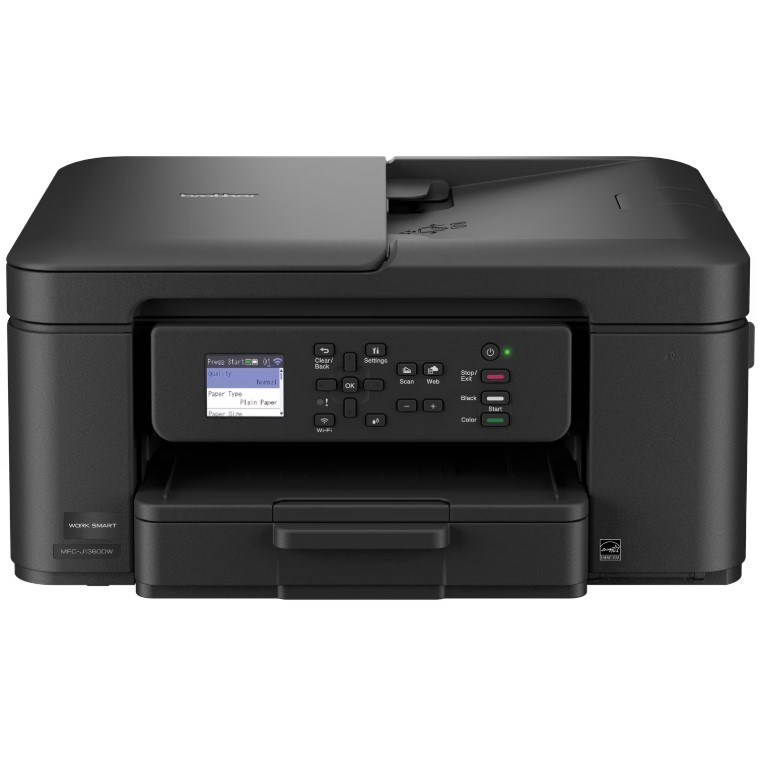
Looking for a reliable printer that’s easy to use? The Wireless All-in-One Color Printer makes everyday printing simple. It prints on both sides automatically, copies or scans stacks of pages for you, and connects easily to your Wi-Fi so you can print from your phone, tablet, or computer using the color screen on the printer. Whether you’re printing to-do lists, schoolwork, or work documents, you’ll get sharp black text and bright color prints at fast speeds. The printer also monitors your ink levels, so you know when it’s time to replace the cartridge. Setup is quick with the mobile printing app(1), and once you’re connected, you can print from almost anywhere. For best results, use Genuine LC501 Ink for consistent, dependable printing.
MFC-J1360DW Inkjet Printer Helpful Product Details
What is the MFC-J1360DW?
The MFC-J1360DW is a wireless color inkjet all-in-one printer that can print, scan, and copy in one machine.
Can the MFC-J1360DW print on both sides of the paper?
Yes. The MFC-J1360DW inkjet printer automatically prints on both sides, which helps save paper and reduce printing costs.
Can the MFC-J1360DW scan or copy multiple pages at once?
Yes. You can place a stack of pages in the top tray, and the MFC-J1360DW will scan or copy them automatically instead of one page at a time.
Can I print from my phone or computer with the MFC-J1360DW?
Yes. The MFC-J1360DW inkjet printer lets you print wirelessly from your phone, tablet, laptop, or desktop computer using Wi-Fi1, and also lets you scan documents directly to popular cloud services.
What is the 1.8” Color Display screen for the MFC-J1360DW inkjet printer?
The color screen on the MFC-J1360DW inkjet printer lets you start copying or scanning, change settings, connect to Wi-Fi, and check ink levels directly on the printer without using a computer.
Is the MFC-J1360DW good for home or small office use?
Yes. The MFC-J1360DW color inkjet printer is designed for home offices, remote workers, students, and families who need reliable everyday printing.
Why choose an inkjet or laser printer?
Inkjet and laser printers are designed for different printing needs. Inkjet printers are great for everyday home use, offering vibrant color, photo-quality prints, and low-cost color printing, especially if you print regularly. Laser printers are ideal for fast & high-volume document printing, delivering sharp text, quick speeds, and consistent results for home offices and small businesses use.
Save time & paper: Automatically prints on both sides, so you use less paper.
Handle multi-page jobs easily: Built-in top feeder lets you copy or scan stacks of pages instead of one page at a time.¹
Print from your phone or computer: Wireless printing works with phones, tablets, laptops, and desktops using Wi-Fi.²
Scan to the cloud: Send scanned documents directly to popular cloud services for easy storage and sharing.³
All-in-one convenience: Print, copy, and scan from one compact inkjet printer with quick setup.
Fast everyday printing: Prints up to 16 pages per minute in black and up to 9 pages per minute in color¹
Clear, reliable results: Produces crisp black text and vibrant color for homework, work documents, and everyday printing.
Easy to use color screen: 1.8″ color display lets you start copies or scans, change settings, connect to Wi-Fi, and check ink levels.
Multiple ways to connect: Use Wi-Fi for wireless printing or USB for a direct connection.²
Print and manage from your phone: Mobile printing app lets you print, scan, copy, and manage the printer from your mobile device. (6)
Less refilling, fewer interruptions: 150-sheet paper tray holds more paper so you reload less often.¹
Know when ink is low: Page Gauge tracks ink usage and helps you avoid running out for compatible ink: Works best with Genuine LC501 ink cartridges for consistent performance. We engineer our ink cartridges to work seamlessly with your printer.
Printing techInkjetPrinter functionsPrintPages per min.16 ppmMono colorColorPaper sizeletter, legalMaximum print resolution6000 dpiPrinted page methodDuplexHas automatic document feederNWirelessWirelessCompatible OSFor the latest OS compatibility and to download drivers, visit support.brother.com.FeaturesMulti-Page CopyMaximum scan paper size11 inMaximum scanner resolution1200 dpiMaximum image resolution1200Product multifunction descriptor3-in-1Pages per min9 Pages Per MinuteCopy speed9 ppmFirst page print speed6 sMaximum print width8.5 inMaximum print length14 inMaximum duty cycle2500Input/output typeWirelessInputs & outputsInputs - USBModel nameMFC-J1360DWColorBlackAssembled product height7.2 inAssembled product weight16.8 lbInput/output quantity1Warm-up time6.2 sPower typeCorded ElectricAccessories includedStarter Black Ink Cartridge (200 pages)14, Starter Cyan, Magenta, Yellow Ink Cartridges (200 pages)14 & AC Power Cord,Internal memory256 MBInk container typeInk CartridgeInk refill codeLC501Display screen width1.8 inDisplay screen length1.8 in