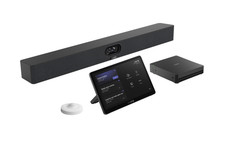
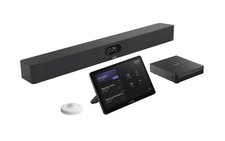
Yealink MVC S40-C5U-000 Microsoft Teams Rooms System – Dual 48MP AI Camera & Intel Core Ultra 5 PC for Small to Medium Conference RoomsReady to make every meeting feel like everyone’s in the same room? The Yealink MVC S40-C5U-000 Microsoft Teams Rooms System is built exactly for small to medium conference spaces. It combines a powerful dual-camera video bar, a high-performance mini-PC, an easy-touch controller, and a smart room sensor so your team gets clear video, crisp audio, and effortless control every single time. No complicated setup, no extra apps—just reliable Teams meetings that actually work. Expert Summary If you're tired of grainy video calls where half the team gets cropped out, the Yealink MVC S40-C5U-000 changes the game for small-to-medium spaces. This all-in-one Teams Rooms bundle features the SmartVision 40 video bar with dual 48MP lenses and intelligent AI framing that keeps everyone in focus—literally. Pair that with a powerful MCore Pro Mini-PC running Windows 11 IoT, an 11.6-inch MTouch Plus touchscreen controller, and optional RoomSensor for occupancy awareness, and you get reliable, enterprise-grade collaboration without the usual IT overhead. Perfect for huddle rooms, boardrooms seating up to 10, or agile offices where hybrid work is the norm. We've seen clients cut meeting setup time in half and dramatically improve remote participant engagement. It's not just hardware—it's a smarter way to meet. Key Features Dual-eye SmartVision 40 All-in-One Video Bar — Two 48MP cameras with 120° ultra-wide field of view, fixed-focus stitching for sharp detail across the entire room, and AI features like IntelliFocus (auto subject tracking), Multi-stream IntelliFrame, and Video Fence to eliminate distractions. Premium Audio Performance — Built-in 8-microphone array with up to 20 ft (6m) pickup range, full-duplex audio, AI-enhanced noise cancellation, and reverberation suppression for natural conversations—no more "can you repeat that?" Intuitive Control — 11.6-inch MTouch Plus touchscreen runs the native Microsoft Teams Rooms interface; one-tap join, content sharing, and meeting management feel just like using Teams on your desktop. Powerful Computing — MCore Pro Mini-PC (Intel Core Ultra 5 125H processor, 16GB DDR5 RAM, 256GB SSD) handles multiple 4K streams smoothly with three HDMI outputs and EDID support for flexible display setups. Additional Perks — Includes RoomSensor for automatic wake-up and energy savings, USB ports for peripherals, and full Microsoft Teams Rooms certification for worry-free deployment. With native Microsoft Teams integration, wireless (not currently available in USA)/wired 4K content sharing, and effortless device management via Yealink Cloud, the MVC S40-C5U makes every meeting smarter and every deployment simpler. Whether you're an enterprise IT team, AV integrator, or VoIP solutions provider, this system delivers the ultimate hybrid meeting experience. Please see the Yealink MVC S40-C5U Datasheet for more information. Yealink MVC S40-C5U-000 Specifications Parameter Description Package Content • MCore 4• MTouch Plus• RoomSensor• SmartVision 40, All-in-One Audio and Video integration machine Preload • Windows 11 IoT Enterprise X64• Windows 11 IoT Enterprise License• Microsoft Teams Rooms App• Yealink RoomConnect MCore 4, Gen-4 Mini-PC • Processor: Intel Ultra5 125H• Memory: 16GB(2*8GB) DDR5• Storage: 256GB SSDBIOS feature:• 3x HDMI video output-CEC-EDID• TPM2.0• Kernel DMAInterface:• 1 x HDMI-Out 2.1 port• 2 x HDMI-Out 2.0 port• 1 x HDMI-In port• 4 x USB3.0 Type-A Port• 1 x MTouch Port (RJ-45)• 1 x LAN port for AV network• 1 x 10/100/1000 Gigabit Ethernet Port• 1 x Power Supply Port• 1 x 3.5mm headphone Port• 1 x Reset port• 1 x Security Slot• WiFi: IEEE 802.11 a/b/g/n/ac/ax• Bluetooth: BT 5.2 MTouch Plus Physical Features:• 11.6-inch narrow bezel IPS display• Angle between screen and desktop (30° ~ 70°)• Adjustable angle of support frame (50° ~ 180°)Function Features:•1920 x 1080 video resolution• Support wired and wireless (with WPP30 - not currently available in USA) content sharing• Support external PD power supply to power the sharing device• Support HDMI/USB-C video input• Support desktop placement, desktop fixed, wall-mounted deployment RoomSensor • Detection angle: 120°• Adjustable detection angle: ±20°• Operating temperature: 0-40℃• Operating humidity: 10-95% SmartVision 40 Camera:• 2x 48 MP Camera• DFOV: 120°• HFOV: 111°Speakers:• 2 x 10W Stereo speakers• Speaker:
[email protected]:• 1x USB3.0 Type-B port• 1x USB2.0 Type-A port• 1x USB-C port• 1x Yealink VCH port(RJ-45)• 1x 3.5mm Line-in & Line-out port• 1x Power port• 1x Security lock slot• 1x Reset slot• 1x HDMI-outFunction Features:• Built-in Wi-Fi• Support IntelliFocus• Support Multi-Stream IntelliFrame (Only for Microsoft Teams Room)• Support Video Fence• Support 2 x expansion microphone FAQs What is included in the Yealink MVC S40-C5U bundle? The bundle includes the MCore 4 Mini-PC, MTouch Plus touch panel, SmartVision 40 all-in-one camera/audio device, and a RoomSensor for intelligent room detection. What size meeting rooms is this system best for? The MVC S40-C5U is optimized for small to medium-sized Microsoft Teams Rooms, supporting up to 12 participants with clear video and audio. Is this system compatible with Microsoft Teams? Yes, the MVC S40-C5U is a native Microsoft Teams Rooms system with a fully integrated Teams interface for one-touch join, call control, and content sharing. What are the video capabilities of the SmartVision 40? The SmartVision 40 features dual 48MP cameras with a 120° field of view, AI-based speaker tracking (IntelliFocus, IntelliFrame), and support for multi-stream video layouts. Does this system support content sharing? Yes, it supports both wired (HDMI/USB-C) and wireless content sharing with 1080p/30fps resolution using the Yealink WPP30 wireless dongle (not currently available in USA). Can the MVC S40-C5U be managed remotely? Yes, it can be monitored, configured, and updated remotely using Yealink's Device Management Platform or Cloud Service. Is the setup complicated? No, setup is simple. The system uses a single CAT5e cable between the MCore 4 and MTouch Plus for data and power, and the RoomSensor connects via Bluetooth. Can I expand the microphone coverage? Yes, the SmartVision 40 supports up to two additional expansion microphones to cover larger spaces or tables.
Ready to make every meeting feel like everyone’s in the same room? The Yealink MVC S40-C5U-000 Microsoft Teams Rooms System is built exactly for small to medium conference spaces. It combines a powerful dual-camera video bar, a high-performance mini-PC, an easy-touch controller, and a smart room sensor so your team gets clear video, crisp audio, and effortless control every single time. No complicated setup, no extra apps—just reliable Teams meetings that actually work.
Expert Summary
If you're tired of grainy video calls where half the team gets cropped out, the Yealink MVC S40-C5U-000 changes the game for small-to-medium spaces. This all-in-one Teams Rooms bundle features the SmartVision 40 video bar with dual 48MP lenses and intelligent AI framing that keeps everyone in focus—literally. Pair that with a powerful MCore Pro Mini-PC running Windows 11 IoT, an 11.6-inch MTouch Plus touchscreen controller, and optional RoomSensor for occupancy awareness, and you get reliable, enterprise-grade collaboration without the usual IT overhead.
Perfect for huddle rooms, boardrooms seating up to 10, or agile offices where hybrid work is the norm. We've seen clients cut meeting setup time in half and dramatically improve remote participant engagement. It's not just hardware—it's a smarter way to meet.
Key Features
- Dual-eye SmartVision 40 All-in-One Video Bar — Two 48MP cameras with 120° ultra-wide field of view, fixed-focus stitching for sharp detail across the entire room, and AI features like IntelliFocus (auto subject tracking), Multi-stream IntelliFrame, and Video Fence to eliminate distractions.
- Premium Audio Performance—no more "can you repeat that?"
- Intuitive Control — 11.6-inch MTouch Plus touchscreen runs the native Microsoft Teams Rooms interface; one-tap join, content sharing, and meeting management feel just like using Teams on your desktop.
- Powerful Computing — MCore Pro Mini-PC (Intel Core Ultra 5 125H processor, 16GB DDR5 RAM, 256GB SSD) handles multiple 4K streams smoothly with three HDMI outputs and EDID support for flexible display setups.
- Additional Perks — Includes RoomSensor for automatic wake-up and energy savings, USB ports for peripherals, and full Microsoft Teams Rooms certification for worry-free deployment.
With native Microsoft Teams integration, wireless (not currently available in USA)/wired 4K content sharing, and effortless device management via Yealink Cloud, the MVC S40-C5U makes every meeting smarter and every deployment simpler.
Whether you're an enterprise IT team, AV integrator, or VoIP solutions provider, this system delivers the ultimate hybrid meeting experience.
Please see the Yealink MVC S40-C5U Datasheet for more information.
Yealink MVC S40-C5U-000 Content• MCore 4
• MTouch Plus
• RoomSensor
• SmartVision 40, All-in-One Audio and Video integration machinePreload• Windows 11 IoT Enterprise X64
• Windows 11 IoT Enterprise License
• Microsoft Teams Rooms App
• Yealink RoomConnectMCore 4, Gen-4 Mini-PC• Processor: Intel Ultra5 125H
• Memory: 16GB(2*8GB) DDR5
• Storage: 256GB SSD
BIOS feature:
• 3x HDMI video output
-CEC
-EDID
• TPM2.0
• Kernel DMA
Interface:
• 1 x HDMI-Out 2.1 port
• 2 x HDMI-Out 2.0 port
• 1 x HDMI-In port
• 4 x USB3.0 Type-A Port
• 1 x MTouch Port (RJ-45)
• 1 x LAN port for AV network
• 1 x 10/100/1000 Gigabit Ethernet Port
• 1 x Power Supply Port
• 1 x 3.5mm headphone Port
• 1 x Reset port
• 1 x Security Slot
• WiFi: IEEE 802.11 a/b/g/n/ac/ax
• Bluetooth: BT 5.2MTouch PlusPhysical Features:
• 11.6-inch narrow bezel IPS display
• Angle between screen and desktop (30° ~ 70°)
• Adjustable angle of support frame (50° ~ 180°)
Function Features:
•1920 x 1080 video resolution
• Support wired and wireless (with WPP30 - not currently available in USA) content sharing
• Support external PD power supply to power the sharing device
• Support HDMI/USB-C video input
• Support desktop placement, desktop fixed, wall-mounted deploymentRoomSensor• Detection angle: 120°
• Adjustable detection angle: ±20°
• Operating temperature: 0-40℃
• Operating humidity: 10-95%SmartVision 40Camera:
• 2x 48 MP Camera
• DFOV: 120°
• HFOV: 111°
Speakers:
• 2 x 10W Stereo speakers
• Speaker:
[email protected]Interfaces:
• 1x USB3.0 Type-B port
• 1x USB2.0 Type-A port
• 1x USB-C port
• 1x Yealink VCH port(RJ-45)
• 1x 3.5mm Line-in & Line-out port
• 1x Power port
• 1x Security lock slot
• 1x Reset slot
• 1x HDMI-out
Function Features:
• Built-in Wi-Fi
• Support IntelliFocus
• Support Multi-Stream IntelliFrame (Only for Microsoft Teams Room)
• Support Video Fence
• Support 2 x expansion microphoneFAQsWhat is included in the Yealink MVC S40-C5U bundle?
The bundle includes the MCore 4 Mini-PC, MTouch Plus touch panel, SmartVision 40 all-in-one camera/audio device, and a RoomSensor for intelligent room detection.
What size meeting rooms is this system best for?
The MVC S40-C5U is optimized for small to medium-sized Microsoft Teams Rooms, supporting up to 12 participants with clear video and audio.
Is this system compatible with Microsoft Teams?
Yes, the MVC S40-C5U is a native Microsoft Teams Rooms system with a fully integrated Teams interface for one-touch join, call control, and content sharing.
What are the video capabilities of the SmartVision 40?
The SmartVision 40 features dual 48MP cameras with a 120° field of view, AI-based speaker tracking (IntelliFocus, IntelliFrame), and support for multi-stream video layouts.
Does this system support content sharing?
Yes, it supports both wired (HDMI/USB-C) and wireless content sharing with 1080p/30fps resolution using the Yealink WPP30 wireless dongle (not currently available in USA).
Can the MVC S40-C5U be managed remotely?
Yes, it can be monitored, configured, and updated remotely using Yealink's Device Management Platform or Cloud Service.
Is the setup complicated?
No, setup is simple. The system uses a single CAT5e cable between the MCore 4 and MTouch Plus for data and power, and the RoomSensor connects via Bluetooth.
Can I expand the microphone coverage?
Yes, the SmartVision 40 supports up to two additional expansion microphones to cover larger spaces or tables.
×
Buy now and save! Tell a friend Visit store Watch now Postage info
Click the Postage tab above the listing description for more info
Click the Postage tab above the listing description for more info!
Additional delivery notes
PICK UP OPTION
Sorry, our items are NOT available for pick-up.
PAYING VIA PAYPAL
We accept PayPal on our all our items so you can shop with confidence.
Simple choose the PayPal option when proceeding through the checkout.
Additional Information
No additional information at this time
Ask seller a question
You might also like Algo 3228 Station Port FXS Doorphone – Hands-Free Secure Entry Intercom for Door Yeastar 2 FXO Ports Grandstream GXP2130 v2 IP Phone Grandstream GXP1630 IP Phone Contact
To contact our Customer Service Team, simply click the button here and our Customer Service team will be happy to assist.
Ask seller a question
© The Telecom Spot
Postage
Click the Postage tab above the listing description for more info
Payment
Accepted Payment Methods
Returns
Returns are accepted
Items must be returned within 30 days of the sale ending
Buyer will pay for return shipping.
Additional Information: Unless otherwise stated in description, returns are accepted within 30 days from date of invoice. A RMA number must be requested before returning any tiems. Merchandise must be in its original condition, unopened and unuséd. Sales on software and licenses are final and not eligible for refund. Buyer is responsible for return shipping, and all returns are subjected to a 20% restocking fee. If the RMA procedures are not followed we may in our sole discretion reject the entire return or choose to impose additional charges against the customer for replacement of the missing item(s). Refunds will be given as merchandise credit. integration by