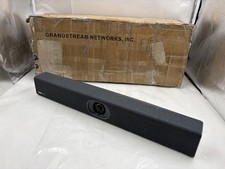
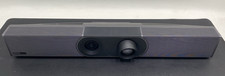
Yealink MeetingBar A30 w/ CTP18 Touch Panel – All-in-One Video Bar for Teams & Zoom (A30-020)
The Yealink MeetingBar A30-020 is an all-in-one Android 13-based video collaboration bar built specifically for medium-sized meeting rooms (typically seating 9–12 people, depending on layout and optional mics). It combines a powerful dual-camera system, advanced AI features, high-quality audio pickup, and seamless integration for platforms like Microsoft Teams Rooms and Zoom Rooms—making it ideal for growing businesses, corporate conference rooms, training spaces, or hybrid teams that need reliable, professional video meetings without the hassle of separate PC setups or complex installations.
At The Telecom Spot, the A30 stands out because it delivers depth and clarity in medium spaces where single-lens solutions start to fall short—participants at the far end of the table stay sharp, and the AI keeps the focus dynamic.
Expert Summary
If you're outfitting medium conference rooms (around 15–25 ft long) and want crystal-clear video with intelligent framing that follows speakers naturally, plus noise-free audio that covers the whole table, the Yealink A30-020 hits the sweet spot. Its dual-eye camera setup (one wide 4K/8MP lens + one telephoto with hybrid zoom) gives you better depth perception and zoom capability than single-camera competitors in the same price range. Setup is straightforward—mount it, connect HDMI/power/Ethernet, and you're live in minutes. We especially recommend it for Teams or Zoom Rooms deployments where you want native Android performance without a mini-PC. Backed by Yealink's solid certification and our own real-world testing, it's a dependable step up for teams tired of "can you see me now?" moments.
Why Choose the A30 for Your Meeting Room?
- Dual-Camera Intelligence: Combines a 120° wide-angle lens for group shots with a telephoto lens for sharp individual tracking.
- Native Teams & Zoom Support: Run your meetings directly from the bar. No dedicated PC or "NUC" required.
- AI-Powered Audio: 8 MEMS microphone arrays with Yealink’s Noise Proof technology to filter out keyboard clicks and background hums.
- One-Touch Join: The included CTP18 Touch Panel lets you start meetings, adjust volume, and control the camera with a single tap from the table.
- Electric Privacy Shutter: The lens automatically closes when the meeting ends, providing physical security for sensitive discussions.
AI-Powered Dual Cameras
Auto Framing and Speaker Tracking adjust the view as people join, move, or present—no manual camera control required. An electric privacy shutter adds peace of mind between meetings.
6-Meter Pickup with AI Noise Reduction
An 8-MEMS microphone array captures voices clearly up to 6 meters, supported by Yealink noise reduction, AGC, echo cancellation, and full-duplex audio. Built-in forward-facing speakers deliver natural, room-filling sound.
CTP18 Touch Panel & Native Platforms
The CTP18 touch panel provides one-touch join, call controls, camera adjustments, volume, and layout switching at the table—no laptop required. The A30 runs Microsoft Teams Rooms and Zoom Rooms natively (no dedicated PC needed).
Yealink A30-020 Key Features
- Designed for Medium Rooms — Typically supports 9–12 participants.
- Dual-Camera System — 10× hybrid zoom (3.5× optical + 3× digital) & 120° ultra-wide FOV with electric privacy shutter.
- 6-Meter Mic Pickup — 8-MEMS array with AI noise reduction; full-duplex audio.
- CTP18 Touch Panel Included — One-touch join and in-room meeting control.
- Native Teams Rooms & Zoom Rooms — PC-free room system with easy content sharing.
- Powered by Qualcomm Snapdragon 845 — Dedicated SoC enables smooth Teams/Zoom performance, fast AI framing response, and reliable long-duration meeting stability.
- All-in-One Simplicity — Compute, cameras, mics, speakers, Wi-Fi, and Bluetooth in one bar.
Yealink A30-020 Datasheet & Full Specifications
For complete technical details, see the Yealink MeetingBar A30 Datasheet (Updated Sept 2025).
Prefer a bundle with a handheld remote instead? View A30-010 bundle with VCR remote →
Note: The Wireless Presentation Pod (WPP20/WPP30) is not available in the U.S. market. For wired content sharing and BYOD, add the optional VCH51 HDMI/USB-C Sharing Kit or native sharing.Package Contents (A30-020)
- MeetingBar A30 endpoint
- CTP18 Touch Panel
- 3 m Ethernet cable
- HDMI cables × 2 (1.8 m)
- Mounting bracket & accessories
- Power adapter
- Quick Start Guide
Detailed SystemAndroid 10.0Dual Camera System
- Wide Camera:
- 8 MP camera
- Field of view: 120° (DFOV 120°, HFOV 112°, VFOV 79°)
- 4× e-PTZ
- Telephoto Camera:
- 8 MP camera
- Field of view: 90° (DFOV 90°, HFOV 81°, VFOV 50°)
- 10× Hybrid Zoom (3.5× optical + 3× digital)
- Horizontal rotation: +25°/-25°; Vertical rotation: +16°/-16°
- Electric privacy shutter; 9 camera presets
- Intelligence features: Auto Framing (frame everyone), Speaker Tracking (switches to active speaker), Picture-in-Picture (speaker + group), Smart Gallery (Zoom Rooms only)
Audio
- 8-MEMS microphone array with ~6 m pickup range; beamforming directed voice pickup
- Yealink Noise Proof; full-duplex; AGC; echo cancellation
- Speakers: rated 10 W (max 16 W), forward-facing; frequency response 115–20 kHz
- Sensitivity 87 dB SPL @ 1 W @ 0.5 m; 98 dB SPL @ 8 W (±2 dB @ 0.5 m)
- Built-in mic frequency response: 100 Hz–8 kHz; sampling 48 kHz
- Supports external microphones
Meeting Features
- Calendar integration & one-click join
- Meeting collaboration & content sharing
- In-room meeting control via CTP18 touch panel
Video Standards
- H.264 High Profile, H.264 SVC, H.264
Network & Security
- Dual-band Wi-Fi (2.4/5 GHz); Bluetooth 4.2
- IPv4/IPv6; DHCP / static IP
- HTTP/HTTPS web server
- TLS 1.2/1.3; AES-256
- QoS 802.1p/q, DiffServ; VLAN; LLDP
- IEEE 802.1X (EAP-MD5, EAP-TLS, PEAP-MSCHAPv2, Ping, Traceroute; SNTP time sync
- Built-in certificate
Ports
- 2 × HDMI out (CEC supported)
- HDMI in (via optional VCH51 Sharing Kit)
- Line-in 3.5 mm; Line-out 3.5 mm
- USB 2.0 ×1; USB 3.0 ×1
- 10/100/1000M Ethernet ×1
- Yealink extension (RJ-45) ×1
- Power port; Security lock slot; Reset slot
- Motion sensor (Teams supported)
Physical & Power
- External adapter: AC 100–240 V in; DC 48 V/0.7 A out
- Power (PSU): standby 14.9 W; average 12.5 W; peak 18 W
- USB output: 5 V / 0.5 A
- Dimensions (W×D×H): 700 × 98 × 121 mm
- Operating humidity 10–90%; Operating temperature 0–40 °C
- Storage temperature −30 to +70 °C
Weight
- A30-020: N.W./CTN 7.05 kg; G.W./CTN 8.13 kg
Carton Measurements
- MeetingBar A30 + CTP18 Package: 796 × 434 × 212 mm
Controller & Sharing Options
- Included in A30-020: CTP18 touch panel
- Optional controllers: VCR20 / VCR11 remote
- Optional content sharing: VCH51 HDMI/USB-C Sharing Kit
- Wireless Presentation Pod (WPP20/WPP30): Not available in U.S. market
Frequently Asked QuestionsWhat is included with the Yealink MeetingBar A30-020?
The A30-020 bundle includes the Yealink MeetingBar A30 collaboration bar and the CTP18 touch control panel, along with mounting hardware, HDMI and network cables, power supply, and setup documentation.
What room size is the MeetingBar A30 designed for?
The A30 is recommended for medium meeting rooms, typically supporting 9–12 seated participants. The dual-camera system and 6-meter microphone pickup ensure all participants are clearly captured.
Does the A30 support Microsoft Teams Rooms and Zoom Rooms natively?
Yes. The A30 can run Microsoft Teams Rooms or Zoom Rooms directly on the device — no dedicated room PC is required. You can also join meetings from other platforms through content sharing or BYOD mode.
What does the CTP18 touch panel do?
The CTP18 provides table-top control for joining meetings, adjusting volume, muting/unmuting, controlling cameras, and selecting layouts — all without needing a laptop or handheld remote.
Can I expand audio coverage for larger rooms?
Yes. The A30 supports external microphones, allowing you to extend microphone pickup coverage for larger conference rooms or boardrooms.
Is wireless content sharing available?
The A30 supports wired and screen-share options via HDMI/USB-C using the optional VCH51 Sharing Kit. Note: The Wireless Presentation Pod (WPP20/WPP30) is not available in the U.S. market. Add VCH51 for reliable BYOD content sharing.
What is the difference between A30-020 and A30-010?
The core A30 hardware is the same. The difference is in the controller included:
- A30-020 — Includes the CTP18 touch panel for full in-room control.
- A30-010 — Includes a VCR handheld remote instead of the touch panel.
If you prefer professional room control, choose A30-020. If you want a simpler remote-based setup, choose A30-010.
Is the system easy to deploy and manage?
Yes. The A30 is an all-in-one room system with compute, cameras, microphones, and speakers built in. It supports remote device management through Yealink cloud tools or Teams/Zoom admin portals.
× × × ×
Buy now and save! Tell a friend Visit store Watch now Postage info
Click the Postage tab above the listing description for more info
Click the Postage tab above the listing description for more info!
Additional delivery notes
PICK UP OPTION
Sorry, our items are NOT available for pick-up.
PAYING VIA PAYPAL
We accept PayPal on our all our items so you can shop with confidence.
Simple choose the PayPal option when proceeding through the checkout.
Additional Information
No additional information at this time
Ask seller a question
You might also like Algo 3228 Station Port FXS Doorphone – Hands-Free Secure Entry Intercom for Door Yeastar 2 FXO Ports Grandstream GXP2130 v2 IP Phone Grandstream GXP1630 IP Phone Contact
To contact our Customer Service Team, simply click the button here and our Customer Service team will be happy to assist.
Ask seller a question
© The Telecom Spot
Postage
Click the Postage tab above the listing description for more info
Payment
Accepted Payment Methods
Returns
Returns are accepted
Items must be returned within 30 days of the sale ending
Buyer will pay for return shipping.
Additional Information: Unless otherwise stated in description, returns are accepted within 30 days from date of invoice. A RMA number must be requested before returning any tiems. Merchandise must be in its original condition, unopened and unuséd. Sales on software and licenses are final and not eligible for refund. Buyer is responsible for return shipping, and all returns are subjected to a 20% restocking fee. If the RMA procedures are not followed we may in our sole discretion reject the entire return or choose to impose additional charges against the customer for replacement of the missing item(s). Refunds will be given as merchandise credit. integration by