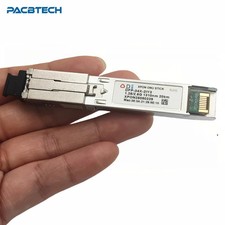
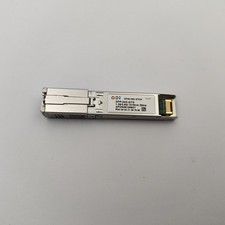
Optical Power: +2 -18dBm
Fiber Type: Single Mode
Optical Interface: SC/APC Connector
Optical Reflection Loss: 245dB
Wavelength: 1310nm (TX) and 1490nm (RX)
Transmission Distance: 20KM
Support: T.30/T.38/G.711 Fax mode, DTMF Relay**Advanced Connectivity for Fiber Optic Networks**
The ODI XPON Stick SFP ONU Stick is a revolutionary fiber optic equipment designed to enhance the performance of your network. With its robust SC/APC connector, this device ensures a reliable and secure connection, offering a transmission distance of up to 20KM. The ODI XPON Stick SFP ONU Stick is a versatile solution, supporting various protocols such as T.30/T.38/G.711 Fax mode and DTMF Relay, making it an ideal choice for a wide range of applications.
**Effortless Integration and High-Performance**
This SFP ONU Stick is a compact and powerful device that integrates seamlessly into your network. Its small form factor and lightweight design make it easy to install, while its high-performance capabilities ensure stable and efficient data transmission. With an optical power range of +2 to -18dBm, the ODI XPON Stick SFP ONU Stick is designed to adapt to various network conditions, ensuring reliable connectivity.
**Optimized for Flexibility and Scalability**
The ODI XPON Stick SFP ONU Stick is not just a simple optical module; it's a complete ONU solution. It supports both GPON and EPON, offering adaptive line rates of 2.5Gb/s and 1.25Gb/s, respectively. This flexibility allows the device to adapt to different network requirements, making it a future-proof investment. With its class I laser safety standard IEC-60825 compliance and RoHS compliance, you can trust in its safety and reliability. Whether you're looking to expand your network or enhance its performance, the ODI XPON Stick SFP ONU Stick is the perfect choice for your fiber optic needs. V06 Version is without DDM function
V08 Version is with DDM function
XPON=XPON 1.25G/2.5G ,It can use for Epon and Gpon at the same time
Connector:SC/APC
Product Overview
PAC-XPON-STICK is a miniature XPON SFP ONU device that can be plugged into the SFP optical port of a switch or routing device to provide XPON network access to the device. In principle, the
PAC-XPON-STICK is an optical module, but it has a built-in CPU, flash memory, and a system, so it can be used as an optical cat.
Complies with SFP Multi-Source Agreement (MSA) SFF-8074i
Class I laser safety standard IEC-60825 compliant
RoHS compliance
Item
PAC-XPON-STICK
Interface
1*PON
PON
Physical Interface: PON Port
type: SC/UPC ( if you need SC/APC ,Please leave message )
Size
8.2mm x 6.8mm x 75mm
weight
<19g
Environment
Operating temperature:-40°C~85°C (I Temp)
Operating temperature:0°C~70°C (C Temp)
Storage humidity:5%~95% (non-condensing)
Power Supply
3.3V
Power Consumption
<2.5W
PON Function
GPON/EPON adaptive
Mode
SFU
Optionally support some functions of HGU(DCHP/PPPoE/NAT)
Configure MAC address
Support
Configure SN
Support
Configure Vendor ID
Support
Configure PVID
Support
DDMI
Support
Management
Http/telent/SSH/TR069
SFP MSA Standard
Support
VLAN
VLAN transport transmission
VLAN swtich function
Application The product is an MSA-compliant SFP that incorporates not just the optics for an ONU, but all of theelectronics need as well.
It is a 'PON on a Stick*' that an entire FTTH ONU in a slightly oversized SFP.lt can be plugged into networking equipment.
Allowing the data interfaces on a switch, router, etc. to be customized for different fiber environ-ments and distance requirements. User Manual SFU-Introduce configuring the network
1GE ONT software version is SFU default,You dont need to do any configuration via ont web.Support port mode of VLAN configuration and u could configure port vlan of ont via olt.After reset ont,there is no wan connection.
1. Prepare for login the ONT webmanagement Before you login the ONT,You should confirm the connect between the ONT and your PC is normal.And stick module is connected the OLT equipment by fiber. Step 1Configuring the IP address of your PC to 192.168.1.x(2~254) subnet mask is 255.255.255.0 Step 2Ping IP address of the ONT (Default address is 192.168.1.1).If the PC can get right reply from Ping command,it is mean the connecting between the PC and ONT is normal.
【Figure 1】 Note:
Please don’t power off the ONT in the process of manage the ONT by the WEB interface.
2 Login ONT
Step 1Open the explore browser and input the IP address:http://192.168.1.1. (ONT defaultIP)
Step 2You need the user name and password for login.The default username and password are on the label of the ONT bottom.Default administrator user name and password is “admin” and “admin”
【Figure 2】
After you login the ONT as the administrator,you can check,configure and change the configuration of the ONT.Some of configuring and changing will take effect only after restart the ONT.
Login success,a “Device Status” windows will show as bellow.
3 ONTAuthentication
pane on the right, you can view or change the authentication mode for the registration of the ONT on the OLT, as shown in Figure.
Click Apply to apply the configuration
Note: Suggest you use the Chrome Internet Explorer to avoid display problem.
You can modify:
1.MAC address via LLID index 0 after inserting EPON optical fiber
2.GPON SN via Serial Number after inserting GPON optical fiber
3.PLOAM password/LOID/LOID password after inserting GPON optical fiber
Once reset , these settings will be restore to default
There is another way to modify via commands in telnet:
1.enable telnet service in windows system
2.telnet 192.168.1.1
3.login account: admin/admin
4.flashsetELAN_MAC_ADDRXXXX//Modify MAC address
flashsetGPON_SNXXXX//Modify Loid ploam
flashdefaultcs//reset
reboot
4 LANConfiguration
In the navigation tree on the left,choose Advanced Setup>LAN Port Work Mode.In the pane on the right,determine whether the LAN port worksmode.
You can modify management ip address at this page
Management
1Reboot &Commit
2Restore Default &Backup
Selected admin-> Backup/Restore
3Update software
Selected admin -> Firmware software -> Selected update file, Upgrade to the latest software version of the application
Statistic
It shows LAN statistics and PON interface statistic