Mini PCIndustrial Soft RouterOpnsense/PFSense/ProxmoxModel ToptonM5-2M (Barebone)
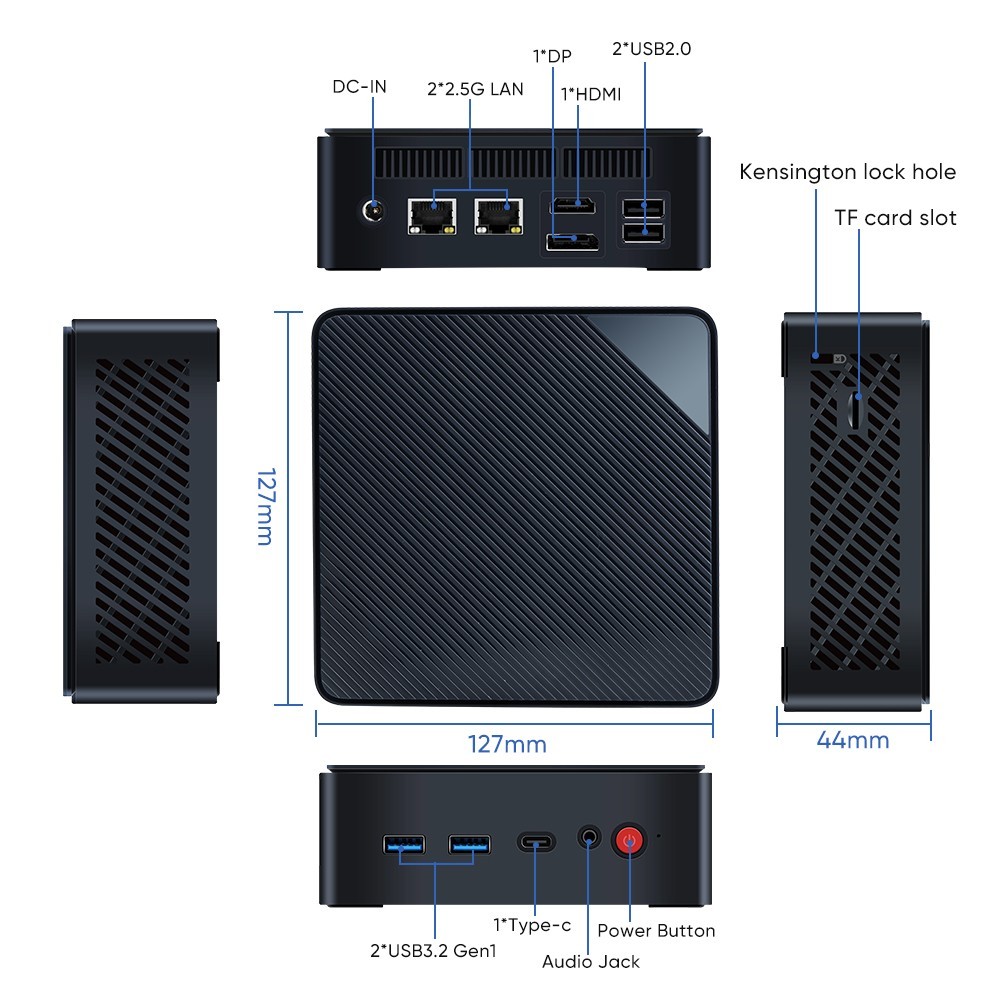
- Intel Celeron N150 Quad Core 3.6GHz Processor (same power consumption as N100 but with higher clock speed)
- 1x DDR5 RAM Slot (Max 16GB 4800MHz - RAM not included)
- 2x Intel i226-V 2.5Gb Nics (RJ45 LAN Ports)
- 2xM.2 2280 NVMe/PCIe3.0 x2 SSD slots(SSD not included)
- 2x USB 3.1
- 2x USB 2.0
- 1x USB-C
- 1x HDMI
- 1x DP
- Wifi 5 & BT 4.2
- Support auto power on (moving jumper), wake on lan, PXE etc function.
Note: Mini PCs (as opposed to firewall appliances) with dual network ports provide more options to run router/firewall and use Proxmox to share the same hardware for other services such as NAS.
In my home lab, I have Proxmox on a similar mini PC with Opnsense (6GB on VM1) and an Ubuntu file server (VM2). I have 16GB RAM, a 250GB SSD for the host and VMs and a 500GB SSD for docker containers and data. I also run Pihole on docker on the 2nd VM. Having virtualized Opnsense makes upgrading almost risk free with Proxmox snapshots.Primary options below:
Option 1: Add 8gb RAM and install Opnsense/Pfsense to use it as a standalone firewall.
Option 2: Add 8GB RAM and install Proxmox with Opnsense/Pfsense (6GB RAM) on a VM.Having virtualized Opnsense makes upgrading almost risk free with Proxmox snapshots.
Option 3: Add 16gb RAM, install Proxmox and create a VM and install Opnsense/Pfsense (6 - 8 GB RAM). You can add additional VMs and/or Linux Containers as needed based on the available RAM and setup a NAS -250GB SSD is good enough for the system disks of two VMs - you may need additional data SSD for a NAS.You can also use the second VM to run pihole or Bitwarden as docker containers or separate Linux containers if you don't need a Linux VM.